- Platform

- Resources
Learn Marketing

Guides

Email Templates

Email Flows

Ebooks & Reports

Marketing Videos

Newsletter
See More Resources ->
Free Tools
Email Marketing 101 FREE
Read Now ->






Stripo vs Mailmodo
Design emails at scale and automate them in minutes
Stripo customers are tired of glitchy template editor, confusing interface, lack of email sending features. Introducing Mailmodo, the better alternative with AI functionalities and interactive emails for higher ROI

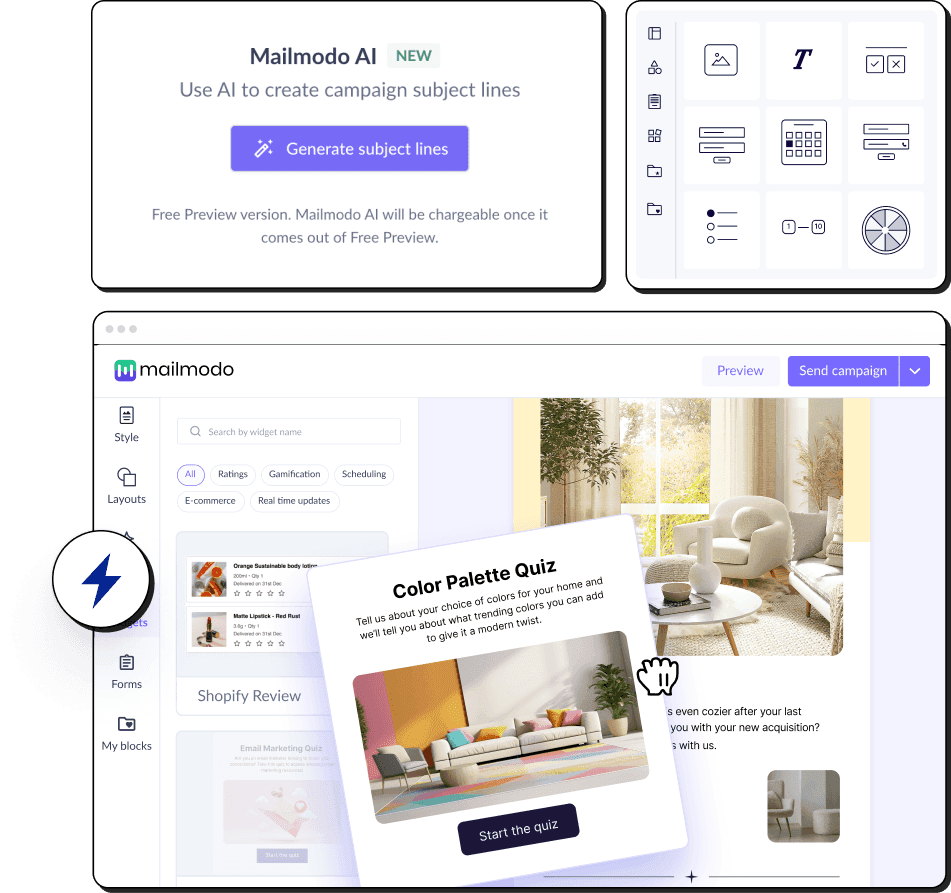
Simple and Intuitive UI
Intuitive email marketing features
300+ customizable templates
Users are not happy with Stripo
@Stripo_email Just spent 3 hours on an email, your app crashed (not the browser), logged me out, and reverted to blank when I logged back in. Thanks a lot. Complete waste of time. I won’t make the mistake of using your service again 👍🏻
— Dan B. Mintin 🏴🍃 (@DanBMintin) August 20, 2024
Hey @Stripo_email - please help! Our account is disabled because of some type of security breach on your servers. We can't find a real person to help us. Please show you care about your customers.
— Andy Friedman (@andy_friedman) February 3, 2023
@Stripo_email hey there, I can't login to Stripo. I get a blank page after signing in with google.
— Matias Paterlini (@paterlinimatias) August 3, 2023
Mailmodo is a better choice for growth-hungry companies
Disclaimer: Stripo is an email design platform and not an ESP. The following comparison is for marketers who want to compare email designers in various products and want an ESP that does everything from email design to analytics.
 |  | |
|---|---|---|
Email editing and creation | Provides a WYSIWYG email creator for both HTML and AMP emails. Allows you to create email templates from scratch using AI. | Provides a drag-and-drop and open HTML editors, also modular email design. AMP emails can be created through AMP blocks and modules w.o coding |
Automation | Provides a visual journey builder with a drag-and-drop interface and an AI to create complete email journeys from scratch. | You can integrate Stripo with other ESPs for email automations |
Integration | 21 native integrations, 4000+ with Zapier, Make, etc. | 75 integrations |
Transactional emails | Included in all plans | It is not an ESP, you can integrate Stripo with other ESPs for sending transactional emails |
Ease of Access | Easy account setup and intuitive tool interface. Chat-based interface for executing tasks using AI. | HTML email template software focused for email creation |
Customer Support | Email, chat, phone, video tutorials | Email Support, Chat support, Phone Support, Google meet/Zoom support, Corporate workshop and knowledge base |
Interactive emails | Let's you create and send AMP-powered interactive emails with widgets such as games, forms, surveys, quizzes, etc. | Create interactive emails with AMP, interactive HTML, and text fallbacks in one email without coding skills. Forms, games, quizzes, dynamic content, etc. |
AI features | AI Email Assistant to plan campaigns, generate and repurpose email templates, create email segments, set up email automations and customer journeys, and analyse past campaigns. | AI features for generating and optimizing email text, subject lines. |
Features of Mailmodo that will help you win
Mailmodo helps you ace email marketing with the best of features and interactivity in emails
✅ Intuitive email automation tool
Create and send gamified emails with no-code email marketing platform
✅ Build basic to advanced AI-powered automations
Create automation drips using AI, with drag-and-drop actions, triggers, and conditions.
✅ 300+ pre-made email templates
Customize your emails the way you want with 200+ pre-made template for every use-case


Here's a detailed non-biased feature wise breakdown of how Stripo compares with Mailmodo
| Feature | Mailmodo | stripo |
|---|---|---|
| Trial Period | Free forever plan available | Free plan available |
| Customer support | Includes video tutorials, knowledge base, ticketing system, live chat, email support, personalised kick-off call and a dedicated onboarding manager for paid plans | Email Support, Phone support, and Chat support |
| Account activation | Email verification | Email verification |
| Onboarding form | Onboarding form requires:
| No onboarding form |
| Product education |
| Education in Stripo's academy |
| Product theme | Light theme | Light |
| Feature | Mailmodo | stripo |
|---|---|---|
| In-product templates | 100+ and growing templates | 1,600+ templates |
| Has a template inspiration gallery | Yes, free inspiration gallery | Yes, free inspiration gallery |
| Inspirational Templates count | 300+ templates | 1350+ templates |
| Feature | Mailmodo | stripo |
|---|---|---|
| AMP email creation | Supports AMP email creation with no code WYSIWYG editor. | Create AMP emails with AMP blocks w.o. coding. AMP modules generator that requires no coding. |
| Whitelisting support | Provides dedicated whitelisting support | It is not an ESP, you can integrate with Mailmodo for whitelisting support |
| Automatic HTML fallback | Yes | You can create one through UI if you use blocks. Generated automatically if you use AMP modules generator. |
| Customize HTML fallback | Yes | You can code customize HTML fallback |
| Sending AMP emails | Yes | It is not an ESP, you can integrate with Mailmodo for sending AMP emails |
| Feature | Mailmodo | stripo |
|---|---|---|
| AI Email Automation Assistant | Provides an AI Email Assistant to plan campaigns, create templates, build segments, set automations, and analyze performance | Provides an AI writing assistant for generating email content. |
| Template editor | Can create from scratch or select a pre-built template from the library. Can also use Mailmodo AI to generate email templates. | Can create from scratch or select template from library |
| Drag and Drop | The selection-based template editor allows stacking new layouts | Actual mimic of Drag and Drop editor, elements can be dragged and dropped any where within the email |
| Email Dimensions | 3 Width options(600px, 700px, 800px) are provided(that resemble industry standards). Rich text emails can be sent with full width email | Minimum width is 420px and Maximum width is 900px. 10px scale is used. So, 420px, 430px, 440px, 880px, 890px and 900px are available options. Multiple options are a drawback for users. To change width you have to skim through all of them. If you want a 800px width and you are default is at 600px, then you have to go through 610px, 620px, 790px and then reach 800px. Multiple clicks are frustating. |
| Pre-made layouts | 7 variations of layouts to select from | 6 variations to select from and you can customize it manually through UI |
| Pre-made blocks/modules |
|
|
| Ability to save & reuse blocks | Can save any layout block | Can save any layout block |
| Design Options | Common options like pading, email body and email bg color options are provided | Apart from common options, many advanced options are provided. BG can be a image and also edit the image within the editor |
| Supported Email Fonts | Total 46 fonts
| Total 62 fonts
|
| If non-standard font is used | Prompts are provided for Web Safe fonts while editing. In case, non-email safe font is use, then Mailmodo replaces it with a fallback font for clients where the fonts are not supported | Prompt: If an email client doesn't support the non-standard font, a similar standard font will be used instead |
| Template preview | HTML and AMP are displayed together with toggle between desktop and mobile screens | desktop and mobile screens are displayed together with toggle between HTML and AMP |
| Template testing | HTML and AMP versions are different, supports unlimited testing | HTML or AMP versions, based on browser. Depends on different plans. |
| Adding custom HTML code | Yes | Yes |
| Rich text editor | Yes | Yes |
| Feature | Mailmodo | stripo |
|---|---|---|
| Interactive AMP widgets | 25 AMP elements | 3 AMP elements |
| Carousel/Image Carousel | Yes | Yes |
| Accordion | Yes, on request | Yes |
| Basic Event invitation | Yes,with forms | Yes, with forms |
| Add to calendar | Yes | Yes |
| Calendly | No | No |
| Zoom Webinar | Yes | No |
| Shopify Card Abandoment | Yes | No |
| Shopify Product Recommendation | Yes | No |
| Poll | Yes | No |
| Live Price Ticker | Yes | Yes |
| Star Rating | Yes | Yes |
| NPS Rating | Yes | No |
| Thumbs up or down | Yes | Yes |
| Emoji Rating | Yes | Yes |
| Chip selection | Yes | No |
| Spin the Wheel | Yes | Coming Soon. |
| Quiz | Yes | Yes |
| Gokwik | Yes | No |
| Form | Yes | Yes |
| Feature | Mailmodo | stripo |
|---|---|---|
| Form Submission capture | Automatic collection and storage of form submission data. Export options available | Stripo claims it can be done through stripo account tiself, You can use stripo data services to store data. |
| Conditional forms | Yes | No |
| Step wise forms | Yes | No |
| Hidden field | No | Yes |
| Form fields | 15 field options | 5 field options |
| Dropdown | Yes | Coming Soon. |
| Radio | Yes | Coming Soon. |
| Checkbox | Yes | Coming Soon. |
| Emoji | Yes | Yes |
| Thumbs up or down | Structured for case specific | Yes |
| Text | Yes | Yes |
| Multiline | Yes | No |
| Image Link | Structured for case specific | Basic with no input elements |
| Date picker | Yes | No |
| Time picker | Yes | No |
| Phone number | Yes | No |
| Single chip | Yes | No |
| Multichip | Yes | No |
| Star Rating | Yes | No |
| Nps Rating | Yes | No |
| Feature | Mailmodo | stripo |
|---|---|---|
| Dynamic data | Yes | Yes |
| Spam testing | No | No |
| Integrations | 21 integrations More details. | 75 integrations https://stripo.email/integrations/ |
| AI Content optimization | Yes | Yes |
| REST API | Has basic email marketing properties, and Campaign and automation level details Refer this page to understand in detail https://www.mailmodo.com/developers/8e957152b6128-getting-started-with-mailmodo-api/ | Yes Has basic email template information https://support.stripo.email/en/articles/3726123-stripo-plugin-js-api |
Is Stripo the right marketing tool for you?
Stripo is recommended to you:
- If you’re looking for a email design platform
- If you can afford time for a learning curve
Stripo is not recommended to you:
- If you are looking for creating and actually sending the emails
- If you want to create and send interactive emails without coding
- If you’d help from a library of pre-built email templates and automation sequences


Mailmodo is your one-stop email marketing need
Mailmodo is a complete email marketing platform that can support any email marketing use-case


Visual Journey Builder
Build a user journey to send automated emails triggered by events, webhooks, integrations, CRMs, etc.

Easy Integrations
Integrate with popular CRMs and marketing tools like Hubspot, Zapier, Google Sheets, Zoom and more

Transactional emails
Send bulk transactional AMP emails using API and webhook triggers based on user behaviors

Contact List Management
Segment users based on attributes or past campaign activities like opens, clicks and form submissions

Complete Email Analytics
Analyze your campaigns and track opens, clicks, submissions, bounces and more in a single dashboard

High Deliverability
Get high deliverability with well managed and dedicated IPs and 1:1 guidance from our deliverability experts
Hear it from our customers
Starting with Mailmodo is easy and worth it
Easy to use
We’re ramping up our email volume with Mailmodo as the platform is intuitive and collaborative.


AMP email interactivity
Our campaigns saw a visible increase in numbers with Mailmodo’s interactive emails. The convenience of customer actions in the email is unparalleled.

Powerful integrations
With the Mailmodo-Zapier-Slack integration, each time a user fills up the AMP feedback form, responses are posted on our Slack channel. We got 6% CTR and 15% open rates.

Frequently Asked Questions
Disclaimer: Stripo is not an ESP, it’s an email design platform. In fact, Stripo has integrations with many of the ESPs to help users send the emails designed in Stripo. The following comparison has been drawn for marketers who are looking to choose an email marketing platform right from email design to analytics.
No, Stripo is an email design platform that can be integrated with various email service providers.
You can design an email on Stripo and send it via the email service providers integrated with the platform. To send mass emails, prefer using Stripo alternatives like Mailmodo for a better inbox placement rate and higher deliverability rate.
Stripo is used for designing effective email templates that engage. However, high spam complaints often redirect users to Stripo alternatives like Mailmodo. Mailmodo offers domain warmup and expert consultations with deliverability experts to increase conversions via email.
Mailmodo is the best email builderto build emails that drive engagement fast. Its email builder has an intuitive user experience and auto-responsive design, is no code, and offers content blocks, saving you time and effort.
Stripo's price-to-performance ratio is poor. To send 10,000 newsletters monthly, you have to pay nearly $80. If you're looking for a more affordable Stripo alternative, consider using Mailmodo. Besides, Mailmodo's reporting and analytics tools are more advanced than Stripo's, making it a suitable choice.
Compared to other email builders like Mailmodo, Stripo's interface is also highly complex. Most users also complain that it lacks email templates with a modern design. Mailmodo's email editor, on the other hand, is intuitive, easy to use, and the tool offers premium email templates with high-end designs.
What product experts say about Mailmodo?









Trusted by brands worldwide
Get 3X email conversion
with Mailmodo

Create & send interactive emails without coding
Put revenue on auto-pilot with pre-built journeys
Save time with AI-powered email content creation
Experience world’s only interactive email marketing platform
Trusted by 10000+ brands