How to create on-brand email templates
Here’s how to create templates that stay true to your brand and help you scale faster without sacrificing design quality.
Step 1: Define your brand identity
Before designing your email template, you need clarity on what makes your brand visually and tonally unique. Collect or create your brand guidelines, including:
- Logo usage and placement rules
- Brand color palette (primary, secondary, accent)
- Font hierarchy and styles
- Tone of voice and writing style
- Image or illustration preferences
Mailmodo, for instance, allows you to set up a brand kit for your email templates where you can define the specifics like brand logos, typography, colors, buttons, etc.
Step 2: Design a consistent, reusable email layout
Design a flexible layout that reflects your brand while fitting different types of campaigns that you'll be sending like newsletters, product updates, or event promotions. Think of this as your master email structure. It should be the starting point that keeps design consistent while allowing content flexibility.
A strong reusable layout usually includes:
- A clear header with your logo and navigation (if needed)
- A hero section for key messages or visuals
- A body section for the descriptive parts of the email
- A footer with social links, contact info, and unsubscribe details
Some ESPs even help you in that. Mailmodo, for instance, has an entire library of pre-built email templates for different use cases that you can edit and use and even create one from scratch and save in the template library.
Step 3: Save reusable blocks and components
Instead of rebuilding designs from scratch each time, save key components as reusable content blocks. This keeps formatting, colors, and spacing uniform across campaigns while reducing design time.
You can create reusable blocks for headers and footers, CTA sections, product or content modules, social media banners and so on.
In Mailmodo's no-code drag and drop builder, you can save these branded blocks once and then drag them into any new email template you're creating. It ensures your designs stay consistent, even when multiple team members are creating campaigns.
How to generate on-brand email templates
Now, this one is a little different. We've already discussed how you can create email campigns that match your brand. But there's a better way of doing it. You can have email templates that match your brand generated by AI with a single prompt.
That's something unique that Mailmodo offers. Mailmodo makes email creation faster, smarter, and more intuitive. Let’s explore how you can use it to generate precise, conversion-friendly email templates.
Step 1
Once you’ve logged in to Mailmodo, go to the Templates tab and click on Create new template button on the top right.
Step 2
You’ll land in the template gallery, where you need to hover over the first card that says ‘Create New Template’ and then choose the ‘Create using AI’ option.

Step 3
On the next page, you can simply define what your email is going to be about and ask the tool to generate the email template for you.
If you have, add a reference to any supporting resources you might have for the email template you’re creating. You could do this by adding a link to it or by uploading the resource as a file.

Step 4
Another refinement you can do is in the Refine your email outline & preferences step. Here, you can tweak the content for each section of the email template. You can also add new sections.
Additionally, you can define the purpose and the tone and voice of the email. This makes it more aligned with your overall brand voice. Once done, you can click on the Generate button on the top right.

Step 5
Next, you can choose to apply your brand kit or choose from a set of presets available for the colors. This will allow you to tweak the overall appearance of your email and align it with your brand colors.
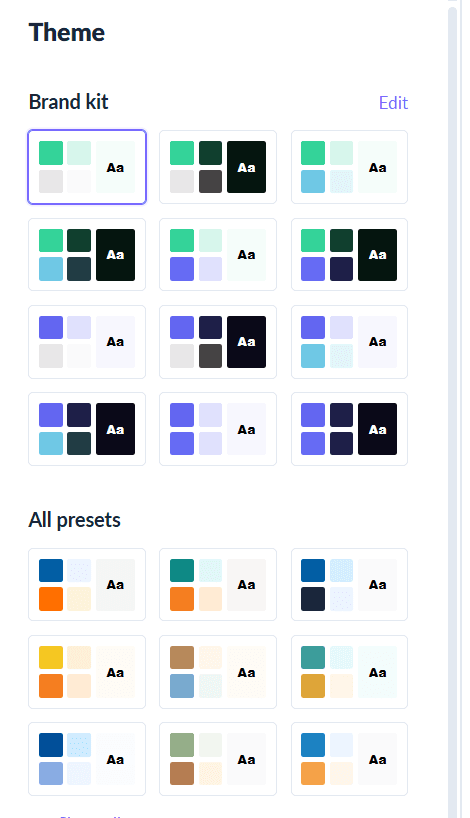
Here, you can also choose to regenerate the email template before making the tweaks if you don’t like what you got back from the template generator.
Once done, you can move to the next step by clicking on the Open in Editor button on the top right.
Step 6
Once inside the editor, you can make other more specific changes you want with the copy, images and so on. From here, you can review the email template and send it to your recipients or save it for future email campaigns.

Takeaways
AI is no longer just a nice-to-have—it’s a must-have for marketers who want to scale their output without compromising quality. With Mailmodo, you get purpose-built AI email template generator that understands the nuances of email marketing so you can work smarter, not harder.
Ready to create your next email template in minutes? Try Mailmodo’s AI template generator today.











