What is a brand kit?
A brand kit is a predefined set of visual guidelines that ensures every piece of content you create, especially emails, is well-aligned with your brand identity.
How to choose the right brand kit elements
Your brand kit is made of multiple elements. Here’s what you should consider when selecting each component of your brand kit:
Start with your brand’s personality
Before you even think about colors, fonts, or buttons, you need a clear understanding of your brand’s personality. Ask yourself:
Who you are: Is your company playful, premium, bold, calm, rebellious, or somewhere in between?
Who you’re talking to: Consider your audience’s age, values, aesthetic preferences, and expectations.
How you want to be perceived: Do you want to feel like a trusted expert, a creative partner, or a disruptor shaking up your industry?
Your goal is to describe your brand in 3–5 adjectives.Your personality will guide tone, style, and visual decisions consistently across campaigns.
Define your imagery & visual style
Once your brand personality is clear, the next step is to define your visual style. Some common types to consider are photography, illustration, or a mix of both; clean and minimalist versus textured and detailed compositions; and minimal versus expressive overall expression.
Next in your style guide, include examples of each choice—sample images, color swatches, composition layouts, and mood boards—so your team has a clear reference for how to apply your visual style consistently.
Logo
Use the same logo version as your website or product.
Make sure it’s a transparent PNG or SVG to blend with any background.
Keep the resolution high enough to look sharp on both desktop and mobile.
Typography
Select fonts that match your website or product UI for consistency.
Stick to one or two font families max to avoid clutter.
Set font sizes separately for desktop and mobile, for example, 16px for body text on desktop and 14px on mobile.
Use web-safe fonts to ensure compatibility across email clients.
Color palette
Define your brand’s primary, secondary, and CTA colors; they should be the same hex codes as those used in your site or product.
Select only 3–5 colors to maintain clarity and contrast.
Make sure your colors are accessible, with strong contrast between text and background.
-
Try to match the visual style of your website or app, whether that’s rounded corners, specific padding, or bold fonts.
Define at least two styles: Primary (for CTAs) and Secondary or Ghost (for secondary actions).
Be consistent with size, color, and alignment across all buttons.
-
Mirror the structure of your website’s footer.
Include company name and address, contact information and legal text (e.g., unsubscribe link).
Keep it short, scannable, and compliant.
-
Only include links to active, maintained platforms.
Use the same icon style (all color, all black, or all white).
Keep icon placement and order consistent across templates.
How to implement your brand kit in Mailmodo
Mailmodo makes it easy to put your brand kit into action, whether you’re starting from scratch or working from a full-fledged style guide.
Here’s how to do it:
From the left side bar, go to Templates → Brand Kit.
Add your brand elements, including logos, typography, colors, buttons, social links, and footer text.

- Once you’ve set each element, click Publish and Next.
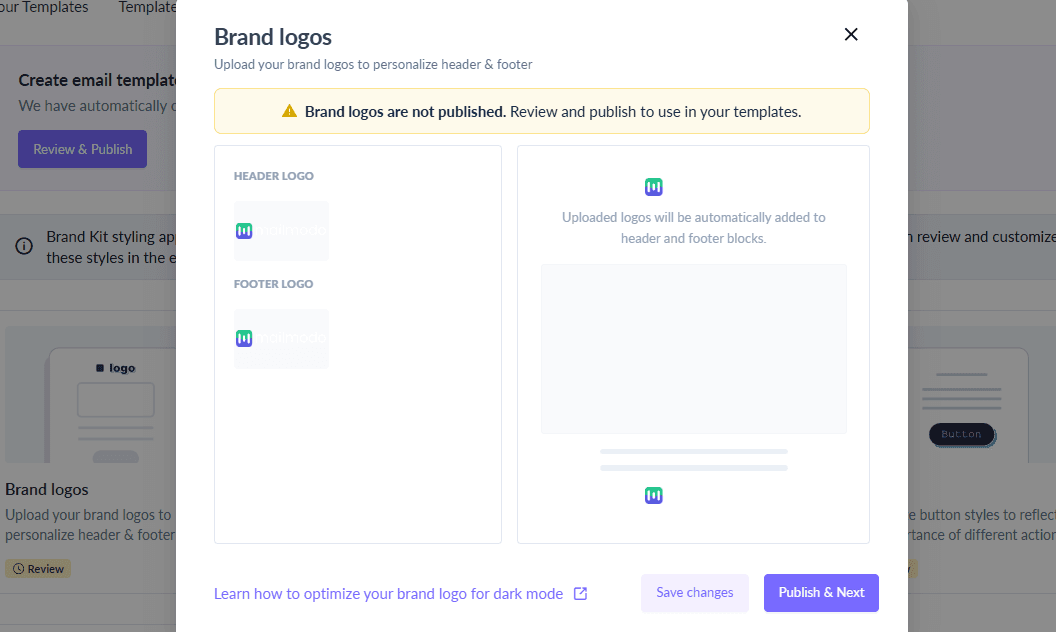
- After publishing, these brand elements will automatically apply to the templates you create afterwards.
Final thoughts
Your brand kit is the foundation of every high-performing, professional email you send. When each brand element is thoughtfully chosen and consistently applied, you not only save time but also strengthen your audience’s trust and recognition of your brand.
With Mailmodo, you don’t have to start from scratch or worry about enforcing brand consistency across campaigns. Whether you’re launching your first brand kit or refining an existing one, Mailmodo helps you apply it seamlessly across your email workflows.
Want to see how your brand kit performs in a real email template? Start with Mailmodo’s visual editor and see your brand come to life.











