What is an email journey?
An email journey is a series of automated emails sent over time, often triggered by user actions (e.g., signing up, abandoning cart, downloading a lead magnet). But even if the first email performs well, the rest often suffer from a sharp decline in open rates.
Why do open rates drop across email journeys
Here are the core reasons why email open rates decline across a journey:
Initial curiosity fades: The first email usually gets strong engagement since the recipient just showed interest. Later emails may feel less urgent or relevant.
Inbox competition: People may be subscribed to multiple brands. Over time, your emails can be deprioritized as inboxes get crowded.
Content fatigue: If emails look or sound similar, subscribers may lose interest over time.
Poor subject line strategy: Following emails often lack the punch needed to stand out.
Deliverability issues: If engagement decreases, inbox providers may start filtering emails into promotions or spam folders, lowering visibility.
How to improve open rates across email journeys using Mailmodo
If you want people to keep opening your emails throughout the journey, you need to treat every step like it matters. Here’s how Mailmodo helps you do exactly that:
1. Personalize every email copy
Most marketers personalize the first email and stop there. But to sustain engagement across a journey, personalization needs to persist throughout every step.
The more aligned each message is with where the user is in their journey — mentally and behaviorally — the more likely they are to keep opening your emails. With Mailmodo, it’s easy to do. Here is how:
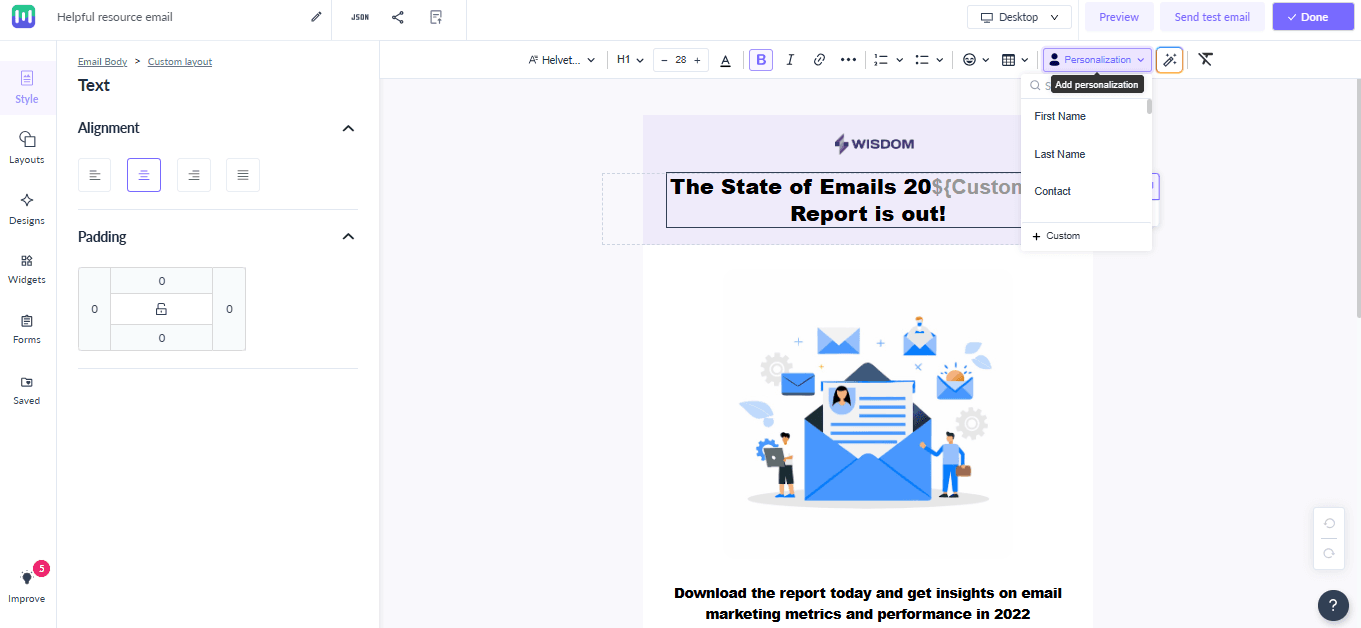
From the Mailmodo dashboard, head over to Journeys and click on Create Journey. You can either start from scratch or pick a prebuilt journey to save time.
Next, set up your trigger via webhook/API.
Once the trigger is set, you will be taken to Journey Builder. Drag a Campaign block into the builder and connect it to your trigger. A panel will pop up on the left.
At the top of that panel, choose the email template you want to use and hit Edit. This takes you straight into the template editor.
In the editor, you can personalize every text element to meet your readers' needs. Click the Personalize icon in the top right to add tags like first name, location, or custom fields. These tags will update content dynamically based on user segments or actions taken.
2. Optimize subject lines at every step
Your email subject line is the very first thing recipients see, and it plays a big role in whether they decide to open your email or not.
When it comes to writing subject lines for a sequence of emails, make sure to keep them interesting and relevant.
Mailmodo offers you features to make the subject line writing process simple and effective. Let’s take a look, how:
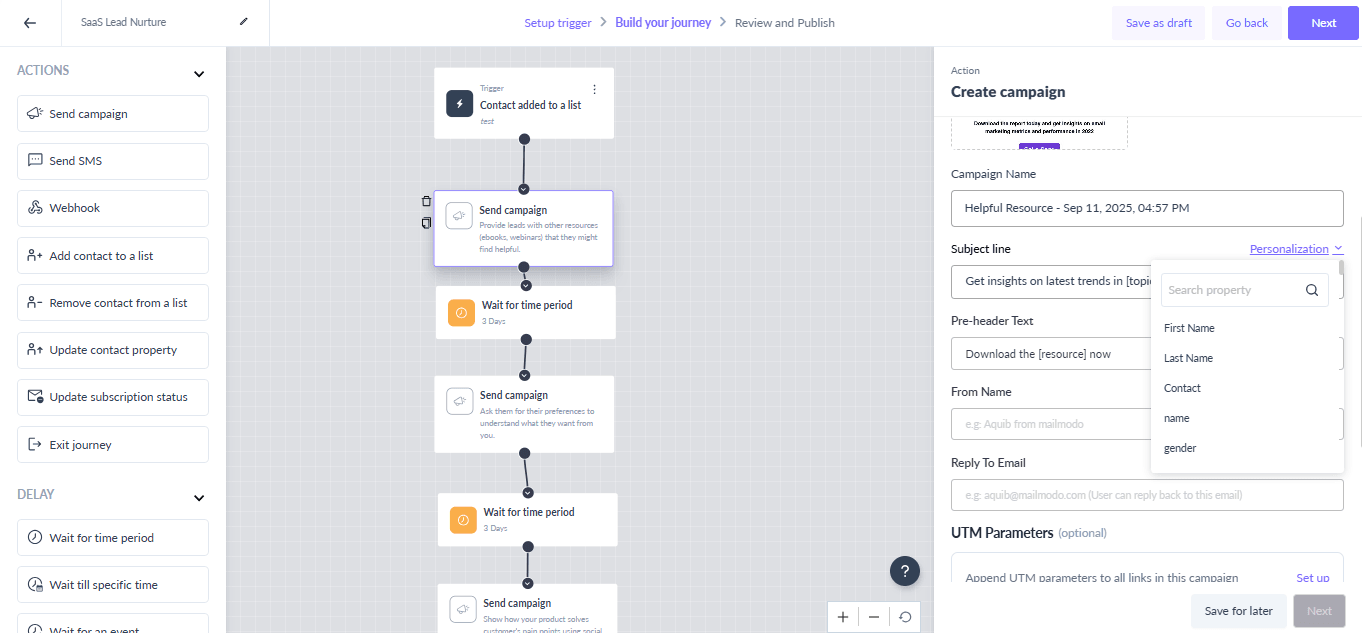
Go to Journeys and click Create Campaign.
Set a trigger—you’ll then be taken straight to the journey editor.
For each email, drag a Campaign block into the builder. Add delays between campaigns so you don’t overwhelm your readers
In the pop-up panel, you have two options for subject lines:
Use AI to generate subject lines.
Click Personalize to insert parameters like first name, location, or other custom fields.
3. Send from a recognizable sender name and address
Your “From” name greatly influences whether readers trust your email and feel curious enough to open it. If it is unrecognizable, less professional corporate, or a “no-reply” address, your message is more likely to be ignored or marked as spam.
With Mailmodo, you can create custom sender profiles that your audience will instantly recognize. Here’s how:
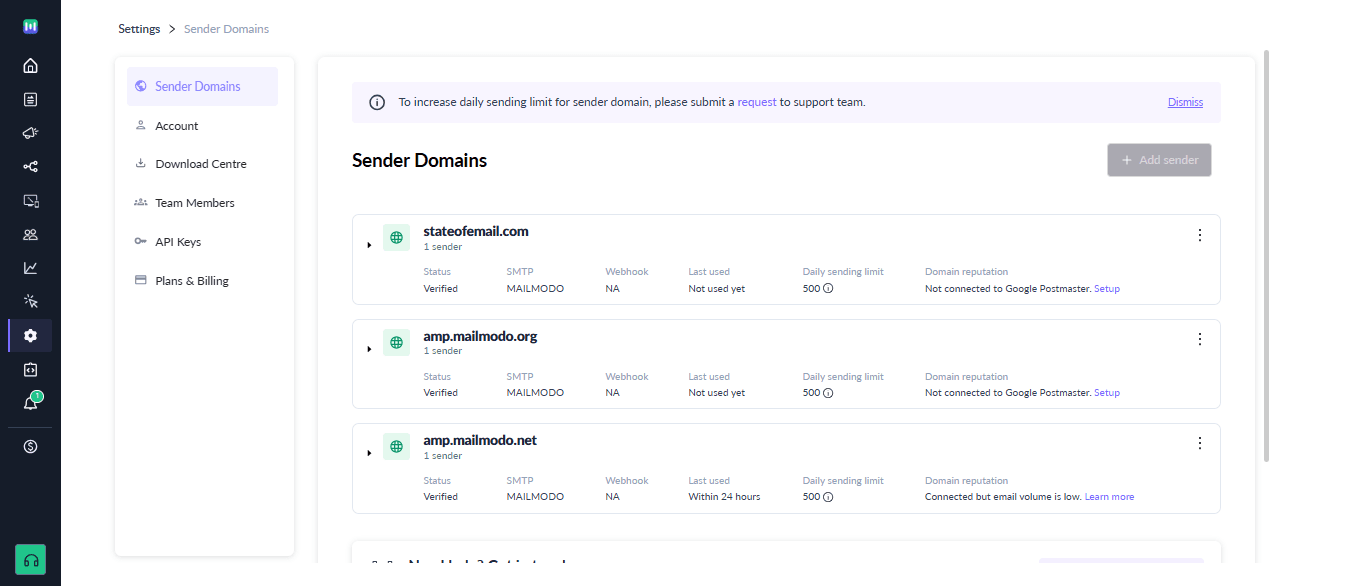
Log in to your Mailmodo Dashboard, go to Settings. In the default Sender Settings. Click Add New Sender to add a new sender email address.
Enter the email address you want to use for sending emails.
Select and configure the email delivery service (SMTP) you want to use.
If the domain (the part after @ in your email) isn’t verified yet, add the required DNS records.
Once verified, all future emails from that domain will be automatically authorized.
Pro tip: Avoid using “do-not-reply” addresses—they hurt engagement and weaken your journey’s performance. Instead, use names like “Rhea from [Brand]” or “Team [Brand]”. This builds trust and ensures continuity across multi-email journeys, keeping your audience engaged
4. Send emails at the right time
Sending a great email at the wrong time is a subtle mistake that can hurt your open rates over time.
Mailmodo makes it easy to improve your timing in two key ways:
1. Set delays between campaigns
When you build your journey, Mailmodo lets you add delays between each email. The benefit of adding delay is that each email will now be sent based on user actions of previous mail—for example, 30 minutes after a form submission or 2 hours after someone clicks a link.
The emails feel timely and are much more likely to be opened while your users are still engaged.
2. Timezone-based delivery
With Mailmodo, you can schedule emails according to each recipient’s local timezone. That means someone in New York will get your email at 10 AM their time—not at 2 AM just because your server is in Europe.
The impact of higher open rates across sequences
Higher open rates across sequences can have several significant impacts:
Increased engagement: More recipients opening emails means your messages are being seen, which increases the likelihood of clicks, responses, and other desired actions.
Improved deliverability: Email providers track engagement. Higher open rates signal that your emails are wanted, which can improve inbox placement and reduce the chance of being marked as spam.
Better ROI on Campaigns: With more people engaging with your content, the efficiency and return on investment of your email sequences improve.
Open rates are a clear signal of how well your emails connect with your audience at every step of their journey. While it’s normal to see engagement drop after the first email, small tweaks in personalization, subject lines, sender identity, and timing can make a big difference.
With Mailmodo, you can optimize each of these elements to keep your emails relevant, trusted, and timely. Sign up for Mailmodo today to see higher engagement, better deliverability, and more results from every email journey.