An unsubscribed recipient is someone who has opted out of receiving certain or all types of emails from your business.
If you don’t handle unsubscriptions straightaway and keep sending out emails to contacts that have request to unsubscribe from your emails, it’ll have multiple negative affects:
Erodes trust
Damages brand reputation
Increases the risk of being marked as spam
Detoriates the email campaign performance
Affects the email deliverability of your entire domain in the long run
Blacklisting
Properly managing unsubscribed contacts is critical for maintaining your sender reputation, staying compliant with regulations, and ensuring your email campaigns continue to reach engaged subscribers. Here’s a deeper look at best practices:
-
The moment a contact opts out, all promotional and bulk emails should stop going to that recipient. Applying the change in real time or at the very least within a short compliance window, such as 24 hours is essential.
Prompt action is not just good practice; it’s required by regulations such as CAN-SPAM, GDPR, and CASL. Failing to honor unsubscribe requests quickly can lead to complaints, lower deliverability, and even legal penalties. Treat every unsubscribe as an opportunity to show respect for your audience’s preferences.
-
To prevent accidentally sending emails to unsubscribed contacts in future campaigns, maintain a dedicated suppression list. This list should include:
Email address or phone number: The primary identifier to block from future sends.
Date of unsubscribe: Helps you track trends and manage compliance audits.
Source of unsubscribe: For example, “Newsletter footer link” or “Preference center,” which provides insight into why contacts opted out.
Before sending any campaign, cross-check your audience against this suppression list to ensure no unsubscribed contacts are included. This not only protects your reputation but also reinforces trust with your audience.
Provide a clear resubscribe path
Preferences and circumstances change, and some users may want to opt back in. Provide an easy-to-access resubscribe option, either via your settings page or through an email confirmation workflow. This allows interested contacts to rejoin without compromising compliance. Never automatically re-add unsubscribed contacts, as doing so can damage trust and violate regulations.
For teams managing large volumes of unsubscribes, using an email service provider (ESP) like Mailmodo can simplify the process. Mailmodo ensures unsubscribed contacts are automatically flagged, dynamically excluded from campaigns, and added to suppression lists. Below is a deeper look how this tool work.
There are series of steps that you might want to take or rather a checklist that you would want to follow to ensure that you’re handling your unsubscribed contacts effectively. Here’s what you need to do:
1. Monitor unsubscribe trends
Use Mailmodo’s analytics dashboard to get an idea about the unsubscribe counts. You can get this for individual campaigns and better understand what’s causing recipients to unsubscribe and make data-informed decisions to prevent more unsubscriptions or at least reduce the unsubscription rate. It gives you a benchmark for you to follow.
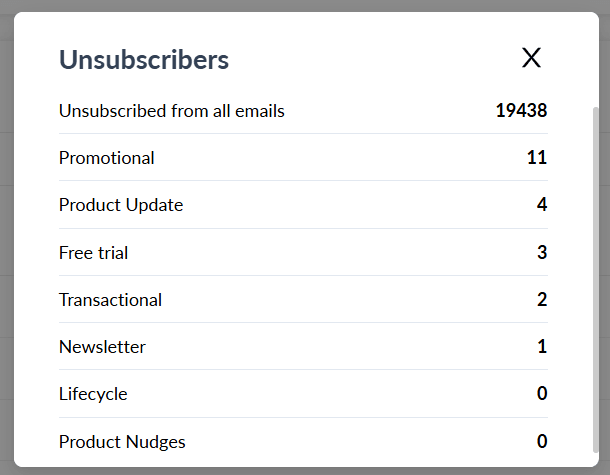
Mailmodo offers a dynamic segmentation feature taht allows you to filter out unsubscribed users from your campaigns automatically in real-time.
Here’s how you can set it up:
Go to the Contacts tab and click on Create Segment
Choose to Start from scratch
Choose the exclude contacts option
From the dropdown that appears, choose the option Unsubscribed from all email types
Under Select segment type, choose the Dynamic segment option
Save the segment

Once you’ve set this up, it ensures that once someone unsubscribes, they’re automatically removed from the segment you created. The dynamic nature of the segment also ensures that it is updated and remains true at all times.
3. Move unsubscribed users to suppression lists
Mailmodo also provides robust suppression list management — both automated and manual. So, here are the two ways it works:
Automatic suppression: When a user clicks "unsubscribe," Mailmodo immediately adds them to the relevant suppression list. This prevents all existing and future campaigns to send emails to them.
Manual suppression: You can upload a CSV of unsubscribed users via Contacts > Suppression List > Upload, and Mailmodo filters them out, especially useful when syncing opt-outs from external tools.
4. Automate the campaigns
It’s hard to let your subscribers go and there might be cases where you want to give it one last try. Maybe someone unsubscribed by mistake or changed their mind, you can re-subscribe them — but only with their explicit permission.
For this, you can connect your existing landing page or form and try to collect consent from them to resume email campaigns. For those who provide consent, you can remove them from the suppression list manually.
This keeps your list compliant while offering a clean path for re-engagement.
Final thoughts
Unsubscribes aren’t just numbers — they’re a reality check.
Managing them well is about respecting user choices, staying compliant, and keeping your list healthy. With Mailmodo’s suppression lists, segmentation, and contact management, you can ensure no unsubscribed recipient gets mailed again, without extra work or risk.