Why your email CTR may be low
Here are some of the most common reasons why your CTR might be struggling:
You’re targeting the wrong segment
Your call-to-action lacks clarity and is not properly placed
You’re not creating curiosity
Your emails aren’t mobile-friendly
How to increase your email CTR using Mailmodo
Mailmodo offers some powerful ways to improve your click through rate. Here are some key ones:
Method 1: Design clear, focused CTAs that drive action
One of the most common reasons people don’t click is they don’t know where to click or why. Mailmodo’s drag-and-drop email editor gives you full control to create clear, compelling CTAs that stand out.
Here is how to get started:
Open your email template in the Visual Builder.
From the layout tab, drag a button block, ideally in the top half of the email.
Click the button to design your CTA:
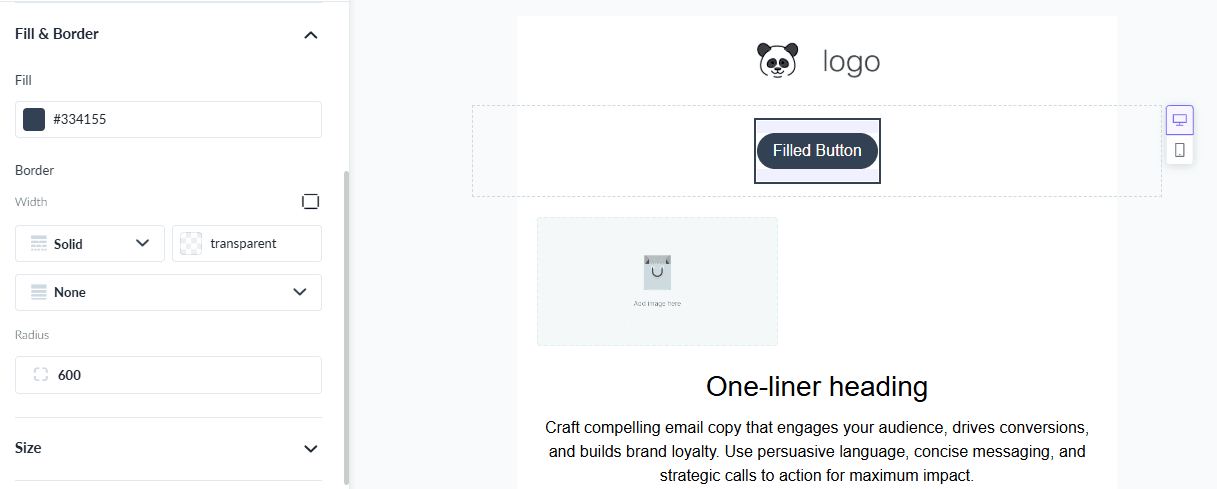
Button URL – The link where users are taken when they click your button.
Fill and border – The button’s interior color and outline that make it stand out.
Size (compact or medium width) – How large the button appears, affecting visibility and emphasis.
Padding and alignment – The space inside the button and its position in the email for readability and clickability.
- Customize the text with action-focused words like “Get the demo,” “Try it free,” or “See the plan.”
Method 2. Run an A/B test
A/B testing helps you figure out what really drives clicks. You can test content, or CTAs to see what resonates.
After selecting your template and entering campaign details, click Create A/B Test.
Choose the variable to test (subject line or content). For content testing, prepare Version A and Version B email copy in advance.
Select your segments and configure the test: sample size, winning criteria, and duration.

Set the winning metric to Click rate. If there’s a tie, Version A is selected as the fallback winner.
Method 3. Use clickmaps to analyze what’s working
Mailmodo provides link-level click tracking, showing which parts of your email got the most and least clicks.
After sending a campaign, go to the Analytics tab → select the sent campaign.
Click the Clickmaps tab.
Review link performance and use the data to:
Move high-performing CTAs higher in your next email
Remove or rework low-engagement links
Reorganize content based on what people interact with most
Method 4. Optimize your CTAs for mobile-first reading
If your CTAs aren’t mobile-friendly, your CTR will suffer because users can’t tap them easily. Mailmodo’s visual builder makes it easy to create fully responsive, making mobile-friendly design simple.
From mailmodo dashboard → select template → open your template.
Add a button element to your design.
Make your CTA large and full-width to ensure it’s easy to click on mobile devices.

Conclusion
Getting people to act on your emails means writing something they care about, a clear CTA, and delivering it at the right time. If you’re tired of doing everything manually, or your current tool just isn’t helping you move the needle, Mailmodo might be exactly what you need.
We designed Mailmodo to take the complexity out of email marketing. With features like behavioral segmentation, mobile-optimized emplates, and actionable CTAs, you can finally build smarter, more personalized email journeys that actually convert. Try Mailmodo for free today.











