What is Python email automation?
Python email automation refers to the process of using python programming to automate your email marketing campaigns, allowing you to save time and effort. It involves the use of libraries like smtplib, imaplib, to interact with email servers and create, send, or process emails automatically.
This can include basic tasks such as scheduling emails ahead of time or more complex tasks such as setting up an automated response system. Regardless of what type of automation is needed, Python is highly efficient for users to set up their email automation system.
Trigger emails based on users’ action without coding
System requirements to automate emails with Python
Before diving into the steps of email automation with Python, it's essential to ensure you have the right tools and information in place. Here are the key system requirements:
Install Python on your system.
Import Python's built-in smtplib library for sending emails. It's necessary to construct and format email messages.
If you plan to send emails securely, make sure your Python installation supports SSL.
But before you start, you should know that automating your email campaigns with Python isn't an easy process. Although it's free, the process of setting it up is complicated and will require more time. Additionally, it doesn't give you much customization options to create visually appealing emails.
So if you want an easy alternative, you can choose an affordable ESP tool like Mailmodo instead, which has better features and is extremely easy to use. Keeping that in mind, let's take a look at the steps involved to setup Python email automation.
Steps to setup Python email automation
To begin with Python email automation, first, you'll need to log in to your email account using Python. This may involve providing your username and password. Here's a crucial security tip: enable 2-Step Verification on your email account to add an extra layer of security.
import smtplib

from email.mime.text import MIMEText

# Your email credentials

sender_email = "your_email@gmail.com"

password = "your_password"

# Connect to Gmail's SMTP server

server = smtplib.SMTP("smtp.gmail.com", 587)

server.starttls()

server.login(sender_email, password)
Once you're logged in, it's time to send an email. This process can be broken down into several steps:
- Import the necessary libraries for email automation
Once you have installed Python, you'll need to import the necessary libraries such as smtp lib, email, and MIME.
from email.mime.multipart import MIMEMultipart

from email.mime.text import MIMEText
- Set the email sender and receiver addresses.
sender_email = "your_email@gmail.com"

receiver_email = "recipient@example.com"
- Specify the subject and body of the email.
subject = "Hello from python email automation"

body = "This is an automated email sent using Python."
- Configure SSL for secure email transmission.
If you want to send your email securely using SSL, make sure to set up the connection as follows:
server = smtplib.SMTP("smtp.gmail.com", 587)

server.starttls()

server.login(sender_email, password)
- Log in and send the email.
message = MIMEMultipart()

message["From"] = sender_email

message["To"] = receiver_email

message["Subject"] = subject

message.attach(MIMEText(body, "plain"))


server.sendmail(sender_email, receiver_email, message.as_string())

server.quit()
- Schedule the Python script to run monthly, weekly, or daily
Automation is all about saving time and effort. To schedule your Python email automation script to run periodically, you can use libraries like schedule or cron.
Here's an example of using the schedule library to send emails daily:
import schedule

import time

def send_daily_email():

Your email sending code here

Schedule the task to run daily

schedule.every().day.at("09:00").do(send_daily_email)

while True:

schedule.run_pending()

time.sleep(1)
Alternative to Python email automation
While Python is a robust choice for email automation, it won't be easy for you to set up if you don’t know how to code. Therefore, you can consider other email automation tools like Mailmodo.
It offers two ways to design email automation flow easily:
1. Use AI Journey Builder
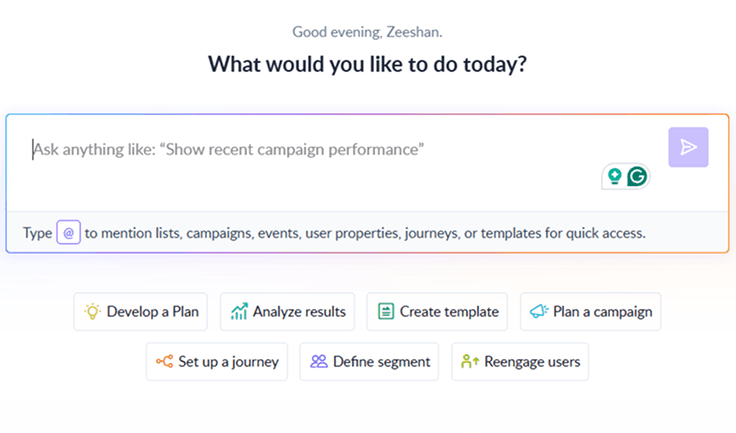
Mailmodo’s AI Journey Builder lets you automatically create complete email campaign flows. You simply input your requirements, such as campaign goals, brand type, and audience preferences, and the AI generates the entire journey for you.
This includes arranging campaign blocks, conditional steps, and trigger actions, so you get a fully structured and optimized email sequence without manually building each step.

Your AI Assistant for Everything Email Marketing
2. Set up email automation campaign from scratch
Visit the Mailmodo website and create an account if you're a new user, or log in if you already have one.
Identify and segment your email list based on relevant criteria
Design and create compelling emails using Mailmodo's user-friendly template builder
Personalize the template by adding your content, images, and branding elements.
Specify the email flow with details like delays and conditions that will trigger your automated emails
Go live and monitor the campaign's performance on Mailmodo's dashboard
Adjust your strategy based on the data to optimize your email automation.
💡Related guide: A Beginner's Guide on How to Set Up Email Automation Successfully
Takeaway
Email automation with Python can save you tons of time and streamline your email marketing efforts once you set it up. By understanding the system requirements, securely connecting to your email server, and scheduling your scripts, you can automate your email tasks efficiently.
But learning how to code in order to automate a campaign is a lot to do as per me. So I would suggest you look for alternative email automation softwares like Mailmodo, sign up for a free trial and see how it can help automate your processes.