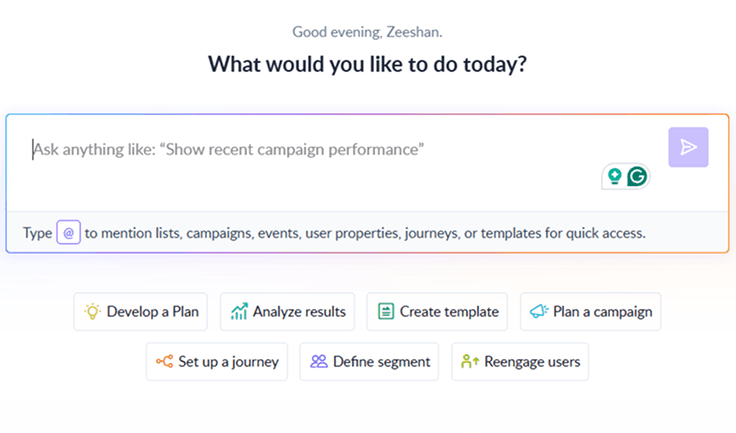
SaaS AI tools are software that use artificial intelligence to optimize common business tasks like content creation, customer query handling, user behavior analysis, hiring , and revenue forecasting.
Here are seven major types of SaaS AI tools based on core job departments:
AI marketing tools: These help you in executing marketing tasks like researching content ideas, writing content from scratch, optimizing for SEO, generating visual content , and more.
AI sales tools: These automate contact data population, generate personalized cold emails, and forecast deal outcomes.
AI customer support tools: The tools automatically route tickets based on skill level, write better support replies, and provide instant responses through chatbots.
AI product analytics tools: These help you auto-segment the user base, run A/B tests, and gather in-app feedback to improve product retention.
AI HR tools: These tools assist you with resume screening, generating offer letters, and personalized training modules, making AI HR tools a valuable way to streamline HR processes, save time, and enhance efficiency.
AI finance tools: These manage subscription billing, detect fraud in payment processing, forecast monthly recurring revenue (MRR), and handle financial risks specific to SaaS business models.
AI workplace tools: These help teams streamline workplace operations through AI meeting assistants, task automation, collaboration tools, and desk booking tools to support hybrid and flexible work environments.
Here are 13 top AI SaaS tools, organized by the key business functions and departments mentioned above.
Jasper
Type: AI content generation tool
Jasper’s idea was simple: write fresh content in half of the time, and they deliver on that promise even after all these years.
One of its core AI features is Voice, which lets you write content that matches your brand tone. You just need to upload something you’ve already written, like a blog post or website copy, and Jasper will study it to memorize your tone.
Jasper also offers a Knowledge Base, which lets you store info about your business, like product features, company details. The software then uses it while writing, so you don't need to repeat the same prompts over and over again.
Here are other features that Jasper offers:
Jasper Canvas to create, manage, and collaborate on campaign content.
Jasper Chat is here to assist you in writing and provide relevant information.
Document statuses to track each document’s progress within your project workflow.
Document sharing to control when and with whom documents are shared,
Pricing:
| Plan |
Pricing (Billed monthly) |
| Creator |
$39 per seat/month |
| Pro |
$59 per seat/month |
| Business |
Custom pricing |
Ahrefs
Type: AI SEO tool
Ahrefs has become a household name among SEO experts thanks to its solid keyword research tool and massive backlink index.
Now, Ahrefs is taking things further by layering AI into its core features. The Ask AI tool inside Keywords Explorer helps generate keyword ideas based on angles like pain points or challenges.
The platform also includes AI-powered search intent analysis, which is especially useful for keywords with multiple meanings or unclear user goals. For example, a keyword like “calligraphy” could indicate interest in learning the art, buying supplies, or exploring its history. Ahrefs uses AI to show what percentage of search traffic goes to each one.
Here are other features that Ahrefs offers:
AI Content Helper to write content in a way that builds trust with your audience.
AI Overview tracking to keep an eye on Google’s new AI-powered search results and stay one step ahead.
Content Gap tool to spot keywords your competitors rank for that you don’t, so you can find fresh content ideas and traffic opportunities.
Project dashboard overview to give you a high-level view of key metrics pulled from tools like Site Audit, Rank Tracker, and Keywords Explorer.
Automatic tracked events to capture key visitor interactions like outbound link clicks and form submissions without any manual setup.
Pricing:
| Plan |
Pricing |
Projects |
| Lite |
$129/month |
5 projects |
| Standard |
$249/month |
20 projects |
| Advanced |
$449/month |
50 projects |
Mailmodo
Type: AI email marketing tool
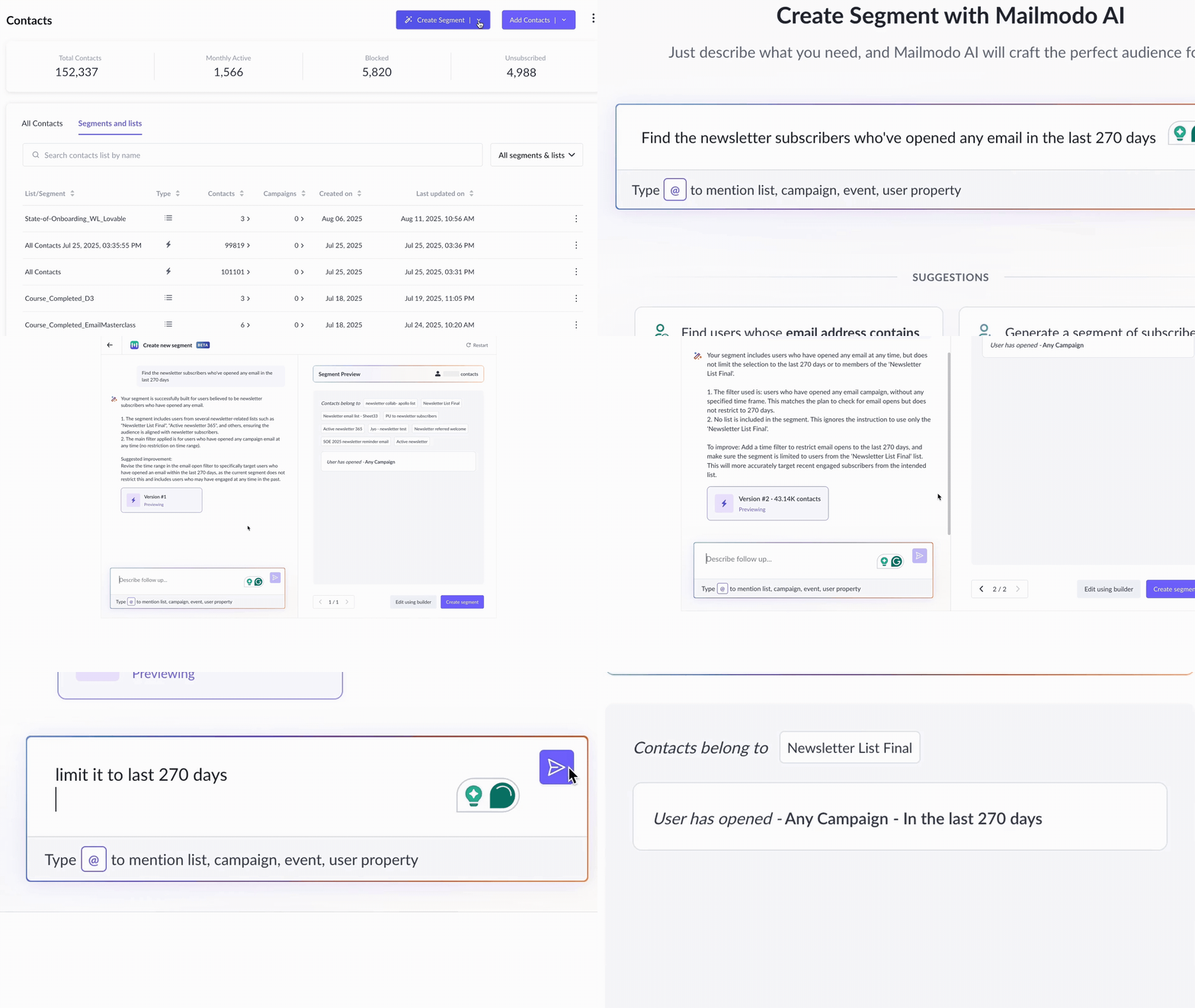
Do you ever struggle with building audience segments for your email campaigns? I definitely did, which is why I was thrilled when I learnt Mailmodo was launching an AI Segment feature.
Instead of digging through endless filters, you can simply write something like “Gmail user who clicked an email in the last 30 days,” and the system will instantly create a segment
On the writing front, Mailmodo has introduced a built-in copywriter that lets you write subject lines, CTAs, and body copy in minutes. Start by selecting a text element, then Ask AI to generate something new or fine-tune what’s already being written.
Your AI Assistant for Everything Email Marketing
Here are other features that Mailmodo offers:
Drag-and-drop email editor to easily create professional emails without any coding.
Brand kit to maintain a consistent email identity with your logos, colors, and fonts.
Pre-built email automation to set up workflows that send emails automatically based on user actions.
Email analytics to track how your emails perform and optimize future campaigns.
Pricing:
| Plan |
Pricing (billed annually) |
Email sending credits |
| Free |
Free |
4,000 |
| Lite |
$39/month |
20,000 |
| Pro |
$79/month |
25,000 |
| Max |
$159/month |
37,500 |
Buffer
Type: AI social media management tool
Buffer has shown up in many of the social media tool roundups I’ve written over the years, and for good reason. It’s super beginner-friendly and offers a surprisingly generous free plan.
Now, it’s even better thanks to its built-in AI Assistant. Just give it a prompt, and Buffer will generate multiple social media post variations in seconds.
You’ll find the AI Assistant in both the Publishing dashboard and the Create space, so no matter where you are in your content workflow, you get the help.
Here are other features that Buffer offers:
Ideas to quickly save content ideas from your phone, browser, or inside the app whenever inspiration strikes.
Tags to help you organize posts, track campaigns, and keep your content mix balanced.
A browser extension to easily share articles, images, or videos directly from the webpage.
Posting schedule to plan content ahead by setting time slots throughout the week.
Pricing:
| Plan |
Pricing ( Billed monthly) |
| Free |
Free forever |
| Essentials |
$5 per channel |
| Team |
$10 per channel |
Canva
Type: AI design tool
Canva has long been a go-to for non-designers who want to create great-looking graphics without complicated software. Recently, it has introduced Magic Studio, which is a suite of AI tools that makes it easy to design any type of content.
One well-built tool is Magic Design, where you can type any text or upload some reference images, and the system will instantly deliver layouts that match your needs
Then there’s Magic Write, Canva’s built-in writing assistant. For moments when it gets stuck writing a caption or newsletter intro, this tool can help you get past the blank page fast.
Here are other features that Canva offers:
Dream Lab to create realistic images using AI, based on your text prompts
Magic Charts to instantly turn your spreadsheet data into beautiful charts that update in real-time.
Magic Expand to stretch an image in any direction and fix tight or awkward framing.
An AI background generator to create new backgrounds for your photos.
A template library to help you start designs quickly with pre-made layouts.
Pricing:
| Plan |
Pricing (Billed annually) |
| Canva Free |
Free for one person |
| Canva Pro |
$55/year for one person |
| Canva Teams |
$50/year per person |
Clay
Type: AI lead enrichment and outreach tool
Since its recent funding boosts, Clay has doubled down on building sophisticated AI research tools for sales teams.
Its AI research agent, Claygent, scans over the domains or lead lists you provide and pulls key details like decision-maker names, recent funding rounds, company size, and more
You can then plug that research into the AI message writer, to get cold email perfectly personalized for each prospect. Once the message is ready, you can send it directly through your email tool of choice like Salesloft, Outreach, Instantly, or Smartlea
Here are other features that Clay offers:
Rollover credits to carry unused credits forward, so you don’t lose what you haven’t used.
Chrome extensions for easy lead capture: one scrapes any website for lists, and the other pulls leads directly into Clay.
Scheduling to set up meetings and reminders easily
Dedicated Slack support for quick help whenever you need it.
Pricing:
| Plan |
Pricing (Billed annually) |
| Free |
$0/month |
| Starter |
$134/month |
| Explorer |
$314/month |
| Pro |
$720/month |
| Enterprise |
Custom |
Intercom
Type: AI customer support platform
If you're focused on improving customer support and want to bring AI into the mix, Intercom might be just the tool you’re looking for.
Its Fin Performance Report gives you a clear view of how well Intercom’s AI chatbot, Fin, is working. It shows key stats like resolution rate, when human agents need to step in, and how customers are rating their experience.
Another powerful tool is Topics Explorer. It uses AI to automatically group your customer conversations into topics and subtopics. This means you do not need endlessly tag or manual sorting.
Here are other features that Intercom offers:
Shared inbox to keep customer conversations organized in one place for your whole team.
Inbox views to sort and filter conversations based on status, team, or topic for easier management.
Macros to quickly reply with pre-written responses and save time on repetitive questions.
Office hours and reply time settings to manage customer expectations and clearly show when you're available.
Pricing:
| Plan |
Pricing (Billed annually) |
| Essential |
$29 per seat/month + $0.99 per Fin resolution |
| Advanced |
$85 per seat/month + $0.99 per Fin resolution |
| Expert |
$132 per seat/month + $0.99 per Fin resolution |
| Fin AI Agent (Standalone) |
$0.99 per Fin resolution, minimum 50 resolutions/month |
Helpscout
Type: AI customer support platform
HelpScout, unlike Intercom, is much more focused on agent productivity than automating customer communication processes.
The company launched AI Drafts, which appears directly in the reply editor and is trained on your Docs articles and past conversation history. When triggered, it writes support responses which you can tweak according to your need.
Additionally, the platform offers an AI summarizer which analyzes the entire message thread and generates a clean summary.
Here are other features that Help Scout offers:
Inbox to manage customer conversations from email, chat, and more in one shared space that supports team collaboration.
Customer profile & activity history to give your team full context with a sidebar showing contact details and past interactions.
Workflows to automate repetitive tasks like assigning conversations or sending replies, so nothing slips through the cracks.
Auto reply to immediately confirm receipt of a customer’s message, keeping them in the loop even before a team member responds.
Pricing:
| Plan |
Pricing (Billed annually ) |
| Free |
$0 (Up to 50 contacts per month) |
| Standard |
$50 (For 100 contacts per month) |
| Plus |
$75 (For 100 contacts per month) |
Amplitude
Type: AI product analytics tool
Amplitude offers two standout AI features: Predictions and AI Agents. Predictions use machine learning to figure out which users are most likely to take certain actions, like making an upgrade or not sticking around, so you can send more targeted emails, adjust pricing, or personalize content based on predicted behavior.
This feature is particularly useful when your user journey doesn’t follow a clear path. However, one prerequisite for using this feature is to have a large user base of data, so the system can properly analyse and spew out skewed results.
Amplitude AI Agents pull together data from across your analytics, session replays, experiments, and surveys to offer recommendations customized to your goals, like improving conversion or feature adoption. For teams looking to implement similar capabilities across their entire workflow, AI agent software can help automate tasks and connect processes enterprise-wide.
Here are other features that Amplitude offers:
Starter templates to get automated reports that help you keep an eye on key metrics instantly.
Dashboard subscriptions to receive updates of your dashboards directly via Slack or email.
Forecasting and alerts to predict trends and get notified when important changes happen.
Conversion drivers to figure out which user behaviors lead to conversions or drop-offs.
Pricing:
| Plan |
Pricing |
MTUs |
| Starter |
Free |
Up to 50K MTUs |
| Plus |
From $49/month |
Up to 300K MTUs |
| Growth Plans |
Custom pricing |
Custom |
| Enterprise |
Custom pricing |
Custom |
Sprig
Type: AI user research and feedback tool
For anyone researching product experience and looking for AI to speed up the process, Sprig is a decent option. Its AI Explorer lets you ask questions about users' experience in plain language, like how to improve onboarding or spot friction, and pulls insights from all your user heatmaps, session replays, and survey data.
Additionally, the platform offers AI Recommendations that are built on the same insights and provide specific advice on what to do next. You’ll get guidance on what you can do to reduce user friction and boost satisfaction.
Here are other features that Sprig offers:
Sprig Replays to capture user journey clips triggered by specific actions, helping product teams see what’s working and what’s not.
Sprig Heatmaps to visually represent in-product user interactions.
Sprig Surveys to run in-app surveys and gather real-time feedback directly from your users.
Insights dashboard to review survey responses, replay clips, and test results with AI-generated themes, sentiment analysis, and recommendations.
Pricing: Custom
Lattice
Type: AI performance and HR management tool
Lattice’s AI upgrades help with some of the most time-consuming people ops tasks, like sifting through survey feedback or writing performance comments. The Engagement Insights summarize open-ended feedback around two to seven key themes, like leadership, recognition, or workload.
The Feedback Writing Assistant is another helpful addition. Embedded directly in the Feedback module, it offers in-line suggestions to help managers and peers write feedback that’s concise, clear, and inclusive. You can reword sections, check tone, or generate alternate versions, up to five times.
Here are other features that Lattice offers:
Performance reviews to assess employee progress and goals.
Feedback and praise encourage continuous communication and recognize great work.
Report builder to create custom reports for insights on performance and engagement.
Employee records to keep all employee details organized and accessible in one place.
Pricing:
| Plan |
Pricing (Billed annually) |
| Talent Management |
$11 per seat/month |
| HRIS |
$10 per seat/month |
Recurly
Type: AI subscription and revenue management tool
The core reason Recurly was introduced to the market was to tackle involuntary churn caused by credit card failure.
Continuing with on mission, Recurly rolled out Expired Card Management tool, which automatically updates expired credit card information to keep subscription renewals running smoothly.
They’ve also added an AI-powered Explore Assistant that lets users interact with subscription data using their day-to-day language. You can quickly see various kinds of charts, such as failed monthly invoices or transaction success rates by country.
Here are other pricing features that Recurly offers:
Subscriber account management to easily handle customer details and subscription changes.
Pause subscriptions to let customers take a break without canceling, reducing churn.
Customizable email templates to tailor billing and notification emails to your brand.
Automated invoice billing to send invoices at the right time.
Pricing:
| Plans |
Pricing |
| Startup and small business |
$0/month for first 3 months (new customers only) |
| Mid-market and enterprise |
Get custom pricing |
13. Marlee
Type: AI-powered performance and collaboration platform
Marlee helps individuals and teams improve performance by turning motivation and work styles into actionable insights.
Using science-backed assessments, Marlee’s AI identifies what drives people at work and delivers personalized coaching plans aligned to individual and team goals. These insights help teams collaborate better, develop soft skills, and improve outcomes across hiring, onboarding, and ongoing development.
Marlee is used by founders, HR teams, and people leaders to build high-performing teams without guesswork.
Key features include:
Science-based motivation and work-style assessments
Personalized AI coaching and goal-driven action plans
Team insights to improve collaboration and alignment
Dashboards to track progress and performance patterns
Pricing:
Free assessment available. Paid plans for individuals and teams, with custom pricing for organizations.
Rounding up
Before you commit to any AI SaaS tool, take a step back and get clear on what you actually need. Are you trying to save time on customer support? Automate your sales outreach? Generate content faster? Knowing your specific goals and pain points will help you avoid the trap of buying flashy tools.
Once you’ve nailed down your priorities, explore the tools that align with them. Most AI software offers free trials or demos, take advantage of it. Test a few options, see how they integrate into your workflow, and pay attention to ease of use, support, and real value delivered.