What does a multi-channel campaign look like?
A multi-channel campaign is basically a marketing strategy where you reach out to your customers across multiple platforms, such as email, SMS, mobile application, etc.
You can mix and match several channels when creating a multi-channel campaign.
To give you an example flow:
- A user signs up on your website → they get a welcome email.
- Two days later → they receive a personalized SMS with a limited-time offer.
- If they don’t click → a reminder email is sent with product recommendations.
How to create a multi-channel campaign
If you have Mailmodo, you don’t need a stack of tools to run a campaign across multiple channels. With Mailmodo’s Journey Builder, you can design and automate an entire campaign that reaches out to your customers via both email marketing and SMS. Here’s how:
In your Mailmodo dashboard, go to Journeys → Create Journey.
Choose whether to start from scratch or pick a pre-built template like Welcome Series, Cart Abandonment Recovery, or Lead Nurture Flow.
If you’re building from scratch, you’ll need to choose what starts the journey. This could be:
- A user signing up or filling out a form
- A trigger from an external system (like Shopify or a webhook integration)
Once the trigger is set, you’ll see the visual flow builder where you can map out the full campaign.
Inside the builder, you can layer in emails, SMS, and wait times. Let’s create a sample email flow:
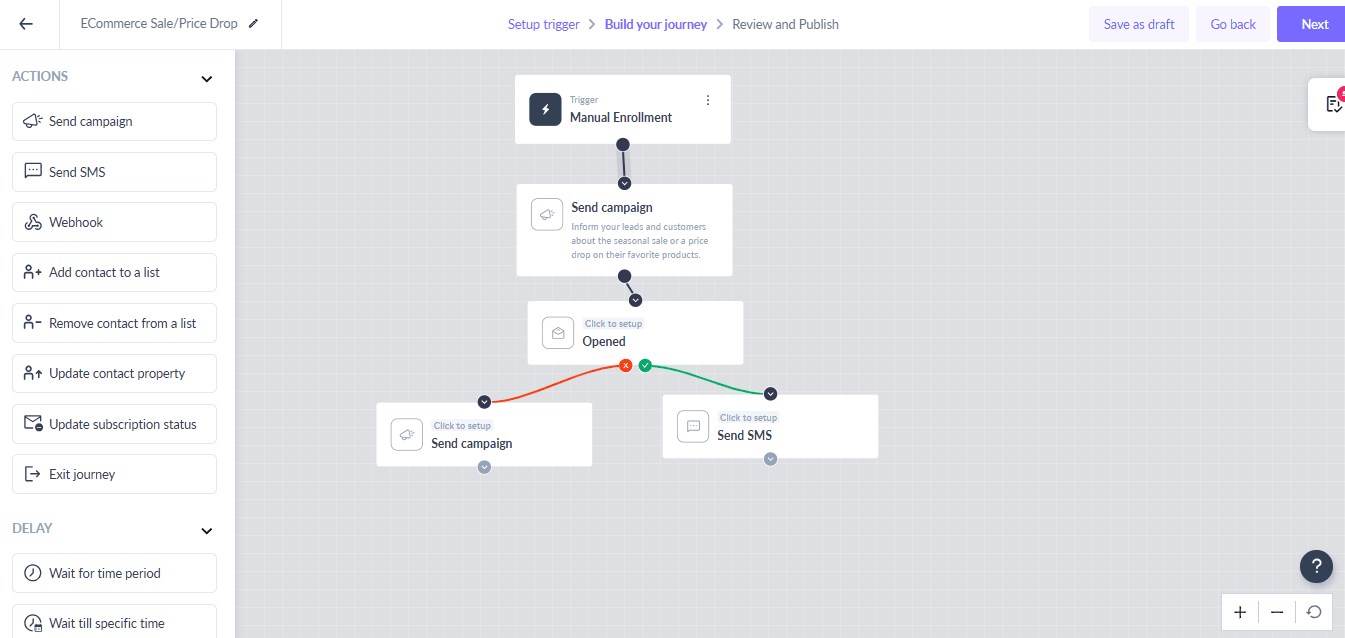
- Add send campaign block and connect it with the initial trigger.
- Set up the campaign block by adding an email template and other relevant details.
- Add the ‘Opened block’ from under the conditions section
and connect it to the last block.
- Now, two more blocks: one Send SMS block (connect with the x) and another send campaign block (connect it with the tick).
- Set up the SMS block by connecting your Twilio account and writing your SMS message.
Once you’re done, click Next.
Review everything and publish the journey.
Final thoughts
Multi-channel marketing isn’t just for big teams or complex setups. Anyone can benefit from coordinating emails, SMS, and triggers in one unified workflow. With Mailmodo’s Journey Builder, you can save time, improve engagement, and scale your campaigns—without juggling multiple tools or dashboards.
Sign up for Mailmodo today and start building your first multi-channel journey.