The hidden costs of complexity in email campaigns
Here are some side effects of having a complex email campaign design:
Developer dependency: Reliance on developers for even minor changes can delay campaign launches and increase operational overhead.
Operational inefficiencies: Repetitive tasks, such as duplicating templates across teams, can consume valuable time and divert focus from strategic work.
Missed opportunities: Delays in campaign execution due to the complexity of the email journeys can result in lost revenue from time-sensitive promotions.
Platform hidden fees: Extra charges for additional features or data handling can accumulate unnoticed, impacting budgets.
Quality assurance: With so many email templates, there can be broken links, which can reduce engagement and require additional time and resources to fix.
How to simplify complex email journeys using Mailmodo
Managing complex email journeys doesn’t have to be overwhelming. Here’s how you can make it easier with Mailmodo:
Use prebuilt journeys to skip unnecessary complexity
Instead of building massive flows from scratch, Mailmodo gives you prebuilt journeys for high-performing and common use cases like onboarding, upselling, cross-selling, win-back campaigns, and more.
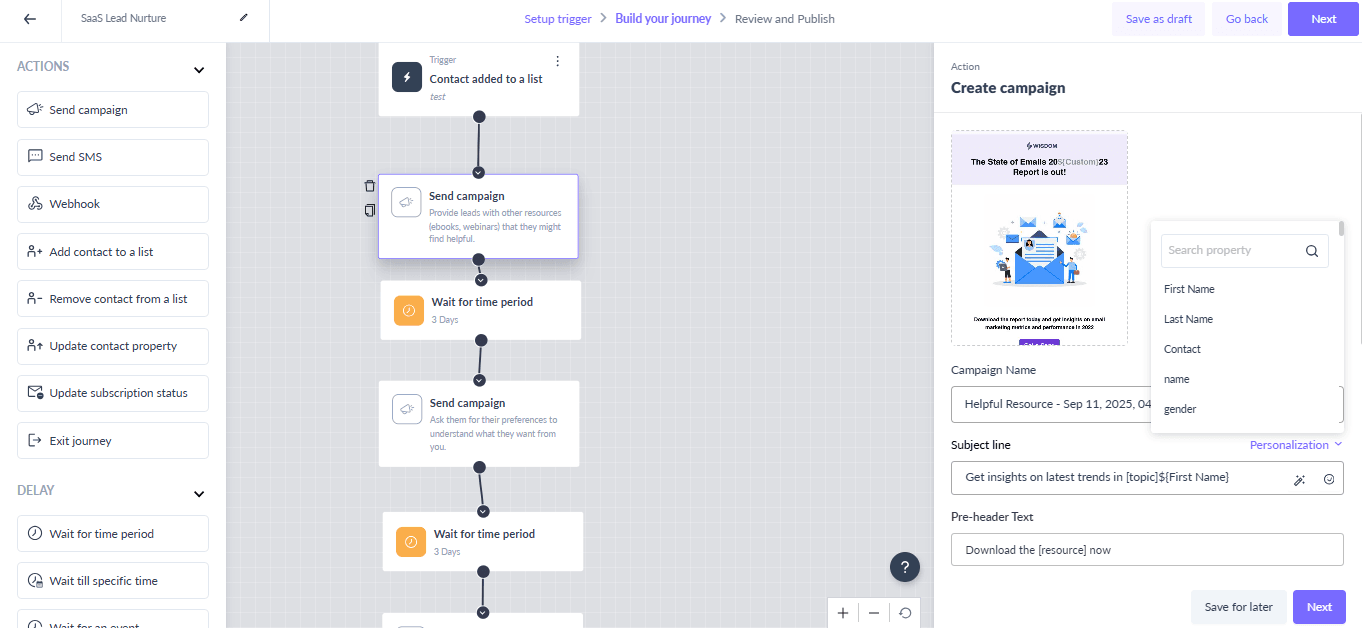
Here's a list of a few pre-built journeys you get:
Build cleaner flows with event-based logic and a visual builder
When journeys are built with long if/else chains, they become visually confusing and tough to manage. Mailmodo simplifies this by offering minimalistic blocks that keep your flow organized and easy to understand just by looking at them. Here are the main block categories available in the journey builder:
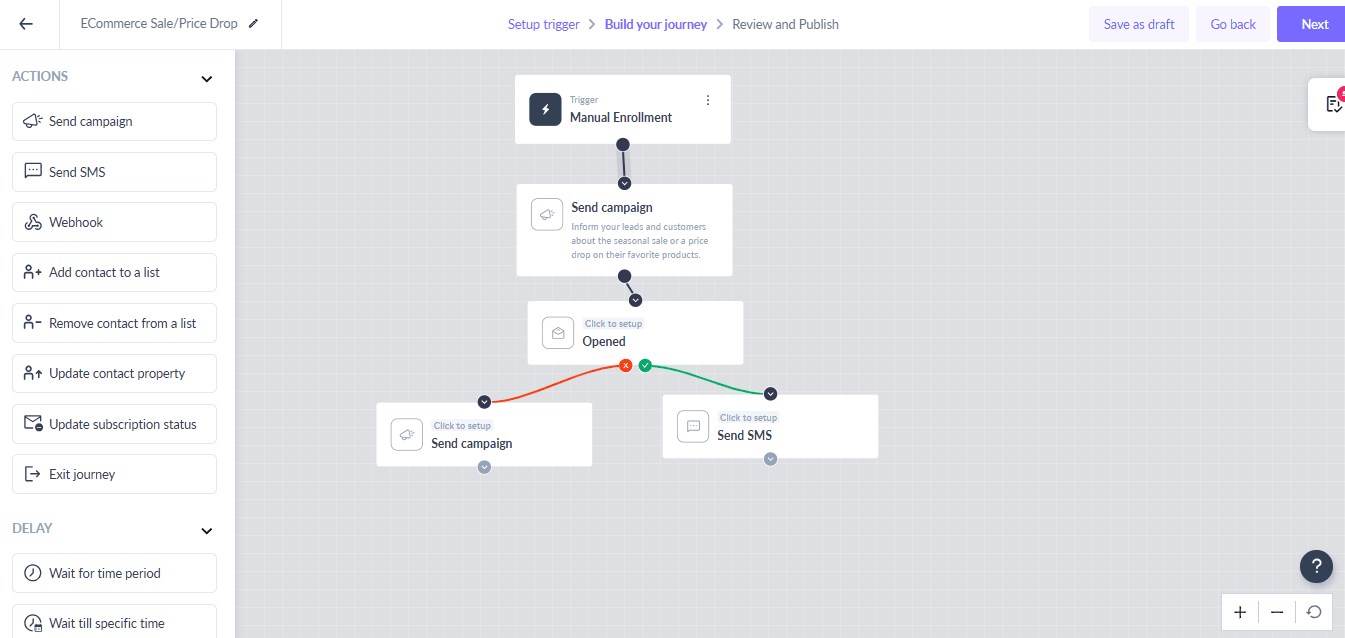
Action blocks: These are actions Mailmodo will take once the trigger event occurs. You can send an email campaign, fire off an SMS, or update contact details.
Time delay blocks: This lets you add a delay before the next email that goes out. For example, you can wait two days before sending a follow-up.
Condition blocks: These blocks let you take action based on how people interact with your emails, such as opens, clicks, or form submissions.
Advanced condition blocks: This lets you do more precise targeting within your flows. You can segment from a specific list or track if specific features are available in contact data.
Simplify your journeys with dynamic segmentation
Managing every possible user behavior within a single journey can quickly become overwhelming. Mailmodo simplifies this with dynamic segmentation, which lets you target segments that are updated with real-time data without creating complicated branches.
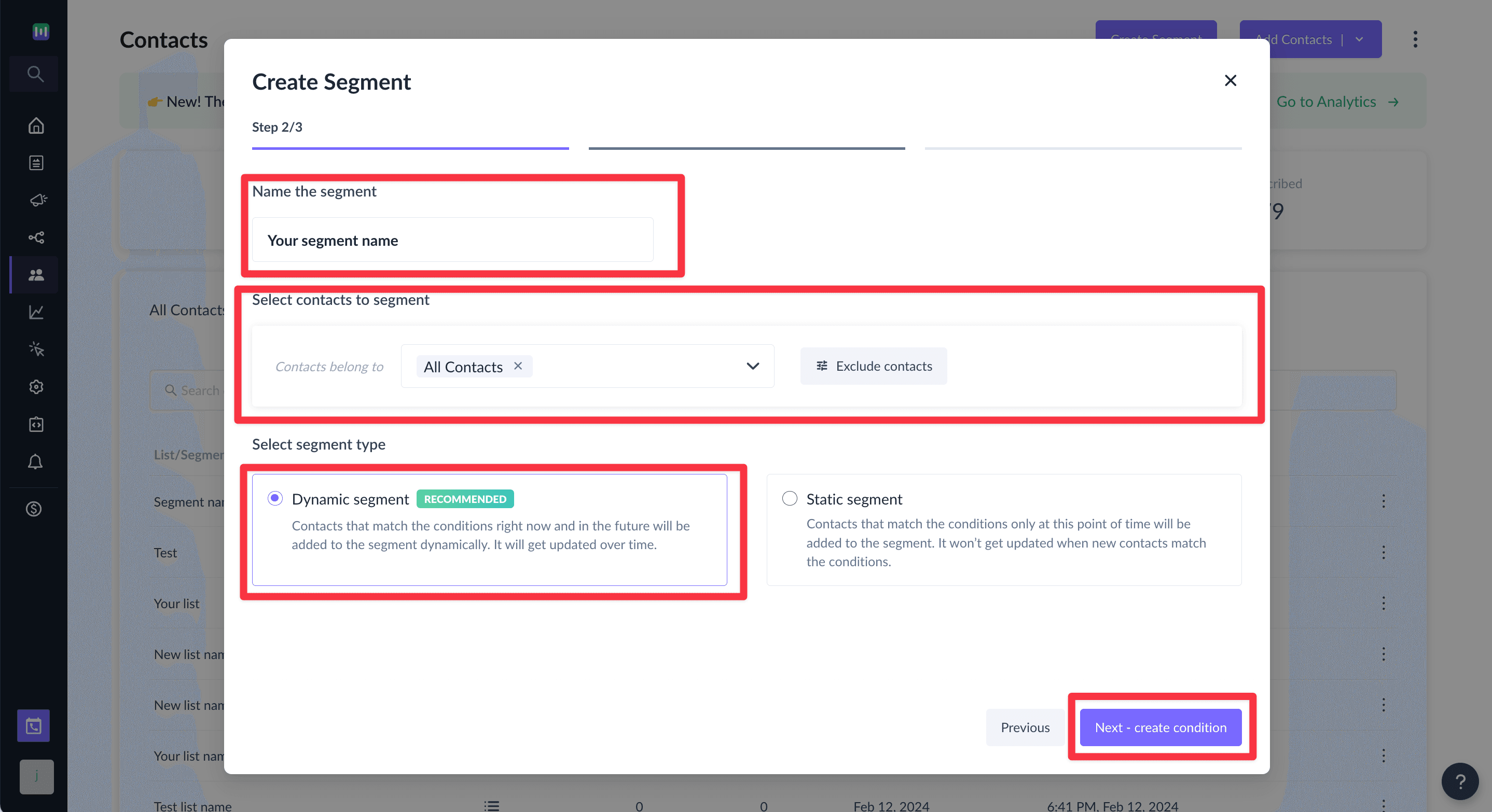
Here’s how you can create a dynamic segment:
From your Mailmodo dashboard, navigate to the Contacts tab.
Click create segment and choose to either create using Mailmodo AI or create with the builder.
If you select the Builder, choose the Dynamic Segment option. If you opt for Mailmodo AI, your segment will automatically be set as a dynamic segment.
Set your conditions using filters such as user properties, campaign activity, or custom events.
Click on Create Segment.
4. Use goals and exit criteria to auto-clean your flows
Without proper endpoints, journeys often run longer than needed, leading to message fatigue. Mailmodo allows you to define goals and exit criteria as you build your journey, ensuring that each contact moves efficiently through your workflow and receives only relevant communications.
Here is how it works:
Goals: Set a target action for the journey, such as “completed purchase” or “booked demo.” Reaching this goal signals that the journey’s purpose has been fulfilled.
Exit Criteria: Automatically remove contacts from the journey if they meet or not meet set conditions. You can use the Exit journey block to stop sending emails to contacts who meet the set conditions.
Conclusion
Simplifying your email journeys doesn’t mean sacrificing personalization or performance. By using prebuilt journeys, modular flows, event-based logic, and dynamic content in Mailmodo, you can reduce complexity, save time, and ensure every message reaches the right audience at the right moment.
Start applying these steps in Mailmodo today to create cleaner, smarter email automation that engages your audience and drives results without the headaches of overly complex workflows.