Learners often explore multiple courses before committing to one. They browse course pages, check syllabi, compare instructors, and may still leave without enrolling. This behavior is common, but it creates a major drop-off point in the student acquisition funnel.
For edtech platforms, every abandoned browse represents high intent. These users already showed interest. They just needed more confidence, clarity, or motivation to take the next step. Without a follow-up, that interest fades quickly as they get distracted or explore competitors.
This is where a browse abandonment email sequence comes in handy. Instead of letting interested learners slip away, you can re-engage them with timely reminders, helpful information, and relevant alternatives. In this guide, we’ll walk through how to build a complete browse abandonment email sequence for an edtech business.
Why should you use an email flow?
Email works especially well for browse abandonment in edtech because it allows you to re-engage learners after the moment of interest, without being intrusive. Unlike ads or push notifications, email gives you space to explain value, address doubts, and personalize content based on what the learner explored.
With email, you can:
- Reach learners directly in their inbox
- Personalize content based on the course they viewed
- Share additional context like outcomes, curriculum, or social proof
- Automate follow-ups without manual effort
- Time messages based on user behavior
However, a single reminder email is rarely enough. Learners need multiple touchpoints. That’s why a sequence, rather than a one-off email, is more effective for browse abandonment.
What is a browse abandonment email sequence?
A browse abandonment email sequence is a series of automated emails sent to users who viewed a product or course but left without adding it to the cart or completing enrollment.
In edtech, this sequence typically includes:
A reminder email about the course they viewed
Follow-up emails with more details or benefits
Suggestions for similar or related courses
Social proof or expert guidance to reduce hesitation
How to build a browse abandonment email sequence
Building an email sequence can be easy if you’re following a well-defined set of steps. Here are the steps for you to follow:
Step 1: Plan your campaign
Planning is the foundation of an effective browse abandonment sequence. Without clarity on goals and messaging, emails can feel random or pushy. In edtech, the focus should be on educating and reassuring, not pressuring.
Start by defining the key elements of your campaign:
- Objective: Re-engage browsers and drive course sign-ups
- Target audience: Users who viewed a course but didn’t add it to cart
- Core message: Help learners understand why the course is right for them
- Number of emails: 2 emails
- Timeline: 1 week
We asked Mailmodo AI to generate an entire campaign plan for a browse abandonment email sequence and it delivered a detailed, actionable plan that we could review, customize, and turn into an automated workflow instantly. The output also outlined what emails to send, when to send them, and what each message should achieve.
Take a look at the prompt we used. Click on the arrow to see the output we received.
Create a browse abandonment email campaign plan for an edtech platform. Include objectives, target audience, number of emails, theme of each email, ideal timing between emails, and the main CTA for each email.
Step 2: Create audience segments
Segmentation ensures your browse abandonment emails are relevant. Instead of sending generic reminders, you can tailor content based on what learners actually viewed and how they behaved.
In edtech, segmentation can be done using:
- Courses or categories viewed
- Time spent on course pages
- Last activity date
- User level (student, professional, beginner, advanced)
- Past enrollments or interests
We used Mailmodo AI to quickly create an audience segment for this email sequence. Once it was done, we got the option to review, make edits using the builder, or ask AI to carry out the changes we wanted. Once we confirmed, Mailmodo AI created the segment instantly and it was ready to use for a campaign.
Take a look at the prompt we used, along with the output we got.
Create a dynamic segment of users who viewed at least one course page but did not add any course to the cart and were active in the last 7 days.
Step 3: Create the email templates
Once the audience is ready, the next step is creating the actual emails. Here’s a sample list of emails that you should be creating for your email sequence. We’ve also included sample prompts that you can use in Mailmodo AI to generate these email templates in minutes instead of having to spend hours creating them.
Email #1: Browse Abandonment Email
When to send: Within a few hours of the browsing session
Purpose: Gently remind learners about the course they explored
What to include:
- Course name and brief description
- Key learning outcomes
- A link back to the course page
- An option to talk to an expert or ask questions
Here’s a sample prompt to generate this kind of email, along with the output it will produce.
Generate a browse abandonment email for an edtech platform. Remind the user about the course they viewed, highlight key outcomes, and include a CTA to view the course and talk to an expert.
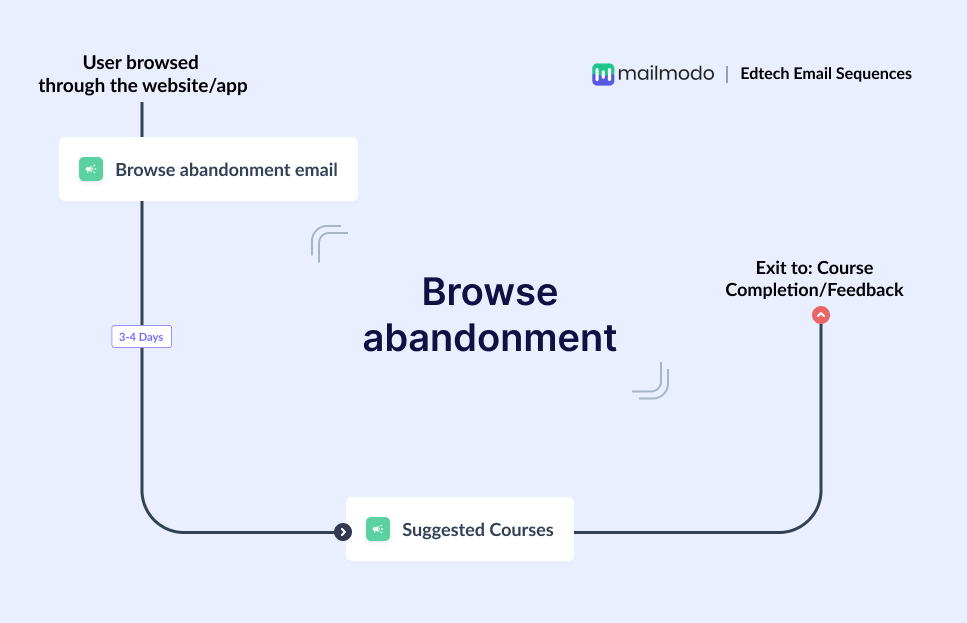
Email #2: Suggested Courses
When to send: 3–4 days after Email #1
Purpose: Help learners explore alternatives if they’ve still not decided
What to include:
- Similar or related courses
- Short descriptions for each course
- Social proof like ratings or learner success
- A CTA to explore courses or book expert consultation
Here’s a sample prompt to generate this kind of email, along with the output it will produce.
Generate a follow-up browse abandonment email suggesting similar courses. Include brief descriptions, social proof, and a CTA for expert consultation.
Step 4: Build the automated workflow
Once your emails are ready, the next step is to automate them so every new user receives them at the right moment. Automation ensures the sequence runs smoothly without manual effort. Your price drop email sequence should include:
- Trigger: User views a course but doesn’t add it to cart
- Delays: 0–1 day → 3–4 days
- Branching logic: If user enrolls → exit sequence; If user doesn’t enroll → continue to suggested courses
- Exit criteria: User enrolls for a course or user is moved to feedback or consultation flow
We used Mailmodo AI to generate the full automated workflow from scratch. It mapped the triggers, delays, conditions, and exits. Once the output was ready, we just had to review the overall journey following a setup checklist and ask the AI to make the tweaks we wanted in the workflow.
Take a look at the prompt that we used and the output we received.
Generate a complete automated workflow for an edtech browse abandonment sequence. Include triggers, delays, branching logic, and exit criteria.
Step 5: Analyze and improve
Once the sequence is live, performance tracking helps you understand what’s working and what needs improvement. For browse abandonment in edtech, focus on metrics that reflect both engagement and intent. Key metrics to track include:
- Open rate
- Click-through rate
- Course page revisits
- Enrollments from the sequence
- Time to conversion
You can also ask Mailmodo AI to analyze the performance of your email sequence and suggest optimizations based on engagement and conversion data. Here’s a sample prompt that you can use for this:
Analyze my edtech browse abandonment email sequence and suggest improvements to increase clicks and course enrollments.
Conclusion
By combining email with sequencing, you can guide learners back with relevant reminders, helpful suggestions, and expert support. Tools like Mailmodo make it easier to plan, create, automate, and optimize these sequences without complexity.
With the right browse abandonment flow in place, you can turn missed opportunities into enrollments, one thoughtful email at a time.


 Learn more about Mailmodo