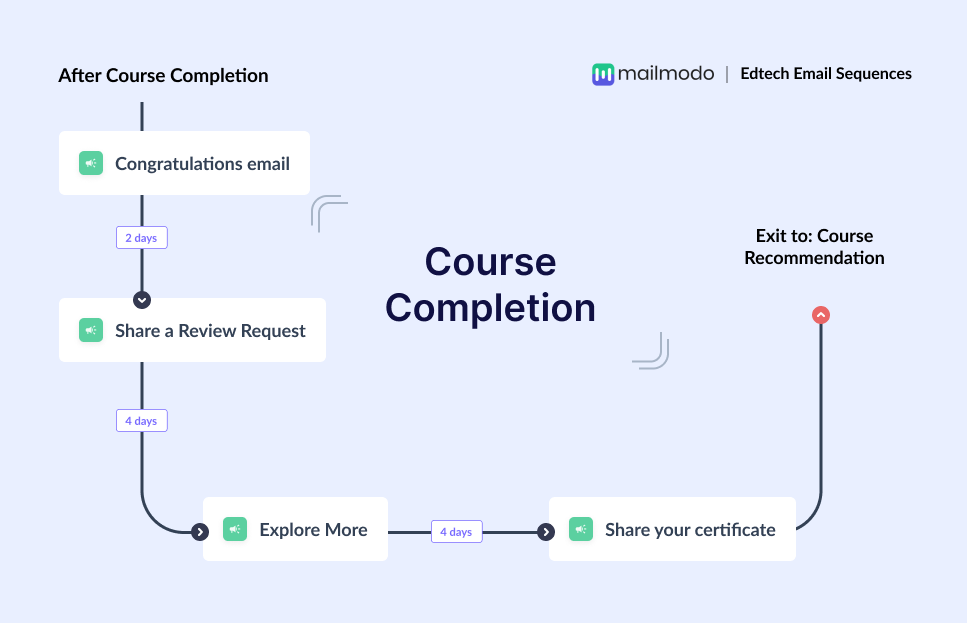
In the edtech industry, course completion is a critical moment. It marks the point where a learner reached a learning goal after investing time, effort, and trust in your content. But many edtech platforms stop engaging users once the course ends.
This creates a gap where motivated learners slowly disengage, even though they are most likely to continue learning, leave reviews, or advocate for your brand at this stage.
A course completion email sequence helps you make the most of this moment. It allows you to celebrate the learner’s success, collect valuable feedback, and guide them toward their next course in a structured way.
In this guide, you’ll learn how to build a complete course completion email sequence for an edtech business, step by step.
Why should you use an email flow?
Email works exceptionally well for course completion in edtech because it reaches learners at a moment of achievement, when they’re most engaged and invested. Unlike in-app notifications or social posts, emails give learners a focused space to celebrate, reflect, and decide what to do next.
With email, you can:
Deliver certificates and congratulations directly to
Personalize messages based on the course completed or skill
Segment learners by behavior, progress, or learning
Automate timely follow-ups without relying on manual outreach
However, a single email is rarely enough after course completion. Some learners may overlook the certificate email, others need a nudge to leave a review, and many only consider enrolling in another course after multiple reminders. A sequence supports all these scenarios and keeps learners engaged beyond the finish line.
What is a course completion email sequence?
A course completion email sequence is a series of automated emails sent to a learner after they successfully finish a course.
It typically includes a congratulatory message with a certificate, a review or feedback request, recommendations for additional courses, and reminders to share achievements.
How to build a course completion email sequence
Building an email sequence can be easy if you’re following a well-defined set of steps. Here are the steps for you to follow:
Step 1: Plan your campaign
Planning sets the foundation for your entire sequence. In edtech, this step ensures your emails align with learner motivation, course outcomes, and long-term retention goals.
Start by outlining the key elements of your campaign:
- Objectives: Celebrate completion, collect reviews, drive repeat enrollments, encourage sharing
- Audience: Learners who have successfully completed a specific course
- Messaging: Encouraging, celebratory, and forward-looking
- Number of emails: 4 emails
- Timeline: 8–9 days from course completion
We used Mailmodo AI to generate a complete campaign plan for a course completion email sequence and it delivered a detailed, actionable plan that we could review, customize, and turn into an automated workflow instantly. The output also outlined what emails to send, when to send them, and what each message should achieve.
Take a look at the prompt we used. Click on the arrow to see the output we received.
Create a course completion email campaign plan for an edtech platform. Include objectives, number of emails, the theme of each email, ideal timing between emails, and the main CTA for each email.
Step 2: Create audience segments
Segmentation ensures that only the right learners enter this sequence and that messages feel personalized rather than generic. For a course completion flow, segmentation can be based on:
- Course completion status
- Course category or skill level
- Completion date
- Engagement during the course
- Certification eligibility
We used Mailmodo AI to quickly create an audience segment for this email sequence. Once it was done, we got the option to review, make edits using the builder, or ask AI to carry out the changes we wanted. Once we confirmed, Mailmodo AI created the segment instantly and it was ready to use for a campaign.
Take a look at the prompt we used, along with the output we got.
Create a dynamic segment of learners who completed a course in the last 24 hours and are eligible for a completion certificate.
Step 3: Create the email templates
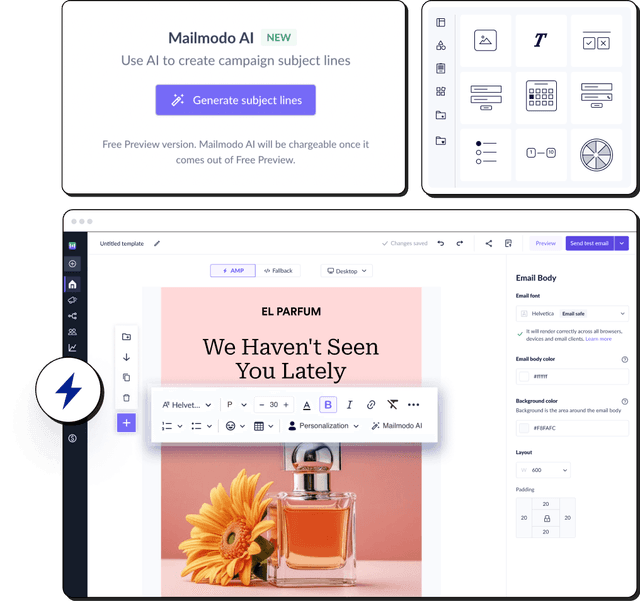
Once the audience is defined, the next step is creating the actual emails to be sent. Here’s a sample list of emails that you should be creating for your course completion email sequence. We’ve also included sample prompts that you can use in Mailmodo AI to generate these email templates in minutes instead of having to spend hours creating them.
Email #1: Congratulations email
When to send: Immediately after course completion
Purpose: Celebrate course completion and deliver the certificate
What to include:
- Personalized congratulatory message
- Course name and completion acknowledgment
- Downloadable or shareable certificate
- Social sharing encouragement
Here’s a sample prompt to generate this kind of email, along with the output it will produce.
Generate a congratulatory email template for learners who completed a course. Include a certificate delivery message and a positive, celebratory tone.
Email #2: Review request
When to send: 2–3 days after completion
Purpose: Collect testimonials and feedback while motivation is high
What to include:
- Thank-you note for completing the course
- Short feedback or rating request
- Interactive form for quick responses
- Reassurance that feedback helps improve courses
Here’s a sample prompt to generate this kind of email, along with the output it will produce.
Generate a review request email for course completers. Include an in-email feedback form and keep the tone friendly and appreciative.
Email #3: Explore more courses
When to send: 5–6 days after completion
Purpose: Encourage continued learning
What to include:
- Course recommendations based on completed course
- Option to share learning preferences
- Clear next-step CTA
Here’s a sample prompt to generate this kind of email, along with the output it will produce.
Generate an email recommending additional courses to learners based on a recently completed course. Include personalized suggestions and a soft upsell tone.
Email #4: Share the certificate reminder
When to send: 8–9 days after completion
Purpose: Encourage social sharing and brand advocacy
What to include:
- Reminder to share completion certificate
- Links to share on social media
Here’s a sample prompt to generate this kind of email, along with the output it will produce.
Generate a reminder email encouraging learners to share their course completion certificate on social media. Keep it light-hearted and motivational.
Step 4: Build the automated workflow
Once your emails are ready, the next step is to automate them so every learner receives them at the right moment. Your course completion email sequence should look something like this:
- Trigger: Course marked as completed
- Delays: 0 days → 2–3 days → 2–3 days → 2–3 days
- Branching logic: If review submitted → skip reminder nudges; If certificate shared → exit sequence
- Exit criteria: User completes feedback or enrolls in another course
We used Mailmodo AI to generate the entire workflow structure from scratch. It mapped triggers, delays, and conditions automatically. Once the output was ready, we just had to review the overall journey following a setup checklist and ask the AI to make the tweaks we wanted in the workflow.
Take a look at the prompt that we used and the output we received.
Generate a complete automated workflow for an edtech course completion email sequence. Include triggers, delays, branching logic, and exit criteria.
Step 5: Analyze and improve
Tracking performance helps you refine future sequences and improve learner engagement. Key metrics to monitor in this sequence include:
- Open rate
- Click-through rate
- Certificate downloads
- Review submission rate
- Repeat course enrollments
- Social sharing actions
You can also ask Mailmodo AI to analyze the performance of your email sequence and suggest optimizations based on engagement and conversion data. Here’s a sample prompt that you can use for this:
Analyze my course completion email sequence and recommend improvements to increase reviews, certificate sharing, and repeat enrollments.
Conclusion
A well-structured course completion email sequence ensures learners feel recognized, motivated, and guided toward their next goal. When paired with email automation and AI-driven insights, the process becomes easier to plan, execute, and optimize.
Mailmodo helps simplify every step, from planning and segmentation to automation and performance analysis, so you can focus on creating better learning experiences.


 Learn more about Mailmodo