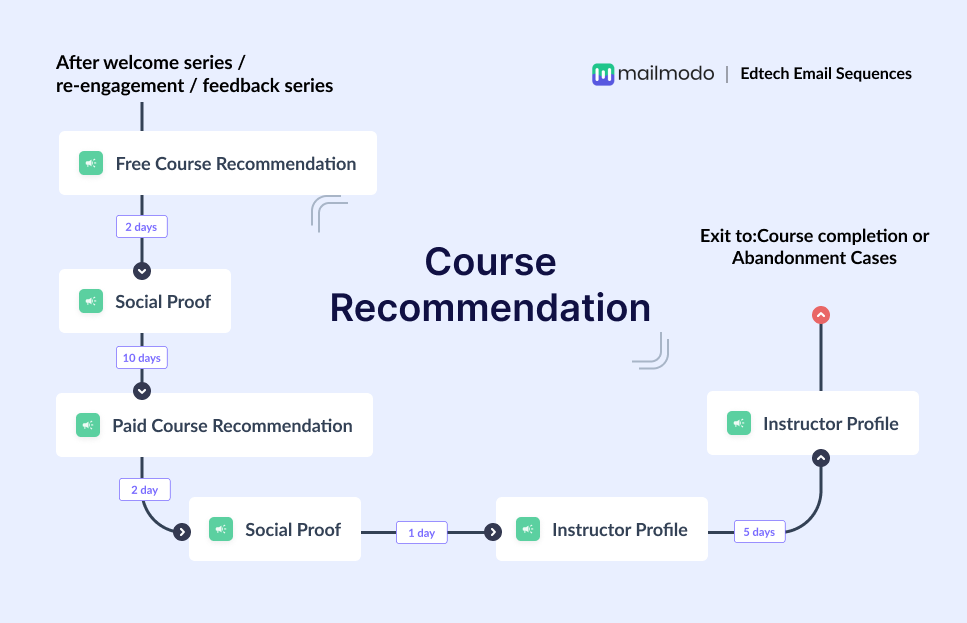
In the edtech industry, helping learners choose the right course is one of the most critical moments in the customer journey. Most platforms offer dozens of programs across skill levels, formats, and career paths. For a new registrant, the choices can feel overwhelming.
This is what a course recommendation flow solves. Instead of pushing all the courses to all the learners at once, you guide learners step by step. When done well, this flow improves course adoption, increases paid enrollments, and sets the stage for long-term learner success.
In this guide, we will walk through how to build a complete edtech course recommendation email sequence, from planning to optimization, using a practical, repeatable framework.
Why should you use an email flow?
Email works especially well for course recommendations in edtech because learning decisions are rarely instant. Learners need time to explore, compare, and gain confidence before committing to a paid program.
With email, you can:
- Reach learners directly without relying on algorithms
- Personalize recommendations based on interests, progress, and behavior
- Educate learners gradually instead of overwhelming them
- Automate follow-ups based on course engagement
- Deliver messages at the right learning moment
A single email is rarely enough to influence a career or learning decision. Learners may need reminders, proof of outcomes, instructor credibility, and personal guidance. A sequence of emails allows you to build that narrative over time. This is where a structured course recommendation sequence comes in handy.
What is a course recommendation email sequence?
A course recommendation email sequence is a series of automated emails designed to guide learners toward the most relevant courses based on their goals, behavior, and engagement.
It usually includes:
- Free or introductory course recommendations
- Social proof from learners and partners
- Paid or advanced course suggestions
- Instructor highlights
- Consultation or counseling invitations
How to build a course recommendation email sequence
Building an email sequence can be easy if you’re following a well-defined set of steps. Here are the steps for you to follow:
Step 1: Plan your campaign
Planning defines the direction of your entire sequence. Without a clear plan, recommendations can feel random or sales-heavy, which hurts trust in an edtech brand. At this stage, you decide what success looks like and how learners should move through the flow.
Your campaign plan should clearly outline:
- Objective: Increase paid course enrollments, consultations booked, or course completion
- Target audience: New registrants, free course learners, or trial users
- Number of emails: 5 emails
- Timeline: Around 3 weeks
- CTA: Start free course, explore paid courses, book a consultation
To speed this up, we used Mailmodo AI to generate a complete campaign plan and it delivered a detailed, actionable plan that we could review, customize, and turn into an automated workflow instantly.
Take a look at the prompt we used. Click on the arrow to see the output we received.
Create a course recommendation email campaign plan for an edtech platform. Include objectives, target audience, number of emails, purpose of each email, ideal timing between emails, and the primary CTA for each email.
Step 2: Create audience segments
Not all learners should receive the same recommendations. Segmentation ensures that each learner sees courses aligned with their interests and readiness. For an edtech course recommendation flow, segmentation can be based on:
- Course category interest (tech, business, design, data)
- Signup source (free trial, webinar, referral)
- Course progress (not started, in progress, completed)
- Engagement level (active vs inactive)
- Career goal or skill preference
We used Mailmodo AI to quickly create an audience segment for this email sequence. Once it was done, we got the option to review, make edits using the builder, or ask AI to carry out the changes we wanted. Once we confirmed, Mailmodo AI created the segment instantly and it was ready to use for a campaign.
Take a look at the prompt we used, along with the output we got.
Create a dynamic segment of edtech learners who signed up in the last 30 days, enrolled in a free course, and completed or engaged with the course in the last 14 days.
Step 3: Create the email templates
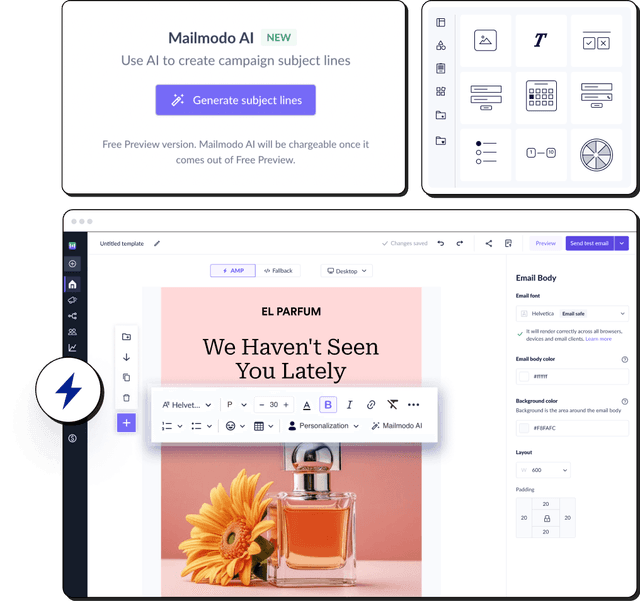
Once segmentation is ready, the next step is designing the actual emails. Here’s a sample list of emails that you should be creating for your course recommendation email sequence. We’ve also included sample prompts that you can use in Mailmodo AI to generate these email templates in minutes instead of having to spend hours creating them.
Email #1: Free course recommendation
When to send: Immediately after signup or enrollment
Purpose: Introduce learners to your platform’s value
What to include:
- Personalized free course suggestions
- Clear learning outcomes
- Easy next steps to start learning
- Brief overview of how the platform supports learners
Here’s a sample prompt to generate this kind of email, along with the output it will produce.
Generate an email recommending free courses for new edtech learners. Explain the value of the courses, what skills they will gain, and include a clear CTA to start learning.
Email #2: Social proof
When to send: 3–4 days after Email #1
Purpose: Build trust and reduce hesitation
What to include:
- Learner testimonials
- Success stories or career outcomes
- University or industry partnerships
- Completion or satisfaction stats
Here’s a sample prompt to generate this kind of email, along with the output it will produce.
Create a social proof email for an edtech platform. Include learner testimonials, outcomes, and partner credibility, and encourage users to continue their learning journey.
Email #3: Paid course recommendation
When to send: 7–10 days after free course completion
Purpose: Introduce premium courses at the right time
What to include:
- Advanced course recommendations based on interest
- Instructor highlights
- Career benefits and certifications
- Testimonials from paid learners
Here’s a sample prompt to generate this kind of email, along with the output it will produce.
Generate an email recommending paid edtech courses to learners who completed a free course. Highlight advanced skills, career outcomes, instructor credibility, and social proof.
Email #4: Instructor profile
When to send: 3–4 days after Email #3
Purpose: Strengthen trust through instructor credibility
What to include:
- Instructor background and achievements
- Industry experience
- Teaching approach and learner feedback
- Courses taught by the instructor
Here’s a sample prompt to generate this kind of email, along with the output it will produce.
Create an instructor spotlight email for an edtech platform. Highlight credentials, industry experience, teaching style, and learner success stories.
Email #5: Book a consultation call
When to send: 4–5 days after Email #4
Purpose: Remove final barriers to decision-making
What to include:
- Value of a counseling or consultation call
- How counselors help with career clarity
- What learners can expect from the call
- Simple scheduling CTA
Here’s a sample prompt to generate this kind of email, along with the output it will produce.
Generate an email inviting learners to book a course consultation call. Explain how counselors help with career decisions and course selection, and include a clear CTA to schedule the call.
Step 4: Build the automated workflow
Once your emails are ready, the next step is to automate them. Automation ensures learners receive the right email at the right time without manual effort. A typical workflow for this sequence looks like this:
- Trigger: Learner signs up or enrolls in a free course
- Delays: 0 days → 3 days → 7–10 days → 3 days → 4 days
- Branching logic: If free course completed → send paid recommendations; If not completed → send reminder or educational content
- Exit criteria: Learner enrolls in a paid course or moves to course completion or re-engagement flow
We used Mailmodo AI to generate the full workflow structure, including triggers, delays, and conditions. Once the output was ready, we just had to review the overall journey following a setup checklist and ask the AI to make the tweaks we wanted in the workflow.
Take a look at the prompt that we used and the output we received.
Generate a complete automated workflow for an edtech course recommendation sequence. Include triggers, delays, branching logic based on course completion, and exit criteria.
Step 5: Analyze and improve
No sequence is complete without continuous optimization. Tracking the right metrics helps you understand what learners respond to and where they drop off. For this sequence, key metrics to track include:
- Open rates
- Click-through rates
- Free course completion rate
- Paid course enrollments
- Consultation bookings
- Drop-off points in the sequence
You can also ask Mailmodo AI to analyze the performance of your email sequence and suggest optimizations based on engagement and conversion data. Here’s a sample prompt that you can use for this:
Analyze my edtech course recommendation email sequence. Identify performance gaps and recommend improvements to increase engagement and paid course enrollments.
Conclusion
A well-designed course recommendation email sequence helps learners move from curiosity to confidence without pressure. By combining email sequencing, personalization, and automation, you can educate learners, build trust, and drive meaningful enrollments.
Tools like Mailmodo make it easier to plan, create, automate, and optimize these sequences without added complexity.
With the right flow in place, you are not just selling courses, you are guiding learners toward better outcomes.


 Learn more about Mailmodo