Mailmodo’s vision
Email marketing isn’t just about sending emails; it's about managing the entire lifecycle. Every campaign goes through three key phases: planning, creating, and optimizing, and Mailmodo’s vision is to power each phase of that lifecycle with AI so marketers can seamlessly move from one phase to the next. Take a look at how we’re doing that:
Planning: Mailmodo’s AI Campaign Planner and AI Contact Segmentation help you strategize and get a clear roadmap to achieve your goals. They help marketers decide what to send, who to send it to, and when. They turn vague ideas into structured plans and build precise audience segments that set a strong foundation for every campaign.
Creating: Once the plan is ready, the AI Email Template Generator designs on-brand templates, while the AI Subject Line Generator and AI Email Writer craft compelling, conversion-focused content. The AI Journey Builder then ties it all together, creating automated email sequences and campaigns, both bulk and trigger-based, in minutes.
Optimizing: After your campaigns go live, the Mailmodo Co-Pilot steps in as your performance partner. It analyzes what worked, what didn’t, and suggests clear, data-driven ways to improve your next send.
What’s great is that these AI agents are a part of a single powerful platform. Everything happens in one place: from planning and designing to sending and analyzing, so marketers can manage their entire email workflow without switching tools or breaking focus. The best part is that you can accomplish this through simple, natural conversations with the AI.
Let’s explore each phase of email marketing in more detail.
Phase #1: Planning
Marketers spend hours outlining campaigns, building calendars, researching audience segments, and figuring out message timing. It’s a lot of moving pieces to manage, especially for small teams. Check out how Mailmodo takes care of this.
Campaign planning
Mailmodo AI takes the stress out of campaign planning. You give it a prompt saying what your goal is and here’s what it does:
Suggests complete campaign structures based on your objective
Defines target segments and audience breakdowns
Recommends messaging themes, content angles, and personalization ideas
Suggests timelines and cadence for every step of the campaign
Provides subject line and CTA recommendations for each email
Sample outlines of each email
This considerably affects the workflow of the marketers. It allows them to:
Save hours of planning with ready-to-use campaign outlines.
Launch campaigns faster without endless brainstorming.
Align campaigns with goals more clearly and confidently.
Get fresh ideas for content, sequencing, and timing.
Focus more on strategy and less on operational planning.
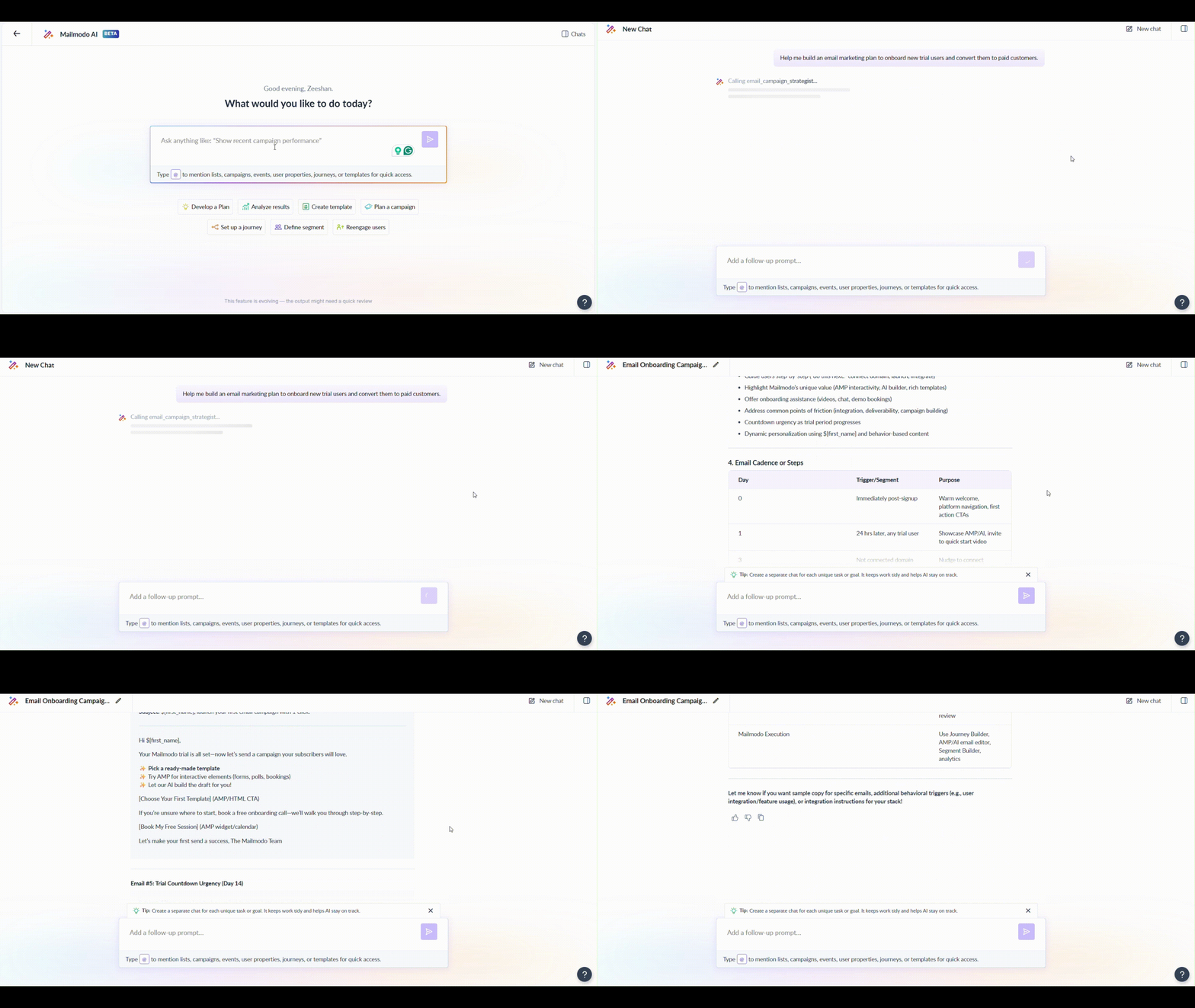
Take a look at this prompt that we gave as an example:
Help me build an email marketing plan to onboard new trial users and convert them to paid customers.
The result was a detailed plan with several headings that included the segmentation strategy, messaging theme and personalization, the email cadence and subject line, and CTA ideas.
Here’s how the feature works, along with the kind of output you get:
Reaching the right audience is just as important as planning the campaigns. Poor segmentation often results in broad, unfocused targeting that hurts performance.
This is why we built the AI segmentation feature to make targeting precise and effortless. Mailmodo AI:
Uses natural language queries to create segments.
Builds segments based on multiple criteria like demographics, behavior, or engagement.
Identifies high-value customers, churn risks, and other predictive segments.
Keeps segments updated automatically as customer data changes.
This helps marketers cut down on the effort and time needed to create segments. They can:
Build complex segments in seconds using plain English.
Target the right audience with precision instead of broad guesses
Save hours spent crunching numbers or cleaning data.
Improve ROI with smarter, more personalized targeting.
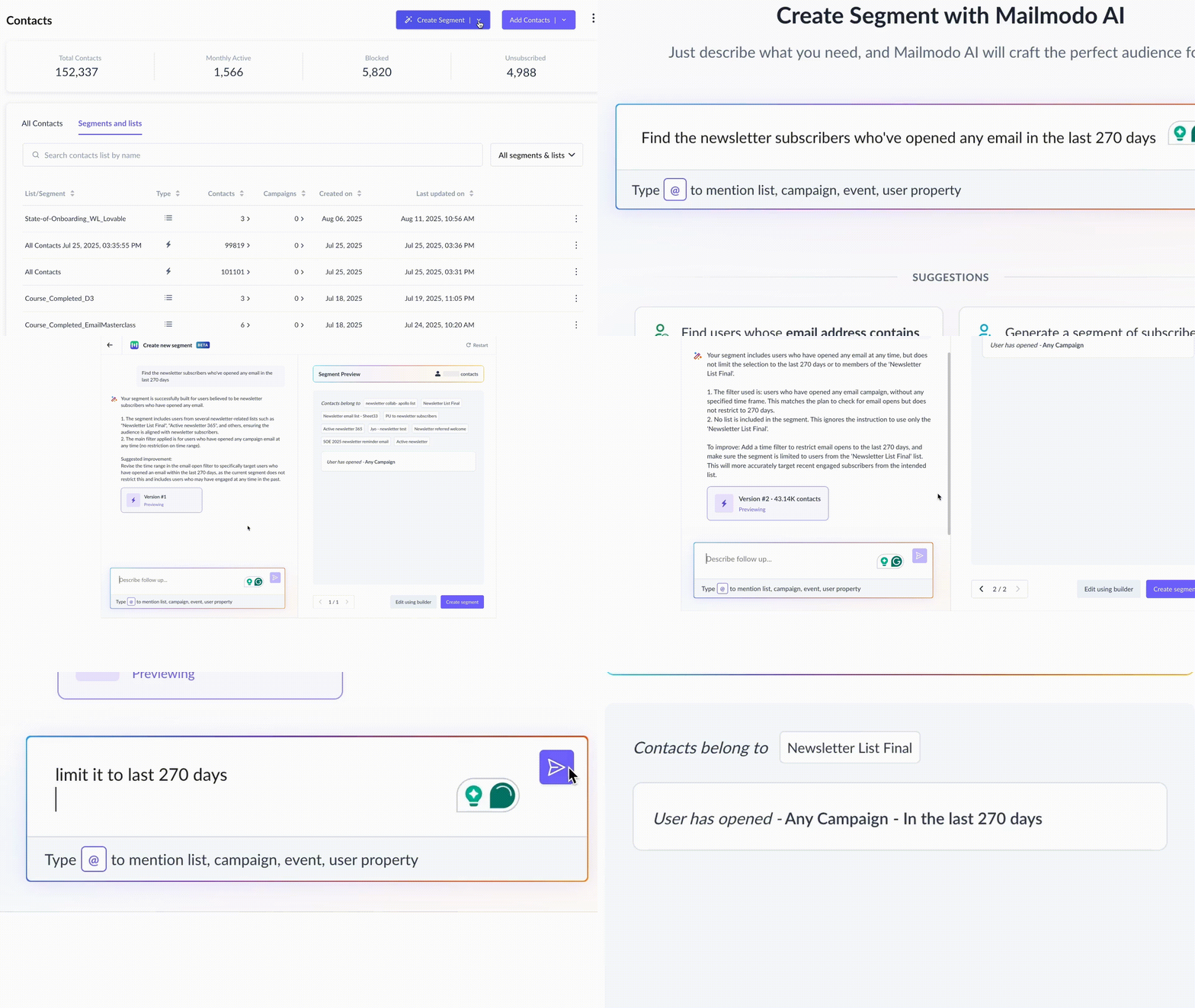
Here’s how it looks in action. We put a simple prompt:
Find the newsletter subscribers who’ve opened any email in the last 270 days.
We even asked Mailmodo AI to make a specific edit to the segment.
You can see how effortlessly it created a ready-to-use segment that updates in real-time based on the conditions we put.
Phase #2: Creating
Once the planning is done, the real work begins: turning ideas into emails that people actually want to open, read, and click. This stage usually takes the most time. Marketers switch between designing, copywriting, and automation, trying to get everything consistent, on-brand, and technically sound.
Check out how Mailmodo uses AI to make this process effortless.
Email template generation
Designing emails has always been hard and time-consuming, even with drag-and-drop email builders. It takes a lot of creativity and a good understanding of what looks good on screen.
The idea was simple: What if AI could design email templates that were beautiful and ready to send? Mailmodo built the AI-powered email generation feature as an answer to this.
At its core, the system combines AI creativity with MJML. The AI understands what marketers want to communicate, generates the structure, design, and layout in MJML, and then converts it into JSON, ensuring it works seamlessly with Mailmodo’s visual editor.
Using it, marketers can now:
Generate a production-ready template in minutes.
Focus on your campaign strategy, not coding headaches.
The generated email template comes complete with custom email copy tailored to the specific template and your use case. You also have the option to define the points and other specifics of the email copy by attaching your outline or already finalized sections to the template, along with the prompt.
To understand how effortless it is, take a look at the template generated with our prompt:
I need to create a welcome email to send to users who sign up on my website. Add the features from the link attached below to the email.

Subject line generation
Coming up with subject lines that stand out and email copy that converts is tough.
The subject line has just a few words to grab attention in a crowded inbox. The email body has a few seconds to keep the readers hooked. Both have to reflect your brand and drive action, all without feeling repetitive or forced.
It’s no surprise that writing takes up a lot of time and creative bandwidth. Mailmodo’s AI subject line generation makes writing subject lines effortless, fast, and effective. It acts as your personal writing assistant, one that understands tone, context, and intent.
You get the option of auto-generating subject lines based on the email template but we chose to create a custom prompt. Take a look at how it works:

Building campaigns and journeys
You’ve got your copy, your templates, and your audience, but mapping how it all connects is a whole different challenge.
When setting up a journey, plan what should trigger the next email. Traditional automation tools are often too technical, with endless conditions, nodes, and logic paths.
We built the AI Journey Builder to simplify automation and make campaign setup intuitive. Instead of spending hours dragging and connecting elements, you can describe what you want, and AI does the rest.
Using this, marketers can:
Launch automated journeys in minutes, not days.
Personalize customer experiences without technical expertise.
Reduce manual work by letting AI handle the heavy lifting.
Scale campaigns effortlessly as your audience grows.
Spend more time refining strategy and less time setting up workflows.
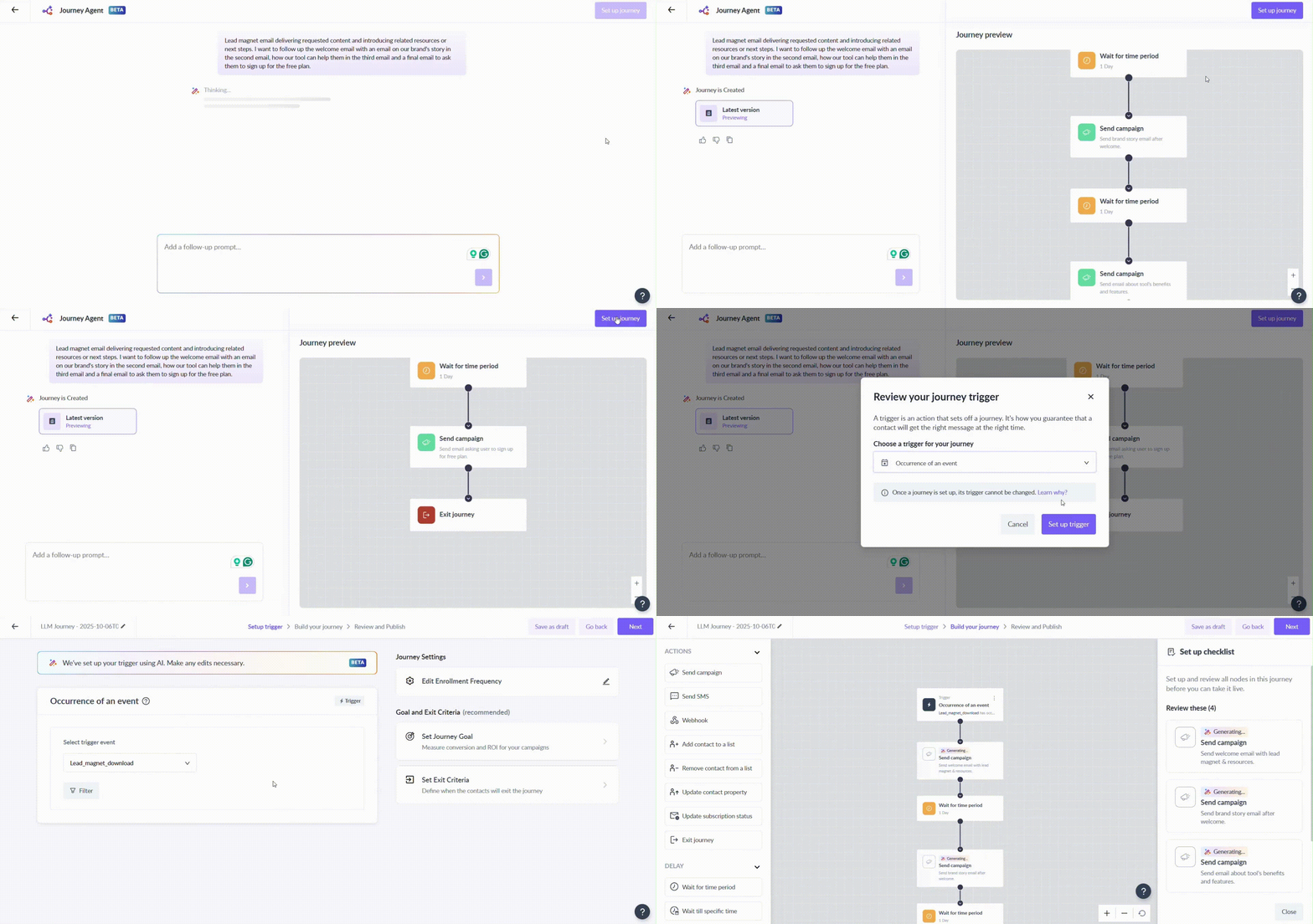
Let’s look at an example. Here’s the prompt we used to create an email journey to remind users about a webinar:
Create a journey to remind users about the Nov 2 webinar on US visa counseling session. We should send at least 3 reminders and the last reminder should go out in the morning of the event.
As output, we got a journey that was ready to move to the editor to set it up with a simple click. We also got the option to have AI make any changes we wanted to make in the journey before we set up each block in the journey builder. This is what the entire process looked like:
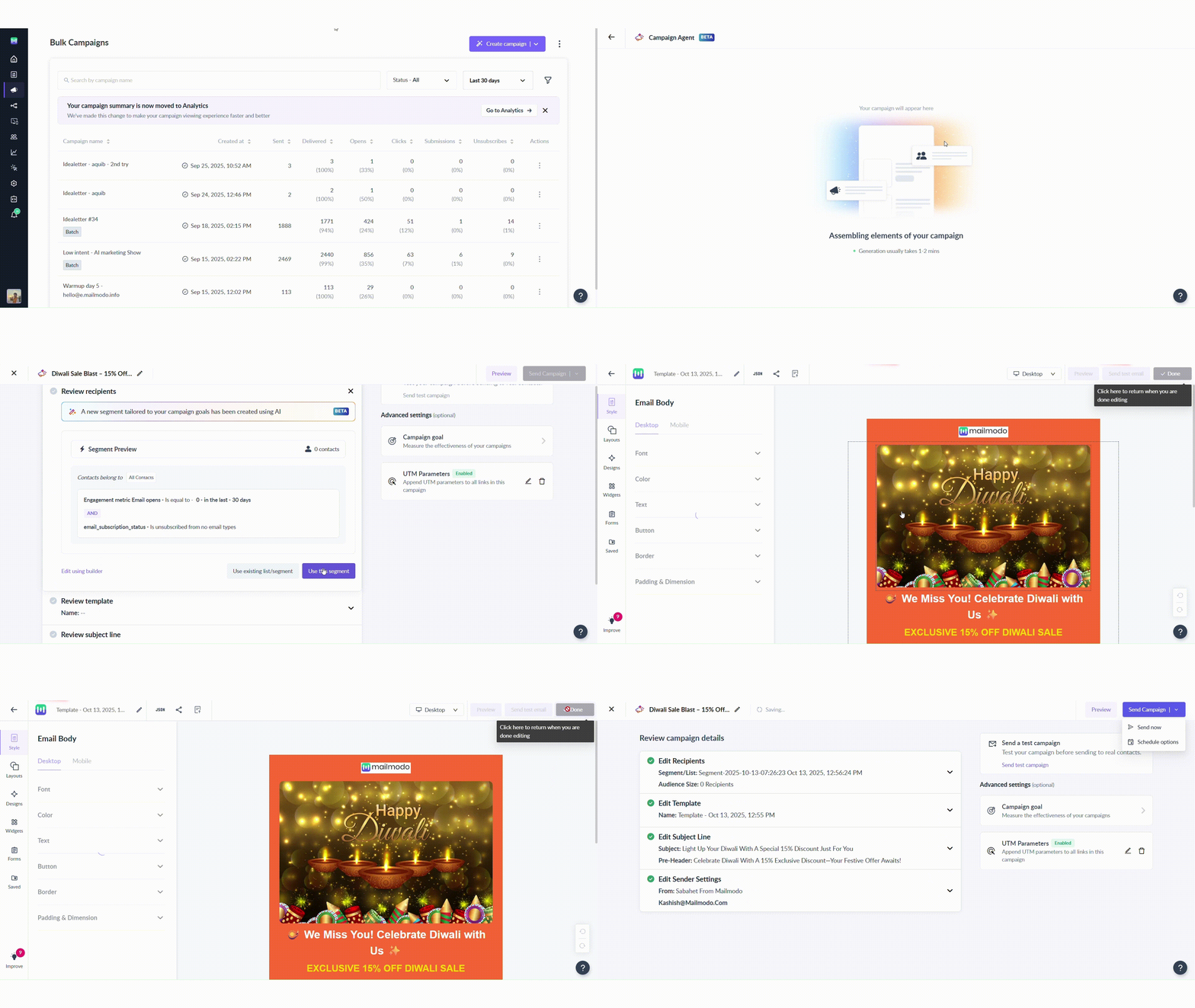
We also used the agent to create a single bulk campaign. Here’s the prompt we used and the output we got.
Create a blast campaign to send email for Diwali sale for 15% discount to people who haven't opened emails in last 30 days.
Once it was done, we got a list 4 things to review: the recipients, the email template, the subject line and the sender settings. Once everything was reviewed, the campaign was ready to be sent out immediately with a single click or scheduled for later. Here’s what the process looked like:
Phase #3: Optimizing
Once your campaigns are live, the work continues. You need to analyze your campaigns to understand what worked, what didn’t, and how to make the next one better.
You jump between dashboards, spreadsheets, and analytics tools to track open rates, click rates, conversions, and bounces. But even with all that data, drawing clear insights isn’t easy. Numbers alone don’t tell you why something performed the way it did and figuring that out can take days.
Campaign analysis
The Mailmodo Co-Pilot is designed to help marketers understand their campaigns and improve them effortlessly. Think of it as your performance analyst that’s always awake, always learning, and always ready with answers.
The Co-Pilot goes beyond static analytics. It looks at campaign data, identifies trends, and explains performance in plain language. Here’s what it can do:
Answer specific questions about campaign results, like “Which email in my onboarding series had the highest click rate?” or “Why did my open rate drop this week?”
Spot opportunities for improvement, such as low-performing subject lines, drop-offs in journeys, or under-engaged segments.
Suggest actionable next steps, like testing a new CTA, changing send times, or targeting a specific audience again.
Learn from your data over time, becoming smarter and more tailored to your brand’s patterns and audience behavior.
We asked it to analyze the performance of our last bulk campaign and suggest what went well. Here’s how the feature worked:
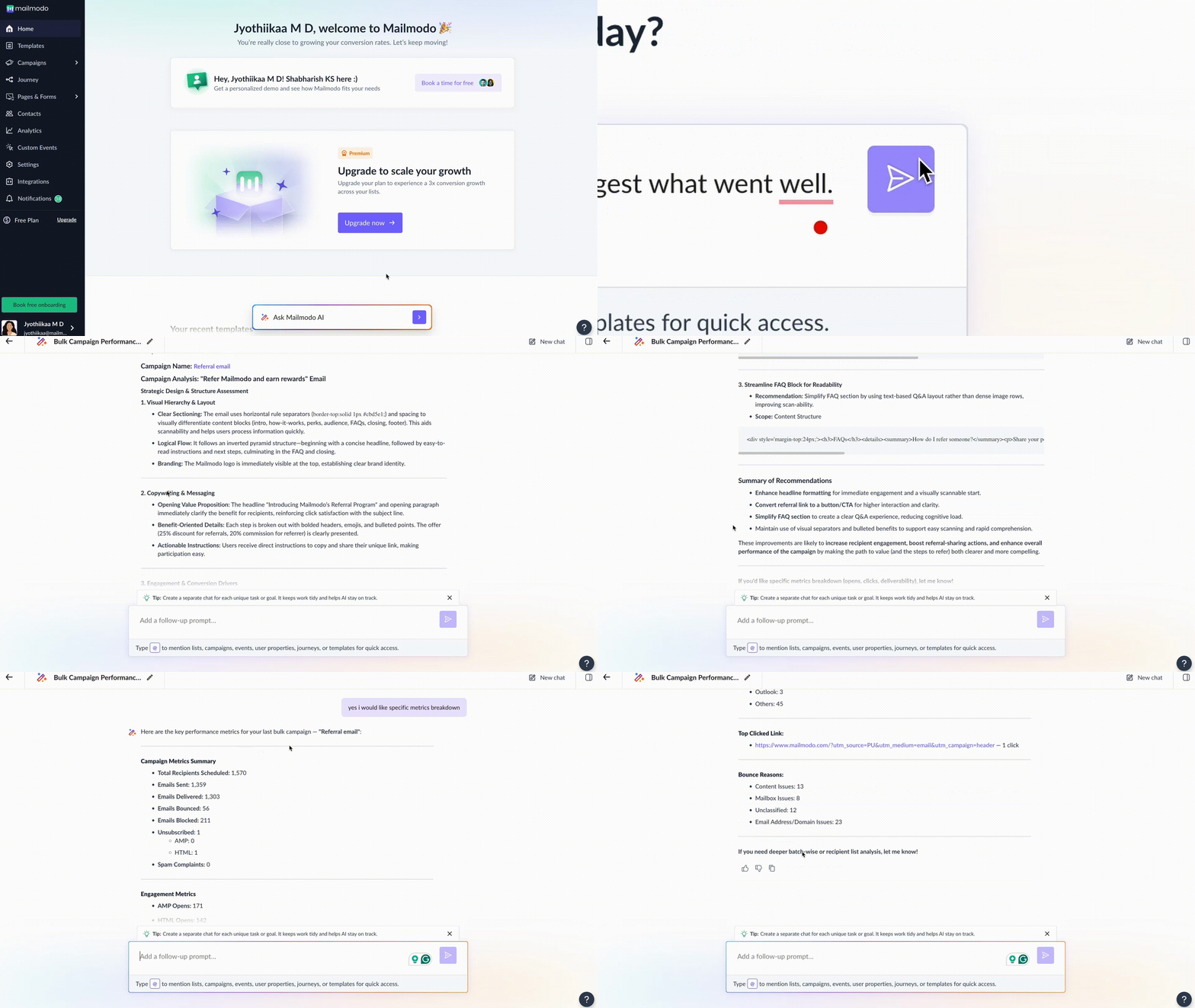
You even get an option to ask for deeper analysis, and it would even give us suggestions to improve the campaign.
What the future holds
We’re just getting started with what AI can do for email marketing. Today, Mailmodo AI can help you plan, create, and automate faster. But the future is much bigger and goes beyond just speed.
We’re building towards a world of predictive automation, where AI doesn’t just execute campaigns but anticipates them. Imagine an AI that understands your users’ behavior, predicts their needs, and automatically suggests and creates personalized, relevant email campaigns and journeys for individual users.
You’ll still be in control, but your role will shift from doing everything to approving everything. Instead of writing, designing, or scheduling manually, you’ll review what AI creates, fine-tune the details, and approve campaigns before they go live.
In this future, Mailmodo’s AI will work like a true marketing co-pilot.
















