How Omnisend automation works
When you enter Omnisend, you can find the automation section on the right-hand side of the platform.
From there, you get two options: browse pre-built workflows or connect your Shopify store.
Connecting your store is a must if you want to get the most out of Omnisend's e-commerce automation features.
Once your store is connected, you can start exploring the available workflows and set up automations based on your business needs.
1. Pre-built workflows
Omnisend offers more than 15 pre-built workflows for common e-commerce use cases.
Some of the available workflows include:
Welcome emails: Send a welcome message or a series of emails to new subscribers.
Abandoned cart: Remind shoppers about products they've added to their carts but haven't purchased.
Abandoned checkout: Follow up with shoppers who started the checkout process but didn't complete their purchase.
Browse abandonment: Reach out to customers based on their product browsing activity.
Product reviews: Ask customers to review products after a purchase.
Order confirmation: Send an automatic confirmation after a customer places an order.
Shipping confirmation: Keep customers updated when their orders are shipped.
Order follow-up: Send follow-up messages after a purchase.
Cross-selling: Recommend related products to encourage another purchase.
Customer reactivation: Reach out to customers who haven't purchased from your store recently.
Birthday emails: Send messages or offers around a customer's birthday.
You can browse the available workflows and filter them by type, goal, or channel. This makes it easier to find a template that matches what you're trying to achieve.
The main advantage is that you get a starting point with the basic workflow structure already in place. However, you'll still need to check whether the default settings match your store's customer journey.
2. Triggers, filters, and delays
Once you choose a workflow, you can customize it.
Triggers determine when a workflow begins. Depending on the workflow and your store integration, this could be when someone subscribes, abandons a cart, places an order, or performs another tracked action.
Audience filters help you control which contacts enter a workflow.
Delays determine how long the workflow waits before sending the next message. For example, you could send an abandoned cart email after a set period rather than immediately after someone leaves the store.
Exit conditions, which remove contacts from a workflow when they meet specific criteria.
These settings give you more control over your automations. You can start with a pre-built template and adjust the timing, audience, and conditions to suit your business.
3. Conditional splits and A/B testing
Omnisend lets you create different paths within a workflow using conditional splits. These allow you to send different messages depending on customer attributes, activity, or other conditions.
Additionally, A/B testing lets you compare different versions of an automation. You could test two subject lines, message variations, or other elements to see which performs better.
These features are useful when you want to improve your workflows over time rather than sending the same sequence to every customer.
However, it's worth checking the features included in your chosen plan before relying on a particular testing or personalization option.
4. SMS and push notification automation
Omnisend also supports adding SMS messages and web push notifications to workflows, allowing you to reach customers through different channels.
Depending on the workflow settings, contacts who aren't eligible to receive a message through a particular channel may be able to skip that step and continue through the workflow.
There are a few things to consider before adding SMS though. You'll need the appropriate contact information and consent for promotional messages, and requirements vary by country.
SMS also comes with additional costs, so factor messaging charges into your budget before building a multi-channel automation strategy. Check Omnisend's current plan details to confirm which messaging features are available to your account.
5. Dynamic content and personalization
Omnisend lets you personalize automated messages using customer, product, and order information. You can also use customer activity and event data to create more relevant workflows.
This is particularly useful for e-commerce scenarios where customers don't all interact with a store in the same way. Someone who has just subscribed may need a welcome series, while a returning customer may be more interested in product recommendations.
Omnisend also offers dynamic content options and personalized product recommendations. The features available to you may depend on your plan and setup, so check the current plan comparison if advanced personalization is a priority.
6. Workflow testing and management
Omnisend provides tools to test your workflow before rolling it out more widely. One important detail is that publishing changes and activating a workflow are separate steps.
Publishing saves your edits, while activating the workflow allows it to start sending messages. If you only publish your changes, the workflow won't automatically go live.
This is worth keeping in mind when updating existing automations. Otherwise, you might assume your changes are active when the workflow is still running its previous version.
7. Automation reporting
Omnisend provides automation performance reports that can help you review metrics such as opens, clicks, and conversions at different stages of a workflow. Revenue attribution can also help you understand how much revenue your automations generate.
A/B testing data can also help you compare different versions of your messages and identify what works better for your audience.
Overall, Omnisend covers the main automation needs of e-commerce businesses. Its pre-built workflows make it easier to get started, while triggers, filters, conditional splits, personalization, multi-channel messaging, and reporting give you more control over customer journeys.
Omnisend pricing
Omnisend offers three main plans: Free, Standard, and Pro. The right one for you depends on your contact list size, email volume, and the features you want to use.
| Feature |
Free |
Standard |
Pro |
| Starting price |
$0/month |
$16/month |
$59/month |
| Monthly email allowance |
500 emails |
Based on billable contacts |
Unlimited, subject to fair-use policy |
| Contact limit |
Up to 250 contacts |
Depends on plan |
Depends on plan |
| Web push notifications |
Up to 500/month |
Unlimited |
Unlimited |
| Automation features |
Available |
Available |
Available |
| Advanced reporting |
Some limitations may apply |
Check plan details |
Additional reporting features |
| Best for |
Small stores testing the platform |
Growing stores running regular campaigns |
Stores with higher email volumes |
Pricing and feature availability may change. Check the official Omnisend pricing page for current plan details.
Which Omnisend plan should you choose?
If you're still testing the platform or have a small list, the Free plan is a reasonable place to start. Just make sure its sending limits work for your needs.
The Standard plan is worth considering if you're running regular campaigns and want more sending capacity. However, check the features included in your specific plan before committing, especially if you need advanced personalization or SMS.
If you're sending emails at a high volume or need features available on Pro, compare the price against your expected contact count and usage. Remember to include any additional messaging costs in your budget.
Also, keep an eye on your billable contact count. Omnisend's pricing tiers adjust as your list grows, and non-subscribers may count toward your billable contacts.
Best omnisend alternatives for e-commerce
Depending on your needs, you might want more advanced customer segmentation, different automation options, or features that help you create more engaging emails.
Here are three e-commerce email marketing platforms worth considering as alternatives to Omnisend.
Klaviyo
Klaviyo is a household name in e-commerce email marketing. Compared to Omnisend, one of its strengths is its range of conversational automation options, including SMS, WhatsApp, and RCS.
You can create automated conversations that ask customers questions, respond to their answers, and provide personalized product recommendations.
Drip
Drip is an e-commerce marketing platform that focuses on email marketing, customer segmentation, and automation.
You can build customer journeys around shopping behavior and purchase history, sending targeted messages at different stages of the buying journey. This makes Drip a useful option if you want to automate customer communication based on how people interact with your store.
Mailmodo
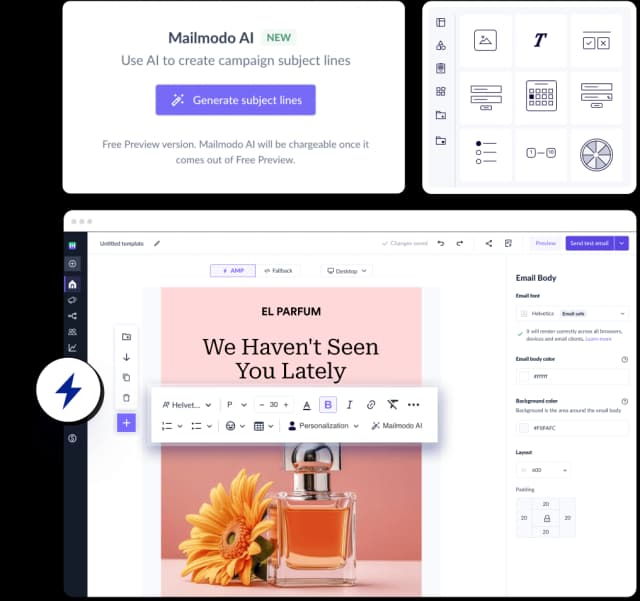
Mailmodo is an email marketing platform that offers automation, segmentation, and integrations with e-commerce and marketing tools.
Its main strengths are interactive emails and AI-powered features. You can add forms, polls, quizzes, and other interactive elements to emails, allowing subscribers to take action directly from their inbox. In terms of AI tools, Mailmodo offers AI-supported email creation and optimization, making it a useful option if you want to create engaging email experiences in short time.
Final thoughts
If you're planning to use Omnisend, make sure you have your store and all the required business details ready. You'll need these to complete the onboarding process and get the most out of the tools it offers.
That being said, the onboarding process can be a bit tricky, and setting up automations may take some time to get used to. If you find the interface difficult to navigate, you might want to try alternatives like Drip or Mailmodo. I think it's easier to test these tools and get a feel for how they work before committing or connecting my store to a platform, which can be a time-consuming process.