In the fintech industry, events play a critical role in building trust, educating users, and driving adoption. Whether it’s a product webinar, compliance-focused roundtable, investor session, or virtual demo, the real challenge is making sure they actually show up after registering.
Fintech audiences are busy, cautious, and often overwhelmed with information. They may register with good intent but forget, miss calendar invites, or deprioritize the event as their day fills up. On top of that, fintech events often involve live demos, regulatory insights, or expert Q&As, things that lose value if attendance drops.
That’s where a well-structured event registration email sequence becomes essential. Instead of relying on a single confirmation email, a thoughtful sequence keeps the event top of mind and nudges registrants to attend at the right moments.
In this guide, we’ll walk through how to build a complete fintech event registration email sequence.
Why should you use an email flow?
For fintech event registration, email is one of the most reliable and effective channels. Unlike social posts or ads, email reaches people directly in a space they already use for professional updates, calendar planning, and financial communications.
Email allows you to:
- Deliver clear, timely reminders without being intrusive
- Personalize messages with event details, roles, or interests
- Segment audiences based on behavior (registered, attended, inactive)
- Automate reminders around critical time windows
But one email isn’t enough because attention fades over time. A sequence of emails, spaced around key moments, ensures multiple touchpoints that gently guide registrants from sign-up to attendance. That’s why defining a proper event registration email sequence is so important.
What is an event registration email sequence?
An event registration email sequence is a set of automated emails sent to people after they register for an event, with the goal of increasing attendance.
It typically includes:
- A registration confirmation email
- One or more reminder emails before the event
- A last-minute or live reminder while the event is happening
How to build an event registration email sequence
Building an email sequence can be easy if you’re following a well-defined set of steps. Here are the steps for you to follow:
Step 1: Plan your campaign
Before creating emails or workflows, you need a clear plan. This ensures your sequence aligns with your event goals and your fintech audience’s expectations. At this stage, your campaign plan must outline:
- Objective: Increase live attendance for the fintech event
- Audience: Registered users (customers, prospects, partners, or investors)
- Event type: Webinar, virtual demo, offline meetup, or hybrid
- Core message: Why attending live is valuable
- Number of emails: 4
- Timeline: From registration to event day (about 1 week)
We used Mailmodo AI to generate a full campaign plan for a fintech event registration email sequence. It outlined the email count, timing, and goal of each message so we could quickly validate and refine the approach.
Take a look at the prompt we used. Click on the arrow to see the output we received.
Create an event registration email campaign plan for a fintech webinar. Include objectives, number of emails, timing between emails, and the goal of each email.
Step 2: Create audience segments
Segmentation ensures that only relevant users enter the sequence and receive the right reminders at the right time. For a fintech event registration flow, segmentation can be based on:
- Registration status
- Event type (online or offline)
- User role (founder, finance leader, developer, compliance officer)
- Engagement behavior (opened emails, clicked calendar link)
We used Mailmodo AI to quickly create an audience segment for this email sequence. Once it was done, we got the option to review, make edits using the builder, or ask AI to carry out the changes we wanted. Once we confirmed, Mailmodo AI created the segment instantly and it was ready to use for a campaign.
Take a look at the prompt we used, along with the output we got.
Create a dynamic segment of users who registered for a fintech event and whose event date is in the next 7 days but have not attended yet.
Step 3: Create the email templates
Once the audience is defined, the next step is creating the actual emails to be sent. Here’s a sample list of emails that you should be creating for your event registration email sequence. We’ve also included sample prompts that you can use in Mailmodo AI to generate these email templates in minutes instead of having to spend hours creating them.
Email #1: Registration confirmation email
When to send: Immediately after registration
Purpose: Confirm the registration and set clear expectations for the event.
What to include:
- Event name, date, and time
- Location or virtual access link
- Add to calendar link
- Brief reminder of what they’ll gain by attending
Here’s a sample prompt to generate this kind of email, along with the output it will produce.
Generate a fintech event registration confirmation email. Include event details, calendar link, and a short value-focused introduction.
Email #2: Reminder email 1 day before
When to send: 1 day before the event
Purpose: Ensure registrants haven’t forgotten and prompt them to plan their time.
What to include:
- Friendly reminder that the event is tomorrow
- Event timing and access details
- One key benefit of attending live
Here’s a sample prompt to generate this kind of email, along with the output it will produce.
Write a reminder email for a fintech event to be sent 1 day before the event. Reinforce the value of attending live and include event access details.
Email #3: Reminder email 1 hour before
When to send: 1 hour before the event
Purpose: Create urgency and prepare attendees to join on time.
What to include:
- Clear subject line indicating the event starts soon
- Joining link or venue reminder
- Emphasis on live-only benefits (Q&A, demos, expert insights)
Here’s a sample prompt to generate this kind of email, along with the output it will produce.
Create a 1-hour-before reminder email for a fintech webinar. Highlight urgency and live benefits like Q&A or demos.
Email #4: Live email
When to send: 10 minutes after the event starts
Purpose: Catch latecomers and reduce drop-offs.
What to include:
- Reassurance that it’s not too late to join
- Direct joining link
- Short reminder of what’s happening live
Here’s a sample prompt to generate this kind of email, along with the output it will produce.
Generate a live reminder email for a fintech event. Send it 10 minutes after the event starts and encourage late registrants to join.
Step 4: Build the automated workflow
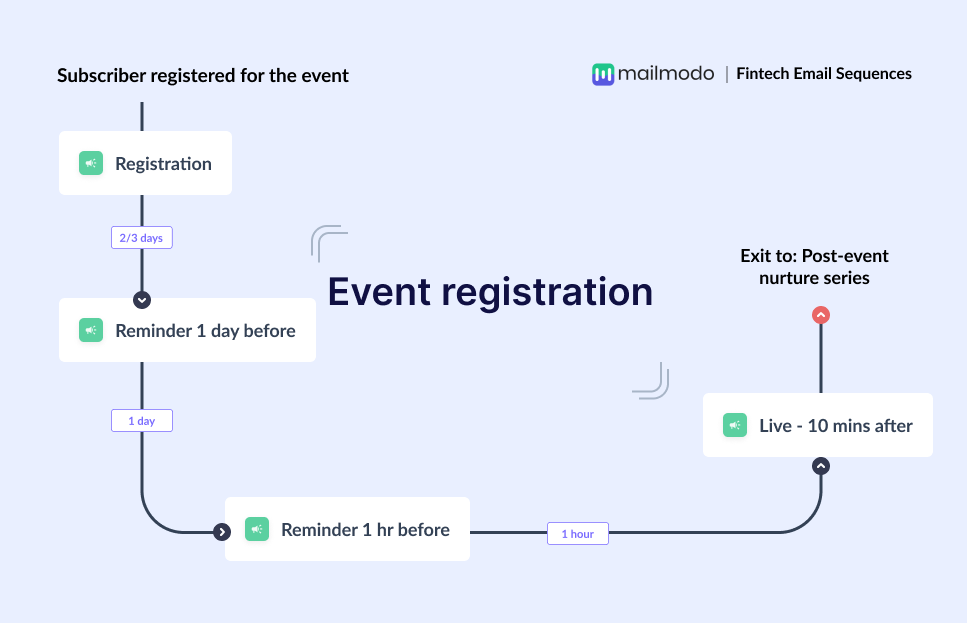
Once your emails are ready, the next step is to automate them so every new user receives them at the right moment. Your fintech event registration email sequence should include:
- Trigger: User registers for the event
- Delays: Immediate → 1 day before event → 1 hour before event → 10 minutes after start time
- Branching logic: If user attended → exit sequence; If not attended → continue reminders
- Exit criteria: User attends event or event ends
We used Mailmodo AI to generate the full automated workflow from scratch. It mapped the triggers, delays, conditions, and exits. Once the output was ready, we just had to review the overall journey following a setup checklist and ask the AI to make the tweaks we wanted in the workflow.
Take a look at the prompt that we used and the output we received.
Generate a complete automated workflow for a fintech event registration email sequence. Include triggers, delays, conditions, and exit criteria.
Step 5: Analyze and improve
Once the sequence is live, you can track the performance of your sequence to improve future campaigns. Key metrics to track for you include:
- Email open rates
- Click-through rates on join links
- Attendance rate
- Drop-off timing
- Calendar link clicks
You can also ask Mailmodo AI to analyze the performance of your email sequence and suggest optimizations based on engagement and conversion data. Here’s a sample prompt that you can use for this:
Analyze my fintech event registration email sequence. Recommend improvements to increase attendance and engagement.
Conclusion
In the fintech industry, event attendance directly impacts trust, education, and conversion. A strong event registration email sequence ensures that people who register actually show up and get value from the experience.
By combining email with thoughtful sequencing, you create timely reminders, reduce drop-offs, and keep your event top of mind.
Tools like Mailmodo make it easier to plan, create, automate, and optimize these sequences without manual effort, so you can focus on delivering a great fintech event experience.


 Learn more about Mailmodo