1. AgainstData
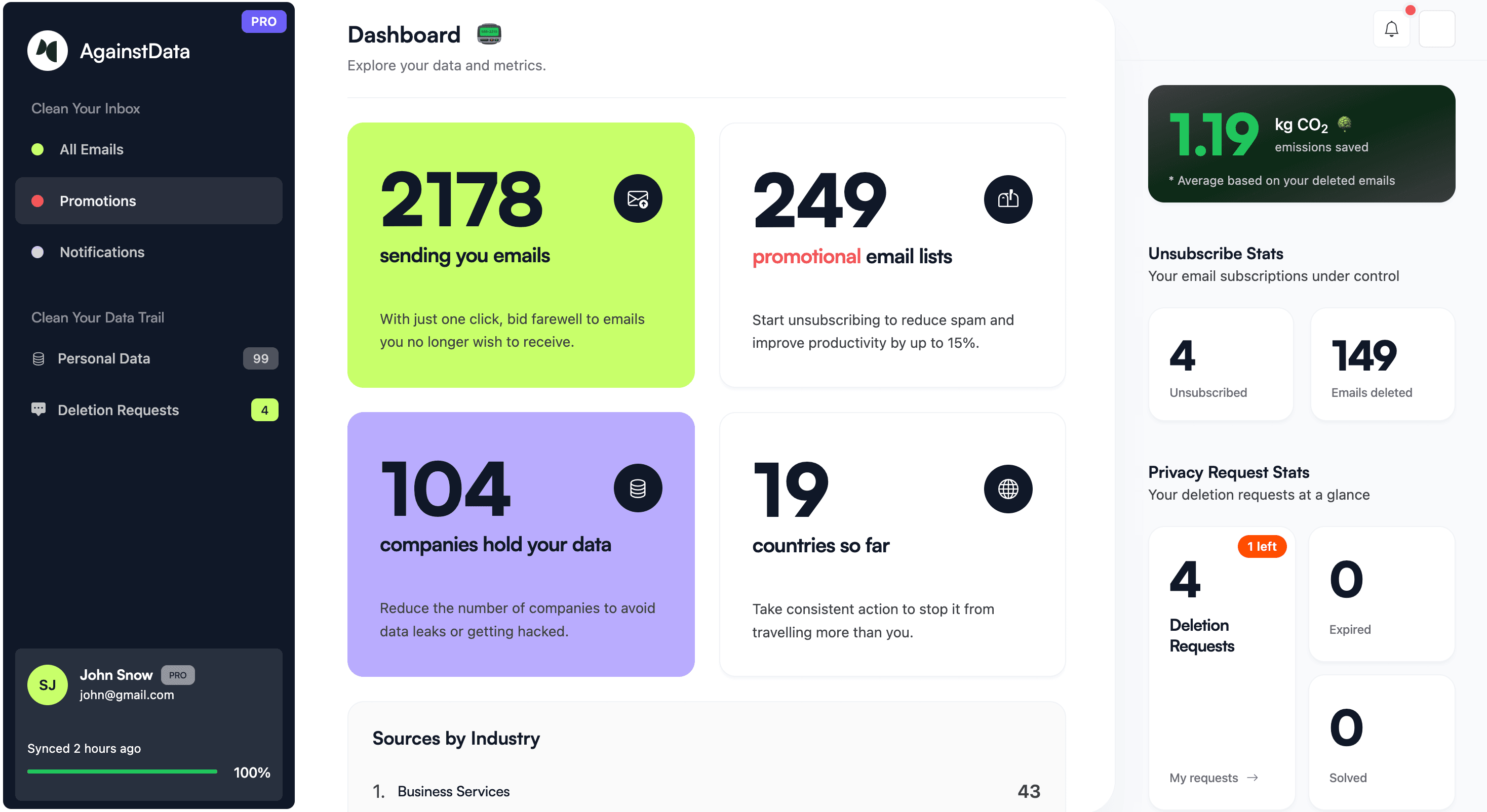
AgainstData is a tool that helps you unsubscribe from emails with one click, without any hassle. It also allows you to delete unwanted emails, helping to reduce the CO2 emissions generated by emails in your inbox. Another great feature is that it shows all the companies storing your data and lets you request the deletion of your personal data from those companies.
Features:
- Automatically filters promotional mailing lists from your main inbox.
- Provides seamless email unsubscribe with just one click.
- Option to bulk delete emails whenever you unsubscribe.
- Reveals which companies hold your personal data and enables you to request data deletion with one click.
Support: Gmail
Pros:
One-click unsubscribe makes removing unwanted emails fast and easy
Bulk email deletion clears inbox clutter in seconds
Allows you to send legal data deletion requests, protecting your privacy beyond just unsubscribing
Cons:
Limited to Google account login
Bulk deletion might risk accidentally removing emails users want to keep if not careful
Doesn’t always guarantee successful unsubscription from stubborn senders
Pricing:
| Plans |
Pricing (billed annually) |
| Lite |
$39/year |
| Pro |
$58/year |
| Max |
$99/year |
2. Unroll.me
Unroll.me is a great tool to unsubscribe from newsletters.
Features:
Gives you a list of all the subscriptions in one place from where you can unsubscribe to any subscription.
The Rollup feature keeps all your subscriptions in a separate folder.
Offers an app for Android and iOS
Support: Gmail, Outlook, Yahoo, iCloud, AOL
Pros:
Easy to clean your inbox by keeping, blocking, or rolling up subscription emails.
Supports all major email providers for easy setup.
Easy to use with a clean, user-friendly interface.
Cons:
Has faced privacy concerns in the past over data handling (worth reviewing current policies).
Focuses mainly on subscription emails, less helpful for other types of email clutter.
Limited advanced sorting or filtering options compared to some competitors.
Pricing: Free

3. Mailstrom
Mailstrom is another email cleanup tool that identifies related emails and bundles them so you can act on them as a group.
Features:
It allows you to block spam emails in one click.
Has an unsubscribe feature that allows you to get off the mailing list with one click.
Offers styles, tips, hacks and suggested best practices for cleaning your inbox.
Support: Gmail, Outlook, Yahoo, Verizon + AOL
Pros:
Groups related emails so you can handle them all at once.
One-click unsubscribe and block features to stop unwanted emails fast.
Uses strong encryption and OAuth2, so your password stays safe.
Cons:
Full access requires a paid subscription after the free trial.
Can feel a bit overwhelming if you prefer simple or automatic cleanup.
Doesn’t use AI to sort emails, so you need to make decisions yourself.
Pricing:
| Plans |
Pricing (billed annually) |
| Free Trial |
Free |
| Basic |
$59.95/year |
| Plus |
$99.95/year |
| Pro |
$199.95/year |

4. Clean.email
Clean.email offers a variety of powerful tools and features to help you quickly auto-clean your inbox.
Features:
It can bundle commonly cleaned emails and bundle emails based on sender, subject, label, etc., which can then be moved to the trash or archived together.
It can unsubscribe or temporarily pause a newsletter subscription or just keep the newest version.
The quick clean feature allows you to clean commonly cleaned emails like social notifications and emails older than 3 years.
The smart views feature helps organize emails by bundling similar types of emails together.
Support: Gmail, Yahoo, AOL, iCloud, Outlook and any other email provider using IMAP.
Pros:
Email Clean Up helps clear clutter by grouping similar emails together.
Unsubscribe feature lets you stop unwanted emails without hunting for links.
Auto Clean lets you set rules to handle emails automatically over time.
Cons:
Most useful features aren’t free and need a paid plan.
Can feel too automated if you prefer managing emails one by one.
Might take time to set up filters the way you want.
Pricing:
| Plans |
Pricing (billed annually) |
| 1 account |
$29.99/year |
| 5 accounts |
$49.99/year |
| 10 accounts |
$99.99/year |

5. Cleanfox
Cleanfox allows you to remove and block newsletters you do not want to receive with just one click.
Features:
Provides you with statistics on newsletters, spam mails and more.
Puts deleted emails in a trash bin in case you need it and the bin is cleaned automatically after a few days.
Support: Gmail, Yahoo, Outlook, iCloud and more
Pros:
Super easy to unsubscribe from newsletters with a swipe-style interface
Gives insights like newsletter frequency and CO₂ savings for eco-conscious users
Free to use, no subscription fees—though it earns via anonymized data sales
Cons:
Shares user data for market research, which poses privacy concerns
Swipe-based controls can lead to mistakes and accidental email deletions
The setup process for Gmail is a bit technical and may confuse some users
Pricing: Free

Escape the spam folder with managed deliverability
6. Triage
Triage is unique in the way it allows you to clean your inbox. It stacks up your unread emails as a pile of cards. Swiping left archives the email, swiping right keeps it and tapping on it expands it. It helps you stick to the concept of inbox zero. One downside is that their app is only available on iOS.
Features:
Support: Gmail, Yahoo, iCloud and most IMAP email services
Pros:
Swipe actions (archive/keep) reduce decision fatigue
Supports Gmail, iCloud, and generic IMAP accounts
Dark mode support for comfortable use
Cons:
iOS-only, leaving Android and desktop users without access
Works best for inbox cleanup, not full-scale email management
Manual swiping through emails can become repetitive with very large inboxes
Pricing: Free

7. Trimbox.io
Trimbox scans your inbox for email lists and unwanted emails and lets you unsubscribe to them with just one click.
Features:
It lets you mass delete all past emails from a sender with a single click.
Lets you unsubscribe without opening the email.
Automatically scans for unwanted emails.
Support: Available as an extension for Gmail
Pros:
Can unsubscribe from mailing lists with just 1 click, no need to open emails.
Mass Delete lets you wipe out old emails from any sender instantly.
Your email data stays private and never leaves your device.
Cons:
Works only with Gmail, so not helpful if you use other email services.
No extra tools for organizing or managing important emails.
You need to install a browser extension to use it.
Pricing: Free

8. Edison Mail
Edison Mail offers an AI-based assistant that categorizes all your emails in its email app. The email cleaner app has a widget that offers a carousel for suggested unsubscribes.
Features:
It has an AI assistant for suggesting unsubscriptions in the form of a carousel.
Lets you view all your subscriptions in one place and unsubscribe from them.
It automatically tracks which newsletters you aren't reading for suggestions.
Support: Gmail, Yahoo Mail, Microsoft Outlook
Pros:
Unified inbox lets you manage multiple email accounts in one place.
Blocks trackers so no one can secretly see when you open emails.
Built-in AI assistant organizes subscriptions, travel info, and bills efficiently.
Cons:
Some advanced security features require a paid Edison Mail+ subscription.
Limited widget features and Easter Eggs only available on iOS devices.
Customization options might feel overwhelming for users wanting simplicity.
Pricing:
| Plan |
Pricing |
| Edison Mail |
$99.99/year on iOS or $14.99/month on Android; optimized for USA |

Final takeaway
By using these above email cleaner apps, you can streamline organizing your incoming emails, unsubscribing from unwanted newsletters and deleting any unwanted emails to achieve a clean email space. If you find yourself drowning in incoming emails, it is time for you to use these tools and claim your inbox for yourself, thereby increasing your productivity and overall efficiency of your email inbox.