What are UTM parameters?
UTM parameters (also known as UTM codes and UTM tags) are short pieces of text that you add to links. The parameters convey information about where the link is shared, through which channel, and content, making it easy to track clicks and traffic from a specific social media post or campaign.
5 main parameters that make up the UTM link
Here is an overview of the five main UTM tags and what each one is used for:
| UTM parameter |
Description |
| utm_source |
Tells you where the traffic came from, like Google, Facebook, or a weekly newsletter. |
| utm_medium |
Explains the medium used to bring traffic, such as email, cpc, social, or referral. |
| utm_campaign |
Lets you name your campaign, so you can track its performance |
| utm_term |
Used to track specific keywords if you are running paid search ads, especially helpful for platforms like Google Ads. |
| utm_content |
Helps you differentiate similar content or links within the same ad or campaign, such as banner1 or cta_top. |
Manual vs. automatic UTM parameters tagging: Which should you use?
When it comes to adding UTM parameters to your campaign URLs, you have two main options: manual tagging or using an automatic UTM builder tool.
Both methods can help you track traffic and measure performance, but each comes with its own pros and cons.
Manual UTM tagging
Manual tagging means typing out the full URL with all UTM parameters directly in your browser, spreadsheet, or content platform.
Pros:
Full control over every part of the URL
No need for external tools
Great for one-off links or simple campaigns
Cons:
Time-consuming, especially for multiple links
High risk of typos and inconsistent naming
Difficult to manage and keep track of
Automatic UTM tagging with a UTM builder
Automatic tagging uses a UTM builder like the one from Mailmodo to help you create UTM-tagged URLs quickly and accurately. These tools typically offer a simple form where you enter:
- Your website URL
- Source, medium, and campaign name
- Optional fields like term and content
Pros:
- Faster and easier, especially for large campaigns
- Reduces errors and typos
- Ensures consistent naming across teams
- Some tools let you store presets or save previous campaigns
Cons:
- Requires internet access and an extra step
- Some advanced features may be limited in free tools
So, which should you use?
If you're running simple or one-off campaigns, manual tagging might be fine, just make sure to double-check for accuracy.
If you're managing multiple campaigns or working with a team, automatic tagging is the better choice. It saves time, reduces mistakes, and helps keep your campaign data clean and consistent.
For most marketers, a UTM builder tool like Mailmodo offers the best balance of speed, accuracy, and ease of use. It’s especially helpful when you're regularly tracking links across different channels and campaigns.
Here are some of the best tools available to help you create UTM links quickly and accurately:
Mailmodo
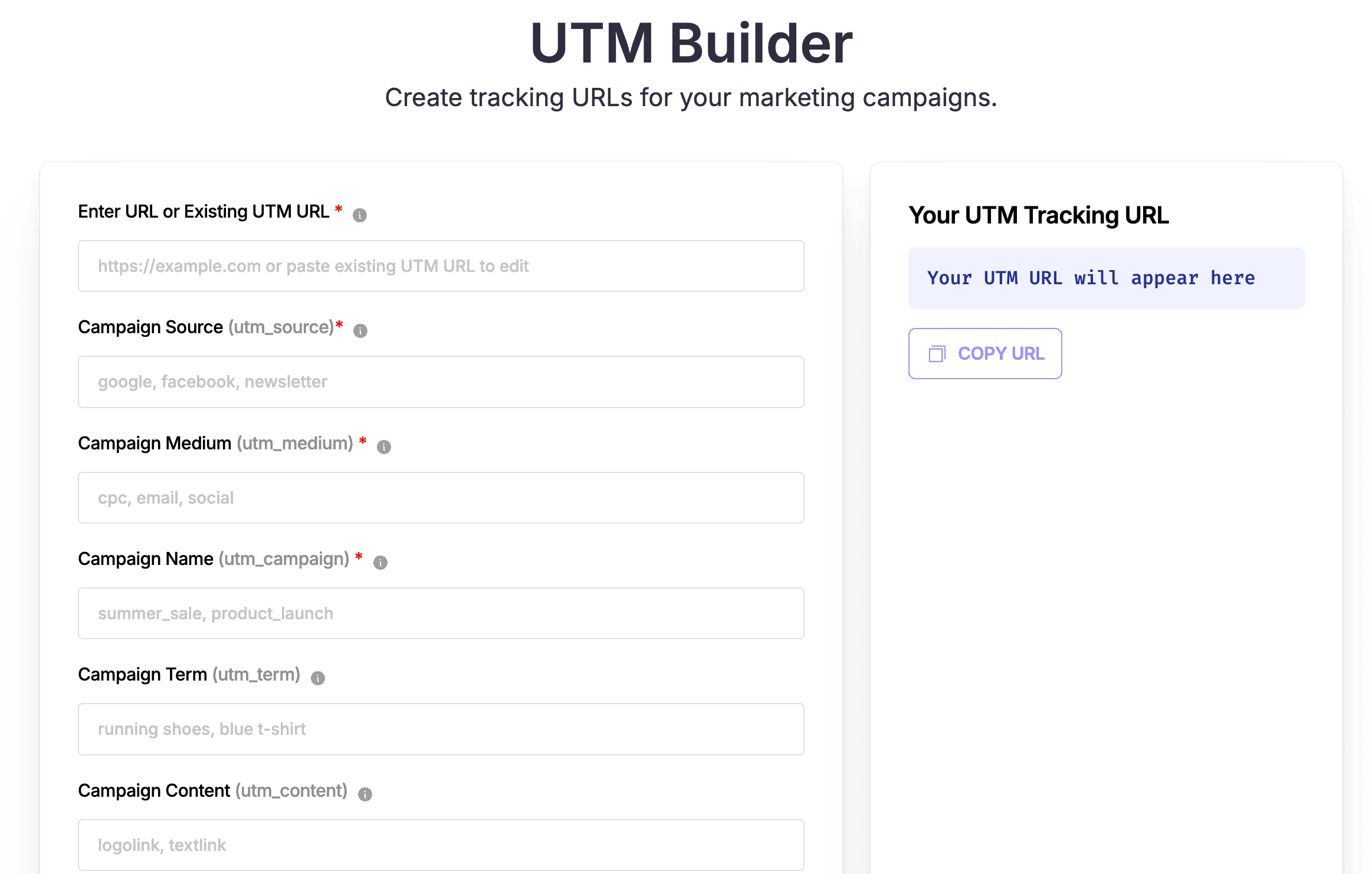
Mailmodo offers a free UTM builder designed to help marketers create trackable URLs quickly and easily. It’s great for anyone running campaigns across multiple platforms and wants to understand where their traffic is coming from. The clean UI lets you build UTM links in seconds. You can save past inputs and avoid repeating data entry.
Buffer
Buffer’s UTM Generator is built with social media in mind. It helps you track how your posts perform across different platforms. The tool pairs nicely with Buffer’s post scheduling features, making it easy to plan social campaigns and measure your campaigns all in one place.
Attributer
Attributer offers a free UTM builder and suggestion tool designed to help you create UTM links for Google Ads, Facebook Ads, LinkedIn Ads, and more. What makes it stand out is how it automatically sends UTM data into your CRM.
Who detects UTM parameters?
UTM parameters are widely supported across many analytics platforms like Google Analytics, Kissmetrics, Mixpanel, and Hotjar. These tools automatically detect UTM tags in URLs to help you track campaign performance and understand where your traffic comes from.
Let's take a deeper look at how each of these software functions:
Google Analytics
Google Analytics (both Universal Analytics and GA4) automatically reads UTM parameters whenever a user lands on a tagged URL. It uses this data to attribute sessions and conversions to specific campaigns, sources, and mediums. This is fundamental for its acquisition reports and marketing analysis.
Mixpanel
Mixpanel’s JavaScript library automatically scans URLs on page load and captures any UTM parameters (like utm_source, utm_medium, utm_campaign, utm_content, and utm_term) as super properties associated with the user’s first touch. This allows you to analyze how different campaigns influence user behavior throughout their journey.
Kissmetrics
With Kissmetrics installed, the tool automatically fires an “Ad Campaign Hit” event whenever someone arrives via a UTM-tagged URL. Each UTM parameter is then logged as a corresponding property, allowing you to segment, analyze, and report campaign performance accurately.
Hotjar
Hotjar allows you to filter and segment user sessions based on UTM parameters. When you tag your URLs with one of 5 UTM parameters, Hotjar recognizes those parameters and makes them available in its Traffic channel filters across tools like Recordings, Heatmaps, Funnels, Trends, and Dashboards.
Final thoughts
UTM parameters may look like a few extra characters in your URLs, but they hold the key to unlocking powerful insights about your marketing performance.
By taking the time to set up UTM parameters correctly, you gain clarity on what you need to do to improve your strategy, spend smarter, and grow faster.
















