Assisted onboarding is most common in high-touch B2B SaaS companies where the product is complex, configurable, or designed for teams rather than individuals. These are tools where customers often need help from sales or customer success to get real value.
In this type of SaaS, onboarding is not just about showing features. It’s about helping customers set up their accounts correctly, align the product with their goals, and get multiple stakeholders on board. When this doesn’t happen early, product adoption slows down, usage stays shallow, and churn risk increases.
While sales calls and demos provide the human touch, email ensures nothing slips through the cracks. It reinforces conversations, delivers guidance at the right time, and keeps everyone moving forward between touchpoints.
This guide walks you through how to build a complete assisted onboarding email sequence, step by step, specifically for high-touch SaaS teams.
Why you should use an email flow for assisted onboarding
In assisted onboarding, email works as the connective layer between sales, customer success, and the product itself.
Sales calls and onboarding sessions are powerful, but they don’t scale well on their own. Email allows you to support those efforts with timely instructions, reminders, and follow-ups that customers can revisit anytime.
Email is especially effective because it gives you:
Direct access to decision-makers and end users
Personalization based on role, account stage, or behavior
Automation that aligns with onboarding milestones
Precise timing without depending on manual follow-ups
One email is never enough for assisted onboarding. Customers need multiple nudges across account setup, team enablement, and success alignment. A structured sequence ensures each step happens in the right order and at the right pace.
What is an assisted onboarding email sequence?
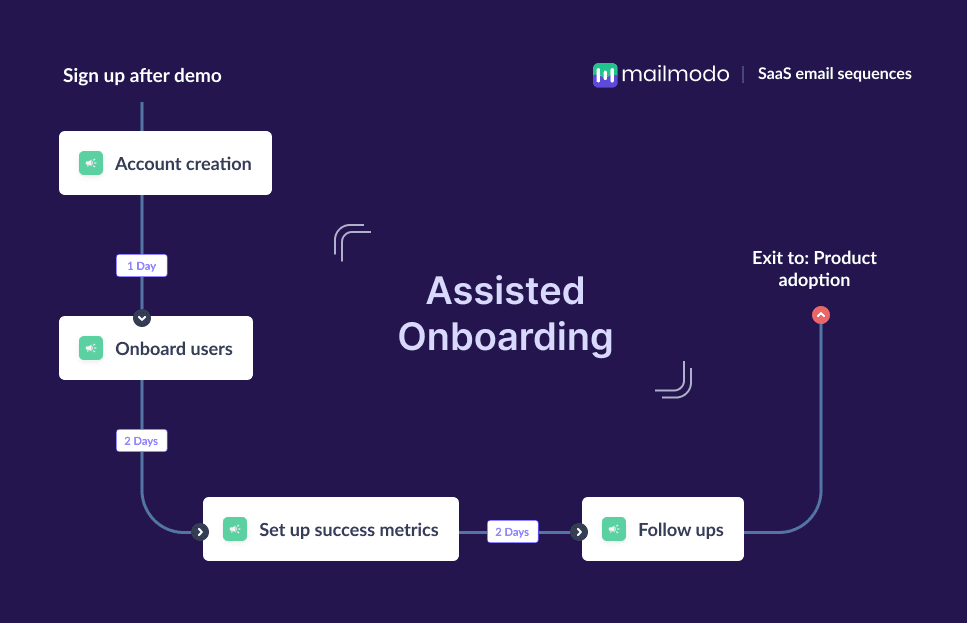
An assisted onboarding email sequence is a series of emails sent to new SaaS customers to help them set up their account, involve their team, understand success metrics, and engage with sales or customer success for guided help.
The sequence typically includes account creation guidance, team onboarding prompts, success metrics alignment and follow-ups from sales or success teams. The purpose is to move customers from sign-up to activation with personalized support.
How to build an assisted onboarding email sequence
Building a lead magnet email sequence is easy if you’re following a well-defined set of steps. Here are the steps for you to follow:
Step 1: Plan your campaign
Planning ensures that your onboarding flow has a clear purpose and structure instead of being a random set of messages. Onboarding success is often tied to actions like account setup, connecting integrations, importing data, booking a demo, or inviting teammates.
To execute this step, define your onboarding goals, identify the audience (admins, decision-makers, end-users), map the emails you need, the time duration of the entire sequence and define the goal for each email.
We asked Mailmodo AI to generate an entire campaign plan for our welcome email sequence and it delivered a detailed, actionable plan that we could review, customize, and turn into an automated workflow instantly. The output also outlined what emails to send, when to send them, and what each message should achieve.
Take a look at the prompt we used. Click on the arrow to see the output we received.
Create an assisted onboarding email campaign plan for Mailmodo. Include goals, audience roles, number of emails, timing, and alignment with sales-led onboarding.
Step 2: Create audience segments
In most high-touch SaaS products, the person who creates the account is not the only user. You may need different messaging for managers, admins, and end users. Segmentation also helps you avoid sending unnecessary emails to users who have already completed certain steps.
Common segments you can use include:
User role: admin vs. manager vs. contributor
Behavior: account created, team invited, demo booked, no activity
Lifecycle stage: trial user, new customer, enterprise onboarding
Company attributes: team size, plan type, industry
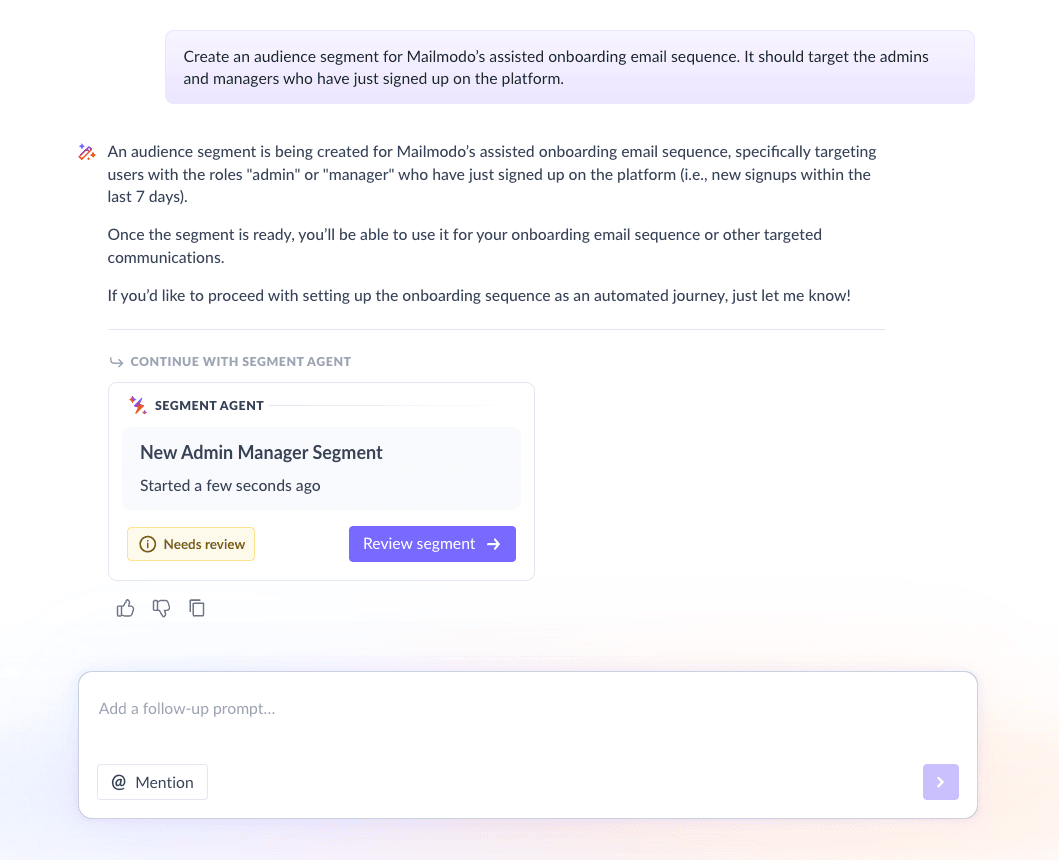
We used Mailmodo AI to quickly create an audience segment for our SaaS Welcome email sequence. Once it was done, we got the option to review, make edits using the builder, or ask AI to carry out the changes we wanted. Once we confirmed, Mailmodo AI created the segment instantly and it was ready to use for our campaign.
Take a look at the prompt we used, along with the output we got.
Create an audience segment for Mailmodo’s assisted onboarding email sequence. It should target the admins and managers who have just signed up on the platform.
Step 3: Create the email templates
This is where your onboarding experience comes to life. Each email should support a specific step in the onboarding journey. Below are the recommended emails for this sequence.
Email #1: Account creation email
When it’s sent: Immediately after signup
Why it’s sent: To welcome new admins and guide them through account setup
What it contains:
Thank-you message
Steps to activate the account
What to expect in the next two weeks
How to get help
Here’s a sample prompt to generate this kind of email, along with the output it will produce.
Generate an account creation onboarding email for Mailmodo. Include a thank you message, setup steps, and what users should expect in the next two weeks.
Email #2: Get the team on board
When it’s sent: 2–3 days after signup
Why it’s sent: To involve the rest of the team who will actually use the product
What it contains:
Explanation of why team access matters
Instructions to invite teammates
Option to book a demo with sales
Here’s a sample prompt to generate this kind of email, along with the output it will produce.
Create an onboarding email for an assisted onboarding email sequence encouraging admins to invite their team and book a demo. Include clear reasons and steps to do so.
Email #3: Set up success metrics
When it’s sent: 1 week after signup
Why it’s sent: To define what “success” means for the customer and how to measure it
What it contains:
Suggested KPIs
Measurement timeline
Guidance on achieving early wins
Option to speak with CS or sales
Here’s a sample prompt to generate this kind of email, along with the output it will produce.
Create an email as a part of an assisted onboarding email sequence for Mailmodo focused on defining success metrics, KPIs, and measurement timelines.
Email #4: Follow-up email
When it’s sent: After 10–14 days
Why it’s sent: To provide personalized outreach from sales or CS and guide next steps
What it contains:
Friendly check-in
Optional recap of actions completed vs. pending
Personalized suggestions
Direction to sales-led or adoption-focused communication
Here’s a sample prompt to generate this kind of email, along with the output it will produce.
Create a follow-up email as a part of a SaaS assisted onboarding email sequence offering a friendly check-in, personalized support and suggestions and next steps based on user progress and directing them to sales-led communication.
Step 4: Build the automated workflow
Once your emails are ready, the next step is to automate them so every new user receives them at the right moment.
Your welcome email sequence should include:
Triggers: signup, account creation, inactivity
Delays: 2–3 days between emails
Branches: If team invited → skip team email; If success metrics defined → skip that email
Exit criteria: Completed onboarding → move to adoption flow or Churn risk → move to churn-prevention flow
We used Mailmodo AI to set up the email sequence. It generated a complete workflow, mapping triggers, timing, and conditions. Once the output was ready, we just had to review the overall journey following a setup checklist and ask the AI to make the tweaks we wanted in the workflow.
Take a look at the prompt that we used and the output we received.
Create a complete automated assisted onboarding workflow for Mailmodo with triggers, delays, conditions, and exit rules.
Step 5: Analyze and improve
Onboarding is never “set and forget.” To make assisted onboarding effective, you need to track the right metrics. SaaS teams should continually monitor metrics like:
Account activation rate
Number of teammates invited
Demo bookings
Email opens and clicks
Time to value
Drop-off points in the journey
We asked Mailmodo AI to analyze our last assisted onboarding email sequence and it not only summarized the results but also highlighted top-performing elements and suggested data-backed improvements for our future campaigns.
Take a look at the prompt that we used and the output we received.
Review performance metrics from my assisted onboarding email sequence and suggest improvements based on low activation and engagement.
Conclusion
A thoughtful email sequence gives customers the structure, clarity, and support they need to get value quickly. It also reduces the burden on sales and customer success while improving activation and reducing churn.
Email sequencing ensures customers get timely nudges and guided help throughout the setup process. And with Mailmodo, you can plan, create, automate, and optimize your entire onboarding journey without friction.


 Learn more about Mailmodo