In the SaaS world, buyers rarely convert on the first touch. They compare tools, read reviews, ask colleagues and friends for recommendations, and spend days or weeks evaluating options. This makes SaaS sales cycles longer and far more competitive than most other industries.
That’s why lead nurturing plays such a critical role. Whether your leads come from webinars, paid campaigns, content downloads, or product pages, most of them aren’t ready to buy immediately. They need reassurance, product understanding, and proof that your solution truly fits their needs. An email flow is the right instrument for this.
This guide walks you through how to build a complete SaaS lead nurture sequence from scratch, step-by-step.
Why email flows are perfect for lead nurturing
Email is one of the most effective channels for lead nurturing because it gives you direct access to your leads’ inboxes. Unlike social media or ads, email isn’t subject to algorithms or hidden from your audience.
However, one email is not enough for this. Leads need multiple touchpoints to understand your solution, see proof, and build trust. A sequence ensures they keep moving from problem awareness to solution consideration to product evaluation.
What is a lead nurture email sequence?
A lead nurture email sequence is a set of automated emails sent to new or existing leads over time to educate them, build trust, and move them closer to conversion.
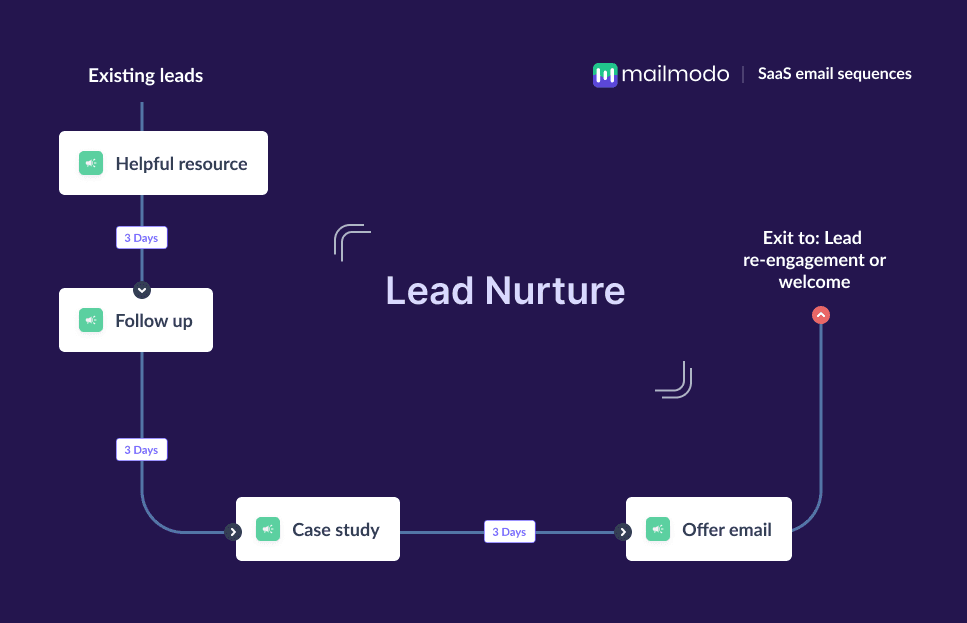
In the SaaS context, this sequence typically includes:
Helpful resources (guides, webinars, templates)
Follow-ups based on engagement
Case studies and testimonials
A final offer or nudge toward a demo or trial
These components work together to warm up leads over time rather than expecting them to convert immediately.
How to build a lead nurture email sequence
Building a lead nurture sequence is easy when you follow a clear, structured framework. Here are the steps to follow:
Step 1: Plan your campaign
A successful lead nurture sequence starts with a clear plan. In SaaS, this means defining what you want leads to do (book a demo, start a trial, explore specific features) and understanding the type of leads entering the flow (MQLs, SQLs, webinar attendees, pricing-page visitors, etc.). You should also plan how many emails to send, what message each one covers, and how long the sequence will run.
When planning for SaaS, define the core objective first. This is usually demo bookings, trial sign-ups, or moving leads to PQL status. Then map your narrative: education → social proof → offer. A 4-email sequence over 1–2 weeks works well for most SaaS funnels.
We asked Mailmodo AI to create a full campaign plan for our lead nurture sequence. It generated a detailed, structured roadmap including email objectives, themes, timing, and expected outcomes, which we then customized and converted into an automated journey.
Take a look at the prompt we used. Click on the arrow to see the output we received.
Create a lead nurture campaign plan. Include objectives, number of emails, the theme of each email, ideal timing between emails, and the main CTA for each email. Target audience: newly acquired MQLs.
Step 2: Create audience segments
Audience segmentation ensures every message feels relevant. Segmentation is essential because different leads have different levels of intent and different use cases for your product.
Some criteria you can consider to create segments include:
Lifecycle stage: MQLs vs SQLs
Behavior: webinar attendance, pricing-page visits, resource downloads
Persona: marketers, sales leaders, product teams
- Industry: tech, ecommerce, healthcare, etc.
We asked Mailmodo AI to create a dynamic audience segment for our SaaS nurture sequence. We reviewed the logic, made small edits in the builder, and approved it and the segment was instantly created and ready to use.
Take a look at the prompt we used for this and the output we got.
Create a dynamic segment of newly acquired leads who engaged with at least one resource or visited our website in the last 7 days.
Step 3: Create the email templates
Next, you create the email templates that will be sent to users. Below are four recommended emails for your lead nurture email sequence, along with sample prompts that you can use to generate similar emails in Mailmodo.
Email #1: Offer a resource
When to send: Immediately after lead capture
Purpose: To deliver value early and position your brand as a helpful expert
What to include:
A high-quality resource (ebook, webinar, frameworks, checklists)
A short explanation of the problem it solves
A subtle CTA for newsletter subscription or a soft product intro
Here’s a sample prompt to generate this kind of email, along with the output it will produce.
Generate an email template that offers a downloadable version of an ebook on email design and explains the usefulness of the ebook. Also, include a CTA that leads the recipients to explore more content on the website.
Email #2: Follow-up
When to send: 2–3 days after Email #1
Purpose: To re-engage based on whether they opened or not, and deliver more targeted content
What to include:
Follow-up message based on their behavior
Additional resource based on their interest
Optional preference capture (topics, challenges, role)
Here’s a sample prompt to generate this kind of email, along with the output it will produce.
Create an email that follows up based on the activity in the first email sent in the lead nurture email sequence. Share an additional resource that is a gallery of pre-made email templates and include a CTA to share their own interests and preferences.
Email #3: Case study/testimonial
When to send: 2–4 days after Email #2
Purpose: To show proof, build confidence, and demonstrate real outcomes
What to include:
A short, impactful case study
Quotes or metrics
CTA to explore your product or book a demo
Here’s a sample prompt to generate this kind of email, along with the output it will produce.
Create an email template that contains a short case study showing how a customer solved a key pain point using Mailmodo. Add a link to lead them to read the full case study and a CTA to book a demo.
Email #4: Offer email
When to send: 2–3 days after Email #3
Purpose: To push them toward the conversion
What to include:
A limited-time offer (extended trial, onboarding session, limited-time discount)
Clear explanation of value
A strong CTA to sign up or schedule a demo
Here’s a sample prompt to generate this kind of email, along with the output it will produce.
Create an email template that is a part of a lead nurture email sequence. The email should present a limited-time offer, along with the explanation of the benefit of signing up for Mailmodo and a strong CTA that leads to the sign-up page.
Step 4: Build the automated workflow
Once your templates are ready, set up an automated workflow that ensures that every lead receives the right email at the right time. For SaaS, your automation should include:
Trigger: Lead becomes an MQL or downloads a resource
Delays: 0 days → 2–3 days → 3–4 days → 2–3 days
Branching logic: If highly engaged → skip to offer email; If not engaged → send extra educational touchpoints
Exit criteria: Converted leads → add in welcome or onboarding flows; Unconverted leads → add in re-engagement flow
We asked Mailmodo AI to generate our lead nurture automation. It mapped out triggers, timing, branching conditions, and exit rules perfectly. After reviewing the journey and making small tweaks, the automation was ready to launch.
Take a look at the prompt that we used and the output we received.
Generate a complete automated workflow for a SaaS lead nurture sequence. Include triggers, delays, conditions, branching logic, and exit criteria.
Step 5: Analyze and improve
Even the best SaaS nurture sequence needs refinement. Once your nurture sequence is live, monitor how leads interact with it. Check out the following metrics you should track:
Open rate: Are recipients noticing your emails?
Click-through rate: Are they engaging?
Demo/trial conversion rate: Are they taking action?
PQL movement: Are they showing product-qualified behavior?
Drop-off points: Which email loses momentum?
We asked Mailmodo AI to analyze one of our past campaigns and it not only summarized the results but also highlighted top-performing elements and suggested data-backed improvements for our future campaigns.
Take a look at the prompt that we used and the output we received.
Analyze my last lead nurture email sequence and recommend improvements to increase engagement and demo sign-ups.
Conclusion
An email flow helps you educate users, build trust, and move them step-by-step toward booking a demo or starting a trial.
Email remains the most effective channel to do this because it lets you stay consistent, personalized, and strategic. And with tools like Mailmodo, you can plan, create, automate, and optimize your entire lead-nurture journey without complexity.
With the right sequence in place, you’ll be able to turn more MQLs into SQLs—and more leads into paying customers.


 Learn more about Mailmodo