In the SaaS industry, customer feedback is one of the strongest signals of product-market fit and long-term growth. Your users interact with your product regularly, which means they have clear opinions about what works, what feels confusing, and what’s missing.
But collecting feedback isn’t easy. Users are busy, surveys are often ignored, and one-off feedback requests rarely give you the full picture. Many SaaS teams struggle to get consistent, honest responses they can actually act on.
That’s where a structured feedback email sequence helps. Instead of asking once and hoping for replies, you guide users through a short, thoughtful series of emails that makes sharing feedback simple and meaningful.
In this guide, we’ll walk through how to build a complete SaaS feedback email sequence—from planning to automation to optimization.
Why should you use an email flow?
Email is one of the most reliable channels for collecting feedback in SaaS. It gives you direct access to users in a space they already use daily, without interrupting their product experience, their inboxes.
With email, you can personalize requests based on user behavior, plan the timing carefully, and automate follow-ups so no opportunity is missed. You can also segment users by plan, activity level, or lifecycle stage to get more relevant insights.
Collecting feedback needs more than one touchpoint. Some users may ignore the first email, others may need a nudge or an incentive, and everyone appreciates acknowledgment. A single email can’t cover all of that.
That’s why a feedback email sequence works better than a standalone message.
What is a feedback email sequence?
A feedback email sequence is a series of automated emails sent to users over a defined period to collect, encourage, and acknowledge customer feedback.
It usually includes an initial feedback request, a reminder or incentive, and a follow-up that thanks users or addresses their concerns. Together, these emails increase response rates and help you gather both quantitative and qualitative insights.
How to build a feedback email sequence
Building the sequence can be easy if you’re following a well-defined set of steps. Here are the steps for you to follow:
Step 1: Plan your campaign
Planning sets the foundation for an effective feedback sequence. Without clear goals, you’ll collect data that’s hard to interpret or act on. Start by outlining what success looks like and how you’ll run the campaign. Here’s what you need to define in your plan:
Objective (product improvement, UX feedback, feature validation)
Target audience (active users, power users, recent sign-ups)
Type of feedback (NPS, CSAT, feature requests, open text)
Number of emails in the sequence
Timeline and delay between the emails
Incentives
For this SaaS feedback sequence, we planned a 3-email flow spread over one week to maximize responses without overwhelming users.
We used Mailmodo AI to generate a complete campaign plan in minutes. It helped outline the goals, suggested the number of emails, recommended timing, and clarified what each email should achieve. This made it easy to review and finalize the strategy quickly.
Take a look at the prompt we used. Click on the arrow to see the output we received.
Create a detailed plan for a customer feedback email sequence for a SaaS product. Include objectives, target audience, number of emails, purpose of each email, and ideal timing between emails.
Step 2: Create audience segments
Segmentation ensures you’re asking the right people the right questions. Feedback from inactive users will differ greatly from insights shared by engaged customers.
Here are some common attributes to segment users by:
Product usage frequency
Subscription plan
Feature adoption
Last login or activity date
Account age
Previous feedback or NPS score
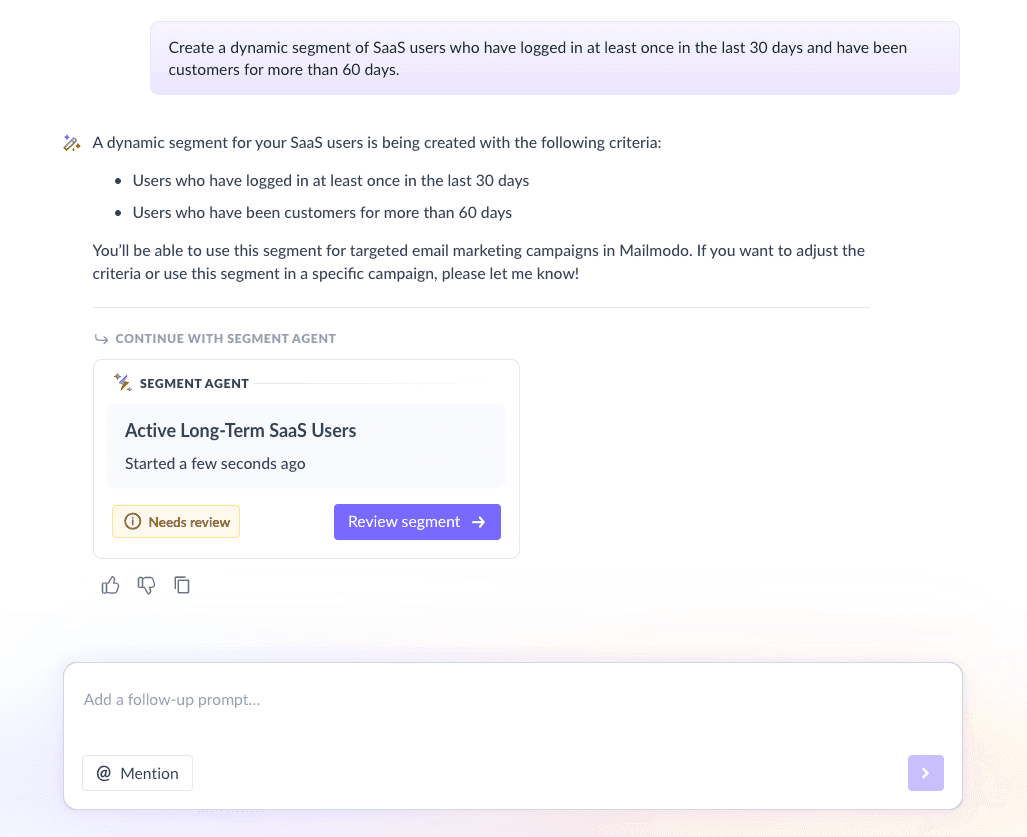
For our sequence, we used Mailmodo AI to create a segment of active users who logged in at least once in the last 30 days and have been customers for more than 60 days. This ensured feedback came from users with enough product experience.
Once it was done, we got the option to review, make edits using the builder, or ask AI to carry out the changes we wanted. Once we confirmed, Mailmodo AI created the segment instantly and it was ready to use for our campaign.
Create a dynamic segment of SaaS users who have logged in at least once in the last 30 days and have been customers for more than 60 days.
Step 3: Create the email templates
Once your audience is ready, the next step is designing the emails that will guide users through the feedback journey. Each email should have a clear role and a simple message.
Here’s how the three emails in this feedback sequence work together.
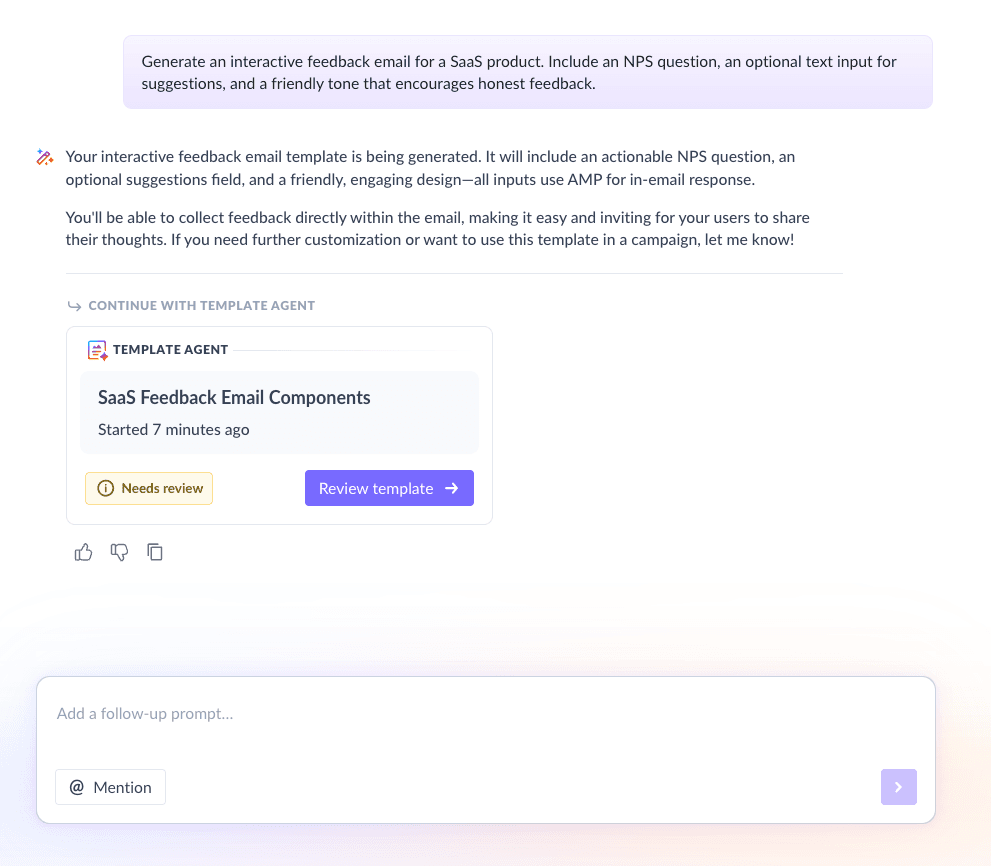
Email #1: Ask for feedback
When to send: Day 1 of the sequence
Purpose: Collect honest feedback about the product experience
What to include:
A friendly introduction explaining why feedback matters
One primary feedback question (NPS, CSAT, or emoji-based rating)
Reassurance that responses are valued and reviewed
This email should feel lightweight and easy to complete, ideally without redirecting users away from the inbox.
Here’s a sample prompt to generate this kind of email, along with the output it will produce.
Generate an interactive feedback email for a SaaS product. Include an NPS question, an optional text input for suggestions, and a friendly tone that encourages honest feedback.
Email #2: Incentivize
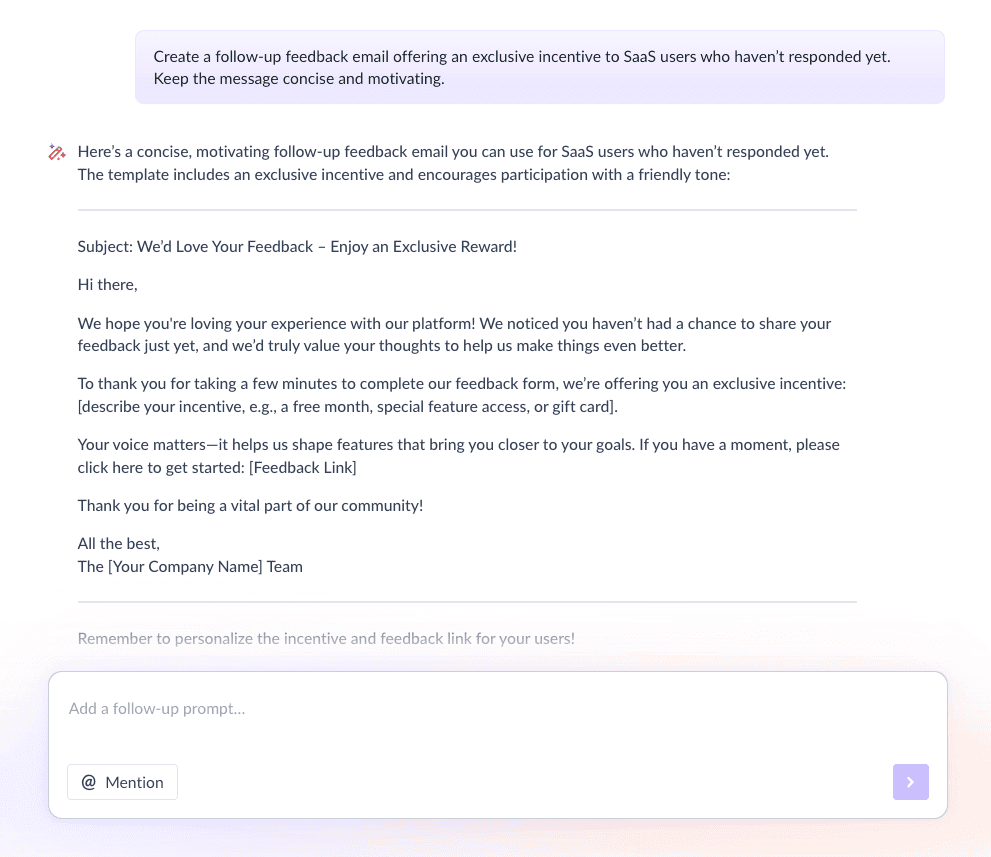
When to send: 2–3 days after Email #1 (only to non-responders)
Purpose: Increase participation with a small reward
What to include:
A reminder about the feedback request
A clear incentive (discount, gift card, early access)
Emphasis on exclusivity for those who respond
A simple call to action
Here’s a sample prompt to generate this kind of email, along with the output it will produce.
Create a follow-up feedback email offering an exclusive incentive to SaaS users who haven’t responded yet. Keep the message concise and motivating.
Email #3: Acknowledgement
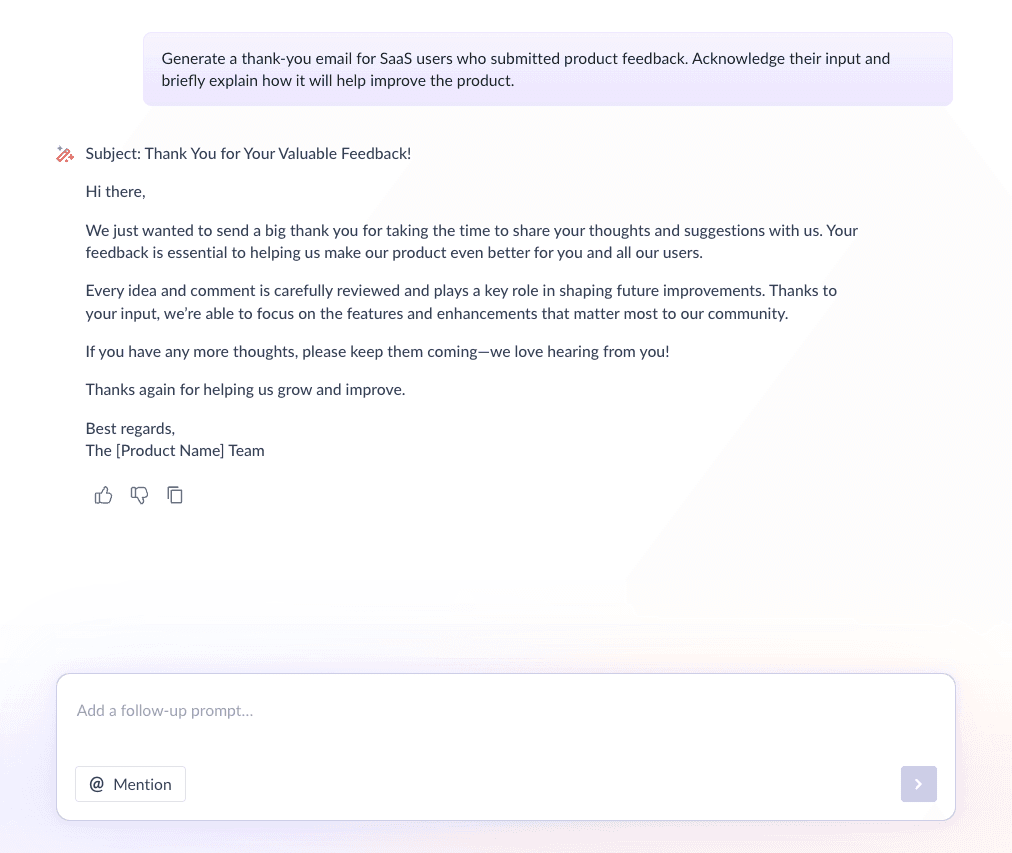
When to send: After feedback is submitted
Purpose: Close the loop and build trust
What to include:
A genuine thank-you message
Acknowledgment of positive or negative feedback
Brief note on how feedback will be used
Next steps, if applicable
Here’s a sample prompt to generate this kind of email, along with the output it will produce.
Generate a thank-you email for SaaS users who submitted product feedback. Acknowledge their input and briefly explain how it will help improve the product.
Step 4: Build the automated workflow
Automation brings the entire sequence together and ensures users receive the right email at the right time. Your email sequence should include:
Trigger: User enters the feedback segment
Delays: 2–3 days between emails
Branching logic: If responded → skip incentive email and send acknowledgement email
Exit criteria: User submits feedback or completes the sequence
We used Mailmodo AI to generate a complete automated workflow for this feedback sequence. It mapped out triggers, delays, conditions, and exits in one go. After reviewing the flow, we made small tweaks to match our timing preferences.
Take a look at the prompt that we used and the output we received.
Generate a complete automated workflow for a SaaS customer feedback email sequence. Include triggers, delays, conditions for responders vs non-responders, and exit criteria.
Step 5: Analyze and improve
Collecting feedback is only useful if you analyze it and act on it. Regular review helps you improve both your product and your feedback process. Here are some key metrics to track:
Open rate
Click or interaction rate
Feedback completion rate
NPS or CSAT score trends
Common themes in qualitative responses
We asked Mailmodo AI to analyze the performance of our feedback sequence and highlight areas for improvement. It pointed out where engagement dropped and suggested subject line and timing optimizations.
Take a look at the prompt that we used and the output we received.
Analyze my last feedback email sequence and recommend improvements to increase response rates and engagement.
Conclusion
A well-structured feedback email sequence helps you understand user needs, improve your product, and show customers that their opinions truly matter.
Email makes this process scalable, personal, and easy to automate. When combined with thoughtful sequencing, it turns feedback collection into a repeatable system rather than a one-time task.
With tools like Mailmodo, planning, creating, automating, and optimizing feedback sequences becomes much simpler, allowing teams to focus on acting on insights instead of chasing responses.


 Learn more about Mailmodo