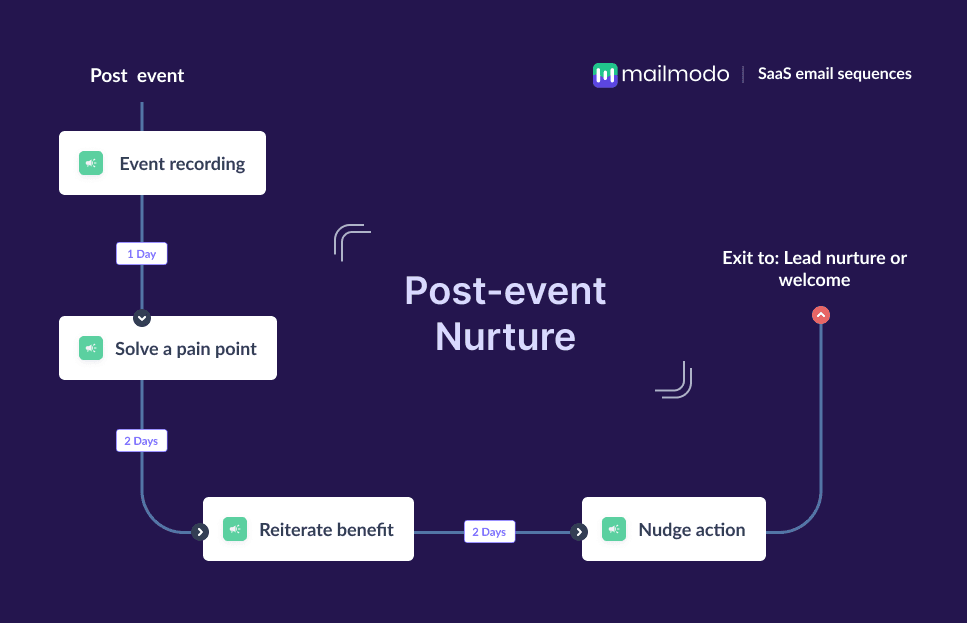
In the SaaS world, webinars, virtual events, and workshops play a major role in educating prospects, showcasing expertise, and generating warm leads. But the real opportunity appears after the event ends. Attendees have just given you their time and attention, meaning they’re already aware of your product category and the problem you solve and you’re fresh in their minds.
SaaS prospects have long, research-heavy journeys. It’s easy for them to lose momentum once the event is over. They may forget the product value, get distracted by other priorities, or simply never take the next step.
In this guide, you’ll learn why an email flow works so well for post-event nurturing in SaaS, what a post-event sequence includes, and how to build one step-by-step.
Why should you use an email flow for post-event nurturing?
Email is a direct, permission-based way to re-engage attendees and deepen their understanding of your product, but a single email may not do the trick.
This is because SaaS buyers often need multiple touchpoints before converting. They need to see examples, hear customer stories, revisit the problem, and assess whether your tool fits their workflow. Email lets you deliver these touchpoints in a sequence that is personalized, spaced out, and aligned with their intent.
You can send different versions of the sequence based on whether someone attended, how long they stayed, what questions they asked, or which features they expressed interest in.
What is a post-event nurture email sequence?
A post-event nurture email sequence is an automated series of emails sent after a webinar or virtual event to engage attendees, share resources, and guide them toward the next action, such as signing up, starting a trial, or booking a demo.
It typically includes event recaps or recordings, feedback requests, case studies, testimonials, etc.
How to build a post-event nurture email sequence
Building a post-event nurture email sequence can be easy if you’re following a well-defined set of steps. Here are the steps for you to follow:
Step 1: Plan your campaign
Planning ensures your email sequence has a clear purpose and supports your broader SaaS acquisition goals.
Start by defining what you want attendees to do after the event. It could be starting a free trial, booking a demo, signing up for your newsletter, or attending another event. Also, identify your ICP segments and what topics or product features align with the event theme.
Decide how many emails you’ll send, the spacing between them (typically 4–7 days total), and the tone of your messaging.
Your plan should consider event intent (top-of-funnel or bottom-of-funnel), buyer stage, and the complexity of your product. A low-intent educational webinar needs lighter product messaging, while a deep-dive workshop can push a stronger CTA.
We asked Mailmodo AI to generate a complete campaign plan for our post-event nurture sequence and it delivered a clear, actionable blueprint we could instantly review, tweak, and turn into an automated workflow. The output included the sequence goals, audience segmentation logic, email themes, and a recommended 1-week send timeline.
Take a look at the prompt we used. Click on the arrow to see the output we received.
Create a detailed campaign plan for a SaaS post-event nurture email sequence. Include goals, target audience segments, recommended messaging pillars, number of emails, timeline for a 1-week sequence, and the primary action each email should drive.
Step 2: Create audience segments
Segmentation ensures you send relevant and timely emails to each group, increasing engagement and conversions. In SaaS, segmentation is critical because attendees vary widely in intent and knowledge.
You can create your segments by:
Attendees vs. registrants who didn’t attend
Watch time or engagement level
ICP fit (role, company size, use case)
Behavior after the event (visited your site, downloaded resources)
Poll answers or Q&A participation
Interest in specific features
For example, someone who stayed until the product demo section should get a more CTA-driven sequence than someone who left after the intro.
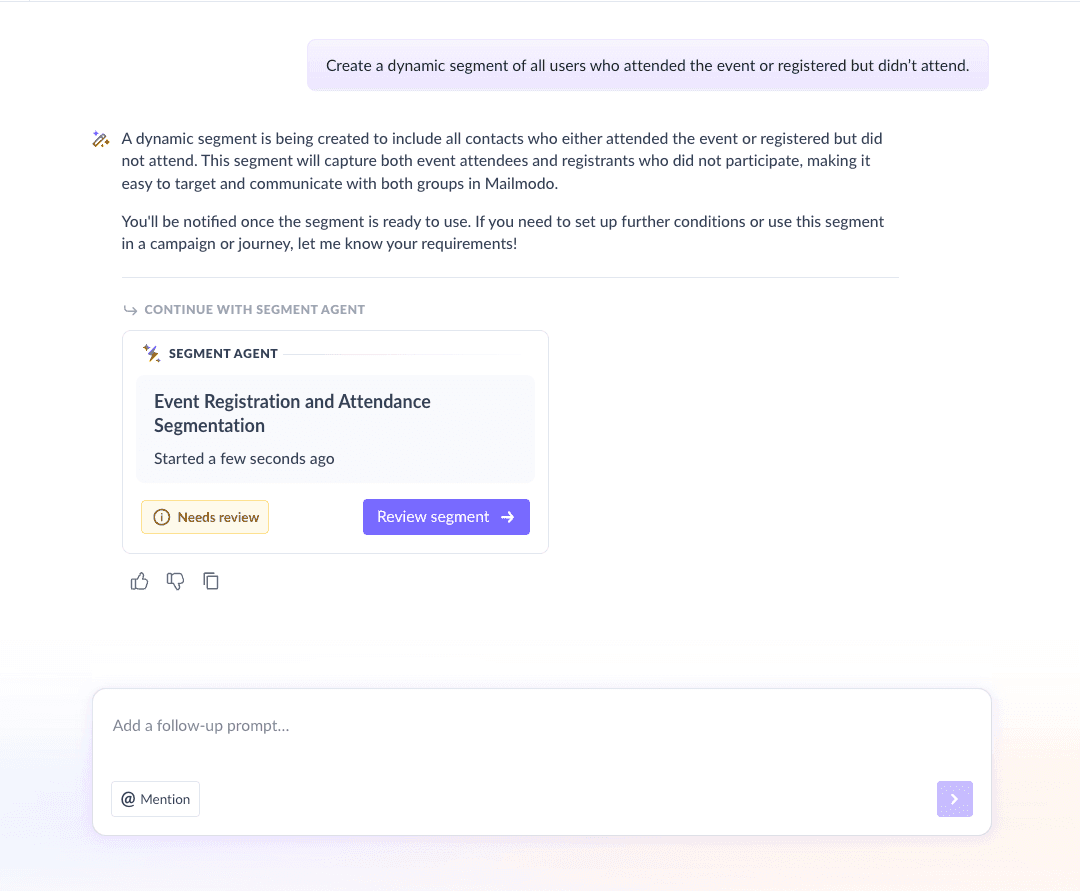
We used Mailmodo AI to instantly build a ready-to-use audience segment for our SaaS post-event nurture sequence. It generated the segment logic in seconds, and we could review it, tweak it using the visual builder, or simply ask AI to apply the changes for us. Once we confirmed the setup, the segment was created automatically and was immediately available for our campaign.
Take a look at the prompt that we used and the output we received.
Create a dynamic segment of all users who attended the event or registered but didn't attend
Step 3: Create the email templates
Now it’s time to draft the emails that will make up your nurture sequence. Below are the four recommended emails and what each should achieve.
Email #1: Event recording/feedback email
When it's sent: Within 24 hours of the event.
Purpose: Deliver the recording of the event, share slides or resources, and ask for feedback. It works for both attendees and registrants who missed it.
What it should include:
Thank-you note
Recording link
Bonus resources (templates, blogs, guides)
Quick feedback survey
Light nudge to explore a relevant feature or guide
Here’s a sample prompt to generate this kind of email, along with the output it will produce.
Create an email that shares the webinar recording with both attendees and no-shows. Include a thank-you message, links to related resources, and a short feedback request.
Email #2: Solve a pain point
When it’s sent: 2–3 days after the event
Purpose: Position your product as the solution to a challenge your audience cares about
What it should include:
A clear statement of a pain point mentioned during the event
How your product solves this problem
One or two product features that help
A CTA to explore the solution
Here’s a sample prompt to generate this kind of email, along with the output it will produce.
Generate an email that highlights a key pain point discussed in the webinar and explains how Mailmodo solves it. Include 1–2 features and a CTA to learn more.
Email #3: Reiterate benefits
When it's sent: 4–5 days after the event.
Purpose: Build trust and move the lead closer to evaluating your product
What it should contain:
Customer success story
Tangible outcomes (time saved, cost reduction, workflow improvement)
A reinforcing insight tied to the event topic
CTA to explore how it applies to them
Here’s a sample prompt to generate this kind of email, along with the output it will produce.
Generate a SaaS nurture email that uses social proof to reinforce the benefits of our product. Include a mini-case study, metrics, and a CTA to explore success stories.
Email #4: Nudge action
When it's sent: On day 6 or 7.
Purpose: Create urgency and drive the next step
What it should include:
A limited-time offer or incentive
Reminder of what they learned during the event
Why now is the right time to act
A CTA to sign up for a trial, book a demo, or claim the offer
Here’s a sample prompt to generate this kind of email, along with the output it will produce.
Generate an email template offering a limited-time incentive for webinar attendees to sign up for a free trial. It should also include the key takeaways from the webinar. Make the tone urgent but not pushy.
Step 4: Build the automated workflow
Now that you have the emails ready, it’s time to automate the sequence so that the attendees and no-shows receive the right content at the right time.
Your post-event nurture workflow should include:
Trigger: Event ends
Delays: 0 days → 2 days → 2 days → 2 days
Branches: If the user engages → prioritize feature/product emails; If the user doesn’t engage → send value-driven resources first
Exit criteria: User signs up for a trial or books a demo
We used Mailmodo AI to generate our entire workflow. It mapped the triggers, conditions, delays, and branching logic in seconds. After reviewing the journey and following a setup checklist, we asked the AI to refine specific parts of the automation and it updated the flow instantly.
Take a look at the prompt that we used and the output we received.
Generate a complete email flow for a SaaS post-event nurture sequence. Include triggers, delays, branching logic, and exit criteria for both attendees and no-shows.
Step 5: Analyze and improve
Once your sequence is live, monitor how users respond. Key metrics you should track include:
Open rate: Are people opening your emails?
CTR: Are users interacting with your content?
Trial/demo conversion rate: Are they progressing to the next stage?
Engagement by segment: Attendees vs. no-shows
Drop-off points: Which email loses the most interest?
We asked Mailmodo AI to analyze one of our past post-event sequences. It summarized performance, identified what worked, and suggested data-backed improvements for future campaigns, including which email topics and CTAs convert best.
Take a look at the prompt that we used and the output we received.
Analyze the last post-event nurture sequence and suggest improvements to increase conversions.
Conclusion
In SaaS, post-event nurturing is one of the most effective ways to convert warm, educated prospects into active users. A well-crafted email sequence helps you reinforce your message, address pain points, build trust, and guide attendees toward action.
Tools like Mailmodo make it easier to plan, create, automate, and optimize your post-event nurture journeys without friction.


 Learn more about Mailmodo