Churn is one of the most important aspects of customer satisfaction. It is one of the clearest indicators of product-market fit, customer satisfaction, and long-term revenue stability. Every customer who leaves represents not just lost subscription revenue but also valuable insights into what isn’t working. Churn often happens due to issues like incomplete onboarding, unclear value, pricing objections, or unmet expectations—all common challenges across SaaS products.
Reaching churned users is rarely simple. They’ve already left the product, so in-app prompts or product-led nudges won’t work. That’s why email becomes the most reliable way to understand why they churned and whether there’s still an opportunity to reconnect; and just ones email won’t work.
In this guide, you’ll learn how to build a complete churned customer email sequence for SaaS, from planning and segmentation to templates, workflow automation, and ongoing optimization.
Why email should be your preferred channel for churn recovery
For churn recovery in SaaS, email stands out because it allows you to reach users even after they’ve stopped engaging with the product. Many churned customers no longer log in, so email becomes the only channel that guarantees visibility.
Email also gives you the flexibility to personalize messages based on plan type, usage data, the features they explored, or their cancellation reason. This level of contextual communication is essential when asking for honest feedback.
Another advantage is automation. You can trigger emails immediately after churn—when motivations and frustrations are still fresh. Well-timed messages increase the chances of getting truthful responses.
However, a single email isn’t enough, though. Most users won’t respond on the first attempt. That’s why a short, thoughtful sequence works better. It allows you to ask for feedback, share updates, and keep the relationship warm without being intrusive.
What is a churned customer email sequence?
A churned customer email sequence is a set of automated emails sent to users after they cancel their SaaS subscription. These emails help you understand why they left, identify product gaps, and create opportunities for future re-engagement.
How to build a churned customer email sequence
Building a welcome email sequence can be easy if you’re following a well-defined set of steps. Here are the steps for you to follow:
Step 1: Plan your campaign
The first step is clarifying what you want this sequence to achieve. For SaaS businesses, the main objectives are usually to understand why customers left, identify patterns in churn reasons, and create a gentle path back to re-engagement later.
You should also define how many emails you’ll include (for churn, two emails work best) and how quickly they should be sent (usually within 3–4 days of cancellation).
We asked Mailmodo AI to generate an entire campaign plan for our welcome email sequence and it delivered a detailed, actionable plan that we could review, customize, and turn into an automated workflow instantly. The output also outlined what emails to send, when to send them, and what each message should achieve.
Take a look at the prompt we used. Click on the arrow to see the output we received.
Generate a campaign plan for a SaaS churned user email sequence. Include goals, audience details, tone, the number of emails, and suggested sending timeline.
Step 2: Create audience segments
Segmentation makes the sequence more effective by tailoring messages to different types of churned users. In SaaS, this usually means grouping users by factors such as:
Churned from trial vs. churned from paid
Low-usage churn vs. power-user churn
Plan type: monthly vs annual
Reason captured at cancellation: pricing, missing feature, switching, support, onboarding, other
Account type: admin vs member (for team products)
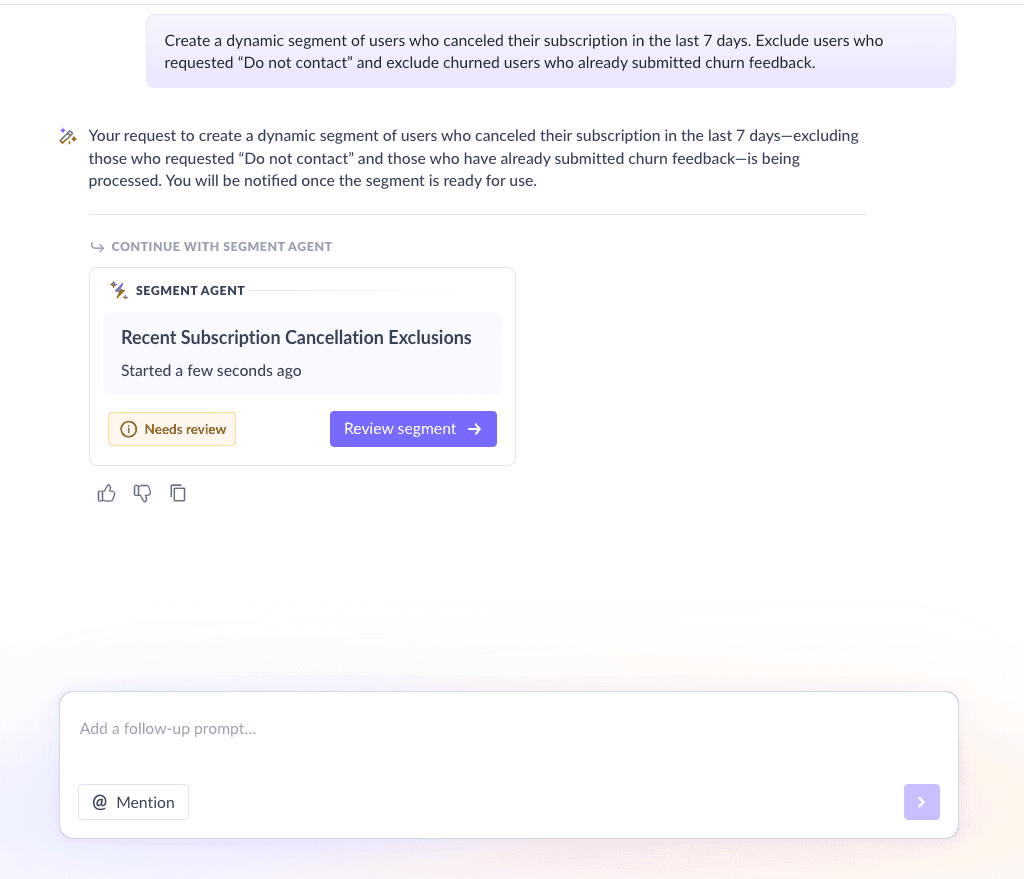
We used Mailmodo AI to quickly create an audience segment for our email sequence. Once it was done, we got the option to review, make edits using the builder, or ask AI to carry out the changes we wanted. Once we confirmed, Mailmodo AI created the segment instantly and it was ready to use for our campaign.
Take a look at the prompt we used. Click on the arrow to see the output we received.
Create a dynamic segment of users who canceled their subscription in the last 7 days. Exclude users who requested “Do not contact” and exclude churned users who already submitted churn feedback.
Step 3: Create the email templates
Next, you create the email templates that will be sent to users. Here’s the list of emails you should create for your churned email sequence. We’ve also included sample prompts you can use in Mailmodo AI to generate these templates in minutes.
Email #1: Feedback email
When it’s sent: 12–24 hours after subscription cancellation
Purpose: Ask for the reason behind churn and collect actionable feedback
What it should include:
Acknowledgment of cancellation (no guilt, no sales pressure)
One-click reasons (radio buttons) + optional open text field
A quick satisfaction rating (optional)
A simple closing from a Founder/CEO or Product lead
A short CTA like “Share feedback” or “Submit”
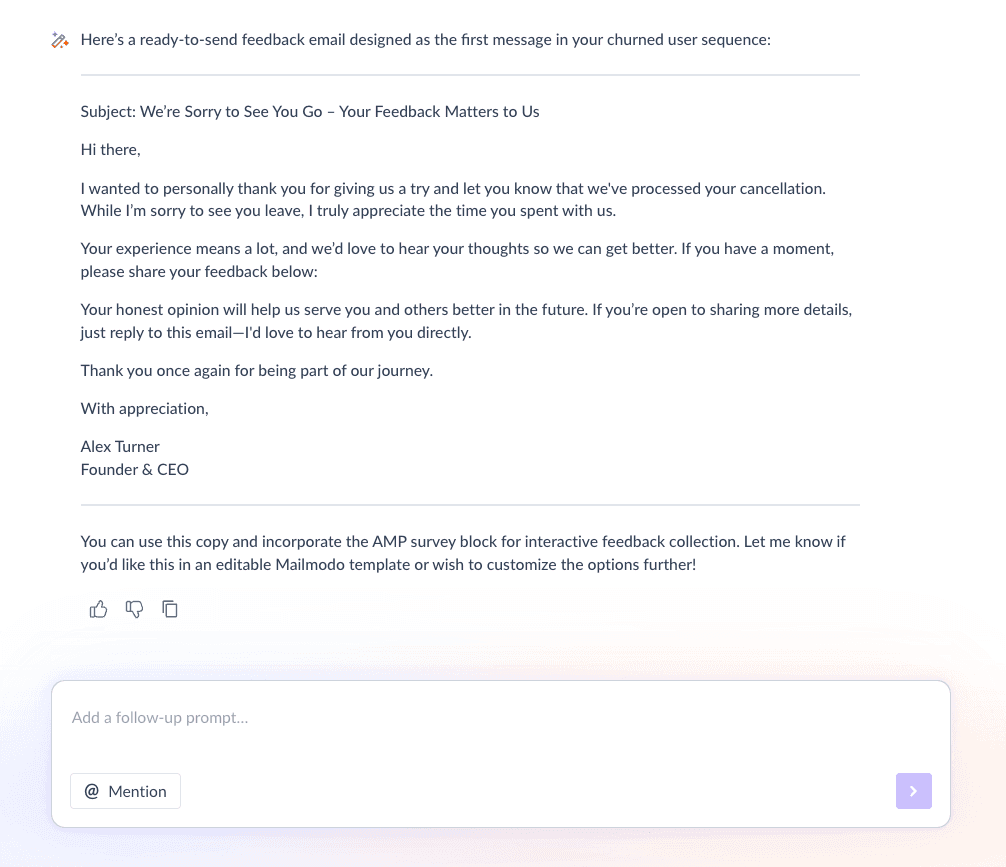
Here’s a sample prompt to generate this kind of email, along with the output it will produce.
Generate a feedback email as the first email in the churned email sequence. It should contain an acknowledgement of cancellation, a simple closing from the founder and a section to collect feedback via an interactive widget.
Email #2: Keep in touch
When it’s sent: 2–3 days after the feedback email
Purpose: Close the loop, show you value their input, and ask how they’d like to stay connected
What it should include:
Thank you + short acknowledgment of learning
A statement like “We’re using this to improve X”
Preference-based opt-in for emails
A clear option to opt out completely
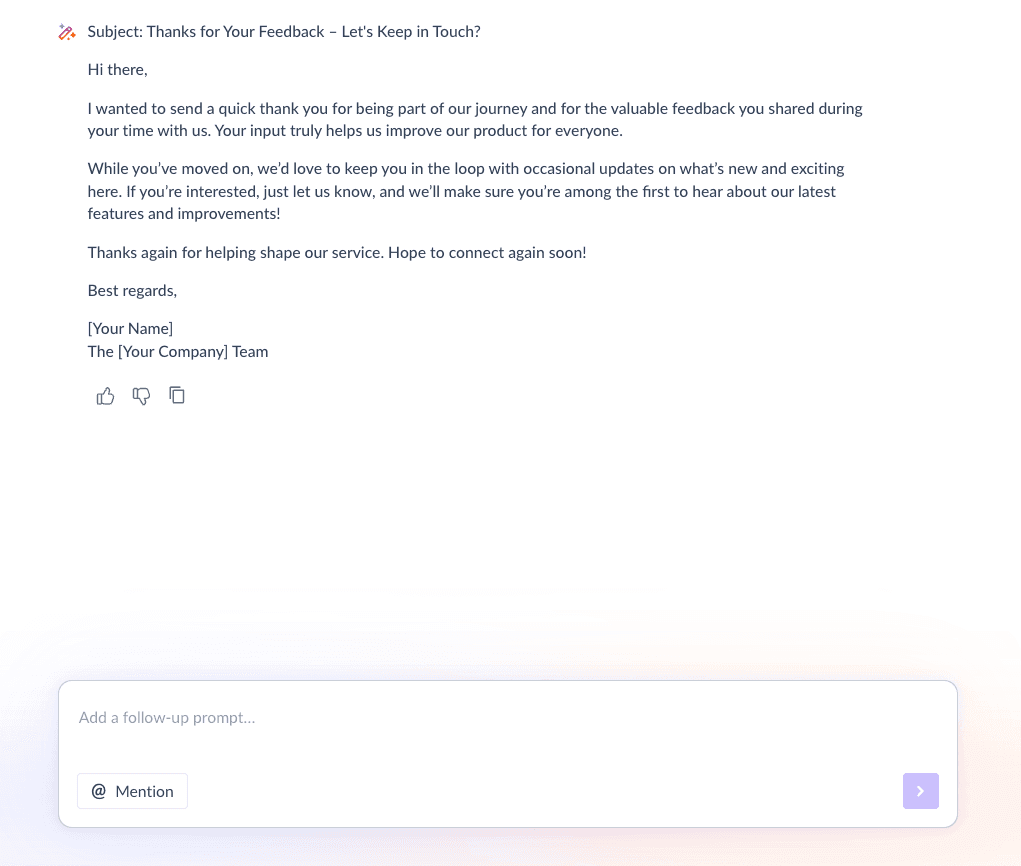
Here’s a sample prompt to generate this kind of email, along with the output it will produce.
Write a “keep in touch” email for a churned SaaS user. Thank them for their feedback, mention that their input helps improve the product, and ask if they’d like to receive occasional updates.
Step 4: Build the automated workflow
Once your emails are ready, the next step is to automate them so every churned user receives them at the right moment. Your churned email sequence should include:
Trigger: User cancels subscription or subscription expires without renewal
Delay: 12–24 hours after churn event → then 2–3 days
Branching logic: If user submits feedback → send “keep in touch” with preference center; If user doesn’t submit feedback → send a lighter “quick feedback” version (same email #2 or a reminder variant); If user opts out → exit immediately
Exit criteria: Preferences captured or user unsubscribes or user is removed from marketing list
We used Mailmodo AI to set up a churned email workflow. It generated a complete journey with triggers, timing, and conditions. Once the output was ready, we reviewed the journey using a checklist and asked AI to tweak what we needed.
Take a look at the prompt that we used and the output we received.
Create a full automated workflow for a SaaS churn recovery email sequence with two emails: one for feedback and the next for keeping in touch. Include relevant triggers, delays, conditional logic, and exit criteria.
Step 5: Analyze and improve
Once your sequence is live, track how churned users respond and what you learn from them. Key metrics for you to monitor include:
Feedback completion rate: Are churned users actually responding?
Reason distribution: What percentage is pricing vs missing features vs switching?
Qualitative themes: Common phrases that indicate friction (onboarding, speed, bugs, reporting, integrations)
Reactivation rate (longer-term): Do preference-based updates bring users back over time?
We asked Mailmodo AI to analyze our last churn campaign and it summarized results, identified the best-performing elements, and suggested improvements to increase feedback submissions and reduce unsubscribes.
Take a look at the prompt that we used and the output we received.
Analyze the performance of the last churn email sequence and summarize key metrics and also provide insights, improvement ideas, and feedback themes.
Conclusion
Churn is a natural part of running a SaaS business, but it also provides meaningful insights into what users value and where they struggle. A thoughtfully designed churned customer email sequence helps you collect these insights, rebuild trust, and keep communication open for future re-engagement.
Email is the best channel for this because it reaches users after they’ve left the product and allows you to send timely, personalized, automated messaging. When you combine sequencing with valuable feedback loops, you create a powerful system for continuous improvement.
Mailmodo makes it easier to plan, write, automate, and analyze these email sequences so you can focus on understanding your users and improving your product.


 Learn more about Mailmodo