
In the SaaS industry, acquiring new customers takes time, budget, and effort. From paid ads to sales calls, every new signup comes with a cost. That’s why growth-focused SaaS teams don’t rely only on new acquisitions. They focus heavily on expanding revenue from existing customers.
Upselling and cross-selling help SaaS businesses increase revenue without increasing acquisition costs. Whether it’s upgrading users to a premium plan or selling add-ons that improve product usage, these strategies directly impact ARR and customer lifetime value.
But most SaaS teams struggle with timing, messaging, and relevance. Sending a one-off upgrade email rarely works. Customers need context, value, and reassurance before spending more.
That’s where an upsell/cross-sell email sequence makes a difference. In this guide, we’ll walk through how to build a complete SaaS upsell and cross-sell email sequence.
Why should you use an email flow?
Email works especially well for upsell and cross-sell in SaaS because you already have an existing relationship with the customer. You know how long they’ve been using the product, which features they rely on, and where they might need more value.
With email, you can:
Reach users directly without relying on algorithms
Personalize messaging based on product usage and plan type
Segment customers by lifecycle stage or behavior
Automate timely nudges triggered by usage milestones
Upsell and cross-sell decisions aren’t instant. Customers often need multiple touchpoints to understand the value, overcome hesitation, and feel confident about upgrading. A structured email sequence helps you guide them through that journey instead of pushing a single sales-heavy email.
That’s why SaaS brands rely on email sequences rather than one-off campaigns.
What is an upsell/cross-sell email sequence?
An upsell/cross-sell email sequence is a series of automated emails sent to existing customers to encourage plan upgrades or the purchase of additional features, add-ons, or products.
These emails usually include product announcements, benefit-driven explanations, social proof, FAQs, and reminder nudges. Together, they educate customers, address objections, and highlight the added value of upgrading—step by step.
How to build an upsell/cross-sell email sequence
Building an email sequence can be easy if you’re following a well-defined set of steps. Here are the steps for you to follow:
Step 1: Plan your campaign
Planning sets the foundation for the entire sequence. Without clarity on goals and audience, upsell emails can feel random or pushy. A solid plan ensures the messaging stays focused and relevant.
For a SaaS upsell/cross-sell campaign, outline:
Objective: Upgrade to premium plan or sell a specific add-on
Target audience: Existing customers on a specific plan
Trigger: Time-based (6–12 months of usage) or behavior-based
Messaging angle: Value, efficiency, performance, or savings
Number of emails: 4–5 emails
Timeline: 10–14 days
We used Mailmodo AI to generate a complete campaign plan for our upsell sequence. It helped us define the number of emails, goals of each email, and ideal spacing between them.
Take a look at the prompt we used. Click on the arrow to see the output we received.
Create an upsell and cross-sell campaign plan for a SaaS product. Include objectives, target audience, number of emails, the goal of each email, ideal timing, and primary CTA.
Step 2: Create audience segments
Segmentation is critical for upsell and cross-sell success. Not every customer needs the same upgrade, and sending generic emails can reduce trust. Segmentation can be based on:
Current plan type
Feature usage frequency
Account age
Team size or company size
Past upgrades or add-on purchases
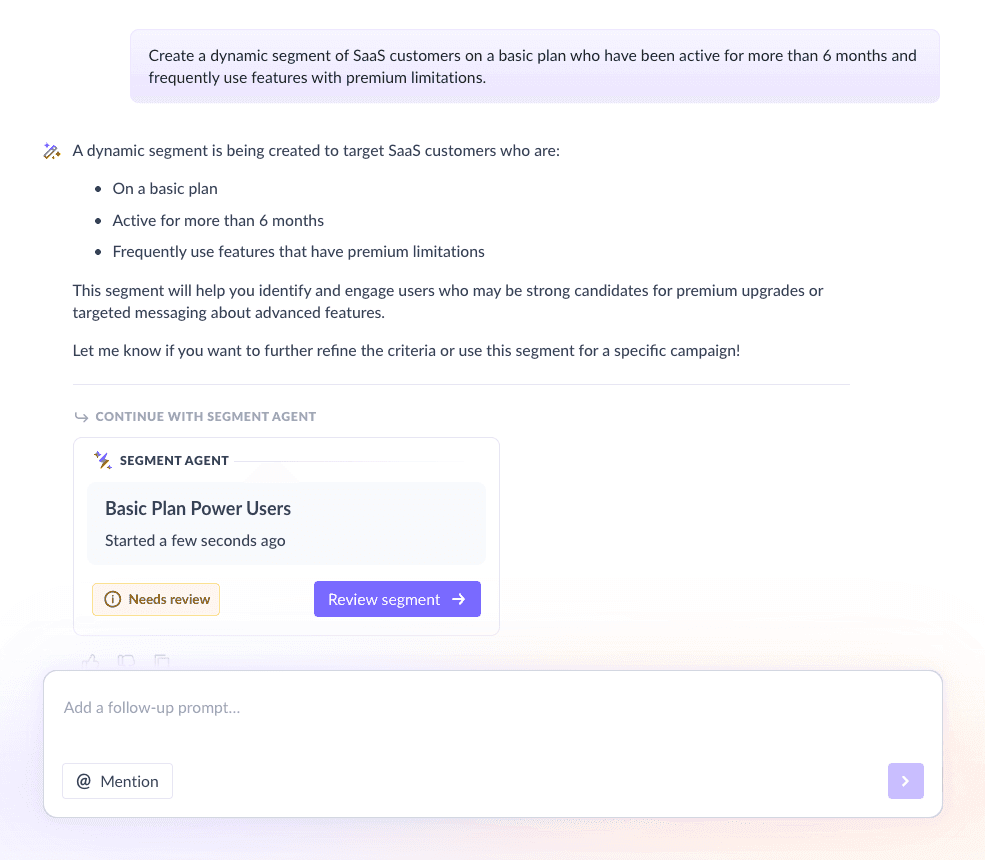
For this sequence, we used Mailmodo to create a segment of users who:
Are on a basic or mid-tier plan
Have been active for over 6 months
Regularly use features limited to higher plans
Once it was done, we got the option to review, make edits using the builder, or ask AI to carry out the changes we wanted. Once we confirmed, Mailmodo AI created the segment instantly and it was ready to use for our campaign.
Create a dynamic segment of SaaS customers on a basic plan who have been active for more than 6 months and frequently use features with premium limitations.
Step 3: Create the email templates
Once your audience is set, the next step is crafting the emails. Each email should serve a specific purpose and move the customer closer to upgrading.
Here’s a sample list of emails that you should be creating for your welcome email sequence. We’ve also included sample prompts that you can use in Mailmodo AI to generate these email templates in minutes instead of having to spend hours creating them.
Email #1: New feature or offering
When to send: Day 1
Purpose: Introduce the premium feature or add-on
What to include:
Clear overview of the feature or plan
How it compares to their current plan
One focused upgrade goal
Here’s a sample prompt to generate this kind of email, along with the output it will produce.
Generate an email announcing a new premium feature for existing SaaS customers. Explain how it works, who it’s best for, and include a clear upgrade CTA.
Email #2: Benefits or exclusive offers
When to send: Day 3–4
Purpose: Show value and incentivize action
What to include:
Key benefits tied to user needs
Exclusive upgrade offer for customers
How the feature improves current workflows
Here’s a sample prompt to generate this kind of email, along with the output it will produce.
Create an upsell email highlighting the benefits of a premium SaaS feature and include a limited-time offer for existing customers.
Email #3: Social proof
When to send: Day 6–7
Purpose: Reduce hesitation
What to include:
Customer testimonials
Short case studies
Results from similar companies
Here’s a sample prompt to generate this kind of email, along with the output it will produce.
Generate an upsell email using testimonials and case studies to show how other SaaS customers benefited from upgrading.
Email #4: Address FAQs
When to send: Day 9–10
Purpose: Handle objections
What to include:
5–6 commonly asked questions
Clear, short answers
Pricing, setup, and ROI clarity
Here’s a sample prompt to generate this kind of email, along with the output it will produce.
Create an upsell email that answers the most common FAQs about a SaaS plan upgrade with concise, objection-handling responses.
Email #5: Nudge email
When to send: Day 13–14
Purpose: Final reminder
What to include:
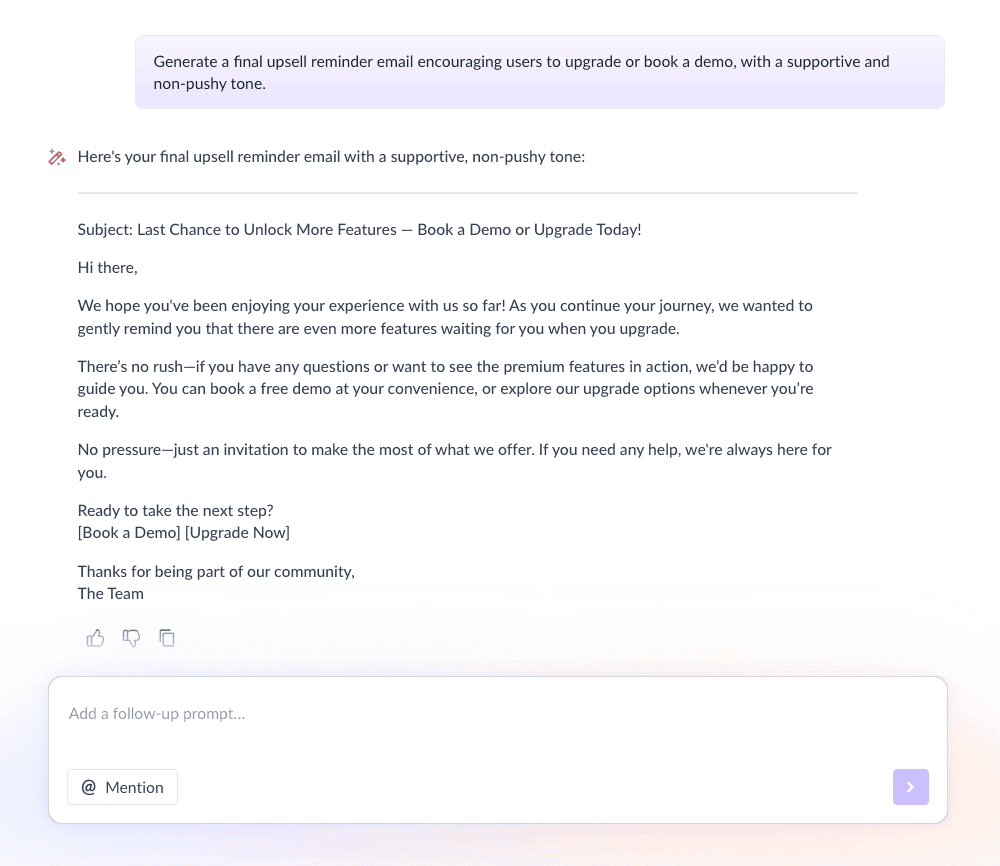
Friendly nudge to upgrade or book a demo
Helpful resources or docs
Low-pressure CTA
Here’s a sample prompt to generate this kind of email, along with the output it will produce.
Generate a final upsell reminder email encouraging users to upgrade or book a demo, with a supportive and non-pushy tone.
Step 4: Build the automated workflow
Once your emails are ready, the next step is to automate them so every new user receives them at the right moment. Your welcome email sequence should include:
Trigger: Customer completes 6 months on a plan
Delays: 0 days → 3 days → 3 days → 3 days → 4 days
Branching logic: If upgraded → exit sequence; If clicked but didn’t upgrade → continue with the next email
Exit criteria: User upgrades or enters feedback flow
We used Mailmodo AI to generate the entire workflow, including triggers, delays, and exit rules. After reviewing the setup, we made small adjustments and launched it quickly. Take a look at the prompt that we used and the output we received.
Generate a complete automated workflow for a SaaS upsell and cross-sell email sequence. Include triggers, delays, branching logic, and exit criteria.
Step 5: Analyze and improve
Once the sequence is live, performance data helps you optimize future campaigns. For SaaS upsell sequences, focus on:
Open rate
Click-through rate
Upgrade conversion rate
Time to conversion
Drop-off points
We asked Mailmodo AI to analyze one of our past campaigns and it not only summarized the results but also highlighted top-performing elements and suggested data-backed improvements for our future campaigns. Take a look at the prompt that we used and the output we received.
Analyze my last upsell and cross-sell email sequence and recommend improvements to increase upgrades and engagement.
Conclusion
For SaaS businesses, upsell and cross-sell strategies are essential for sustainable growth. They help you increase revenue while deepening customer relationships, without the high cost of new acquisition.
Email sequences make this process structured, timely, and scalable. Instead of pushing upgrades, you guide customers through value, proof, and reassurance.
With tools like Mailmodo, planning, creating, automating, and optimizing upsell and cross-sell email sequences becomes far more manageable. A thoughtful sequence can turn satisfied users into long-term, higher-value customers.


 Learn more about Mailmodo