Webinars are crucial and commonly used in the SaaS industry. They play a major role in educating prospects, showcasing product value, and moving leads through the funnel. Whether you’re running a product demo, a thought-leadership session, or a customer training webinar, your goal is always the same: to get as many registrants as possible to actually show up and be a part of your webinar.
But that’s the actual hard part.
SaaS teams often struggle with low attendance rates, busy calendars, time-zone confusion, and prospects who sign up but forget to join. This is where automated email flows or email sequences help.
This guide will walk you through how to build a complete SaaS-focused webinar registration email sequence end-to-end.
Why do you need an email flow for your webinar?
Email is one of the most effective channels for webinar reminders in SaaS because buyers often research products over long cycles. They need multiple nudges to stay engaged. With email, you can reach people directly, personalize reminders based on multiple factors like lifecycle stage or date, and use automation to time everything perfectly.
SaaS prospects also juggle multiple long-term and short-term communications and internal meetings. This is why a single reminder isn't enough to drive attendance. You need a structured sequence that builds anticipation, answers questions, and makes it easy to join the event without digging through old messages. A multi-touch email sequence ensures that.
What is a webinar registration email sequence?
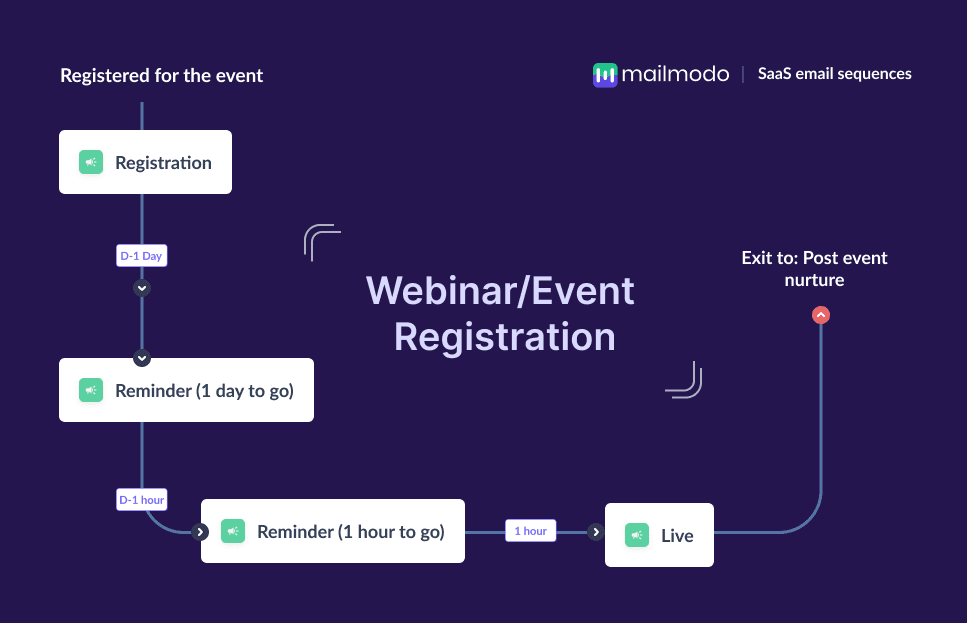
A webinar registration email sequence is a series of automated emails sent to people who sign up for your webinar, reminding them about the session and guiding them towards attending the webinar. It typically includes a registration confirmation, pre-event reminders, a “starting soon” alert, and a live-now email.
How to build a webinar registration email sequence
We’ll take you through the exact steps that you can take to set up an automated email sequence for your webinar. We’ve also discussed how you can use Mailmodo’s AI capabilities to complete each step with ease, along with a sample prompt you can use and the kind of output you’ll get.
Let’s get started.
Step 1: Plan your email flow
Planning lays the foundation for an effective email sequence. Remember that you need to provide clarity on the webinar’s topic, timing, and benefits. This ensures the messaging across all emails aligns with your broader conversion funnel.
For SaaS companies, planning should include identifying ICP segments, determining whether the webinar relates to onboarding, product adoption, or acquisition, and clarifying what action you want attendees to take after the event.
If that sounds too complex, you can ask Mailmodo AI to create this plan for you. It will outline campaign objectives, define the audience, and suggest the ideal number of emails and timing.
Create a complete and structured plan for a webinar registration email sequence on the topic ‘How AI is supporting the email marketers today’. The plan should include goals, audience segments, suggested email frequency, messaging angles, and a clear timeline.
Step 2: Create audience segments
Segmentation helps you send more relevant reminders. Registrants can fall into different lifecycle stages such as trial users, active customers, or enterprise evaluators. Each group joins webinars for different reasons, so your communication should reflect that.
You can create a segment that groups only those users or audiences that would find the topic of your webinar relevant and exclude the rest and target them accordingly.
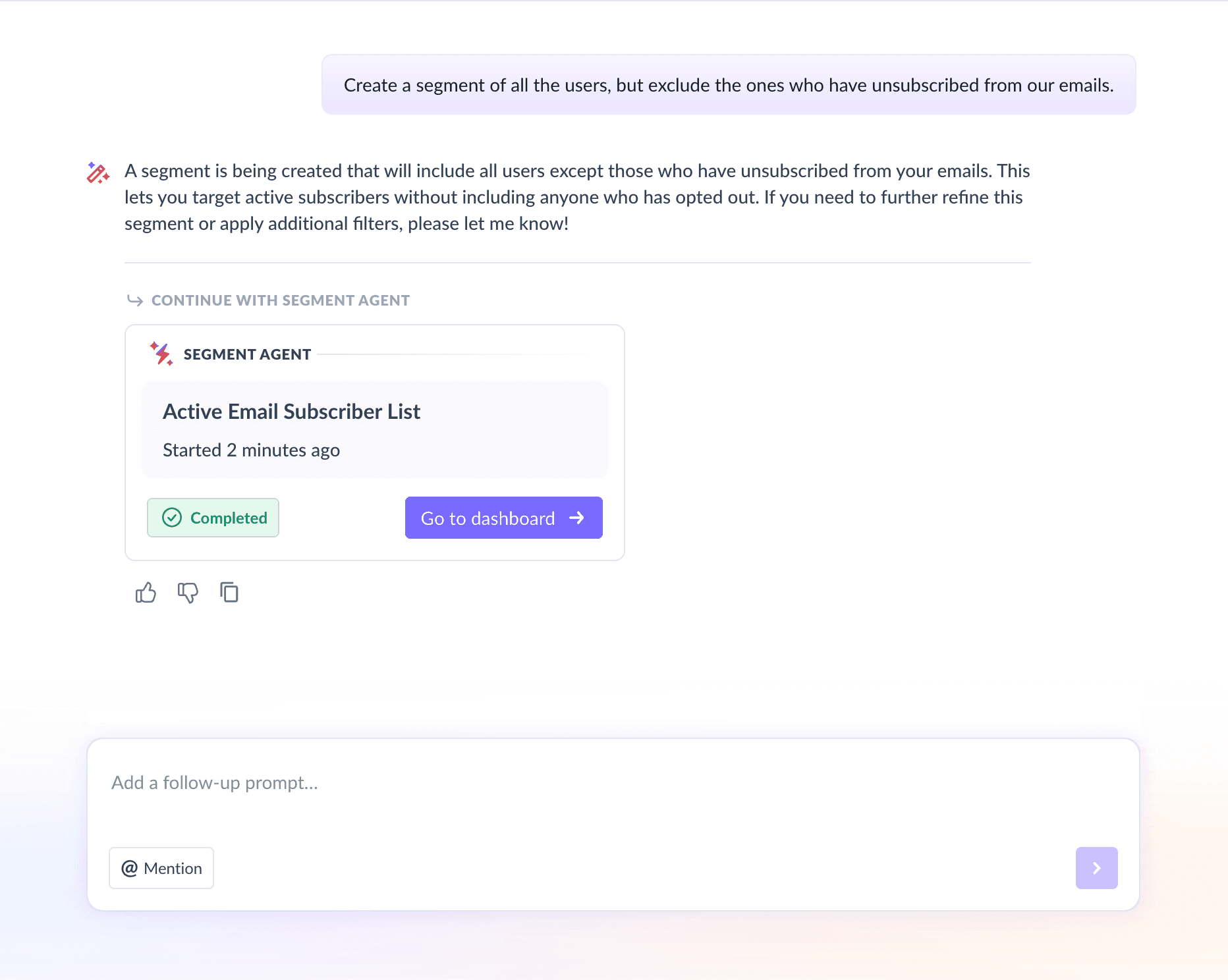
We used Mailmodo AI to generate a custom audience segment for a webinar. We also got the option to review, make edits using the builder, or ask AI to carry out the changes we wanted. Once confirmed, Mailmodo AI created this segment instantly and it was ready to use.
Take a look at the prompt that we used and the output we received.
Create a segment of all the users, but exclude the ones who have unsubscribed from our emails.
Step 3: Create the email templates
Once you’ve planned your campaign and identified your audience, the next step is to create the actual emails you’ll be sending. Your emails should be visually engaging, easy to scan, and guide readers toward a single clear action, like registering or adding the webinar to their calendar.
Here’s a sample list of emails that you should be creating for your webinar email sequence. We’ve also included sample prompts that you can use in Mailmodo AI to generate these email templates in minutes instead of having to spend hours creating them.
Email #1: Registration confirmation
When it’s sent: Immediately after signup
Purpose: Confirms their registration and sets expectations so they feel prepared.
What to include:
Event title, date, and time
Speaker details or agenda
Add-to-calendar links
Joining instructions
Create a SaaS webinar registration confirmation email. Include event details, agenda, add-to-calendar link, and a friendly confirmation tone.
Email #2: Reminder (1 day to go)
When it’s sent: 24 hours before the webinar
Purpose: Helps registrants plan ahead, resolve schedule conflicts, and build anticipation, keeping your webinar top of mind.
What to include:
Agenda in short
Key topics
A way to collect questions in advance
Create a SaaS webinar reminder email to be sent 1 day before the event. Include key takeaways, agenda, and a way to collect questions for the webinar.
Email #3: Reminder (1 hour to go)
When it’s sent: 60 minutes before the event
Purpose: Helps reduce no-shows by reminding people right before they get busy with other tasks.
What to include:
Clear date, time, and time zone
A quick summary of why the session is worth attending
A direct link to join the webinar
Create a SaaS webinar reminder email to be sent 1 hour before the event. Include time zone info, a compelling reason to join now and the link to join the webinar.
Email #4: Live now
When it’s sent: The moment the webinar begins
Purpose: Sent as a last-minute reminder to drive meaningful increase in attendance.
What to include:
A short, urgent message
Direct link to join the webinar
Key benefit of attending
Create a SaaS webinar “We’re live now” email with a short, urgent tone and a direct join link. And include a section saying why they shouldn’t miss the webinar.
Step 4: Build the automated workflow
Once your emails are ready, the next step is to automate them so every registrant receives the right reminder at the right moment.
Your SaaS webinar registration sequence should include:
Trigger: User registers for the webinar
Delays: Immediate → 1 day before → 1 hour before → At event start
Branching logic: If user opens previous reminders → keep standard timing; If user hasn’t opened → send an additional nudge for the last email
Exit criteria: User attends the webinar or the event ends
We used Mailmodo AI to set up a webinar registration sequence. It generated a complete workflow, mapping triggers, timing, and conditions. Once the output was ready, we simply reviewed the automated journey using a setup checklist and asked the AI to make adjustments where needed.
Take a look at the prompt we used and the output we received:
Generate a complete automated workflow for a SaaS webinar registration sequence. Include triggers, delays, conditions, branching logic, and exit criteria.
Step 5: Analyze and improve
Once your sequence is live, start tracking how registrants engage with your webinar emails. Important metrics that you should be tracking include:
Open rate: Are registrants noticing reminders?
Click-through rate: Are they viewing agenda details or adding the event to their calendar?
Attendance rate: How many registrants actually show up?
Drop-off points: Which email loses the most engagement?
We asked Mailmodo AI to analyze one of our past webinar sequences, and it not only summarized performance but also highlighted high-performing elements and suggested data-backed improvements to increase attendance for future events.
Take a look at the prompt we used and the output we received:
Analyze my last webinar registration sequence and suggest how to improve them to increase attendance.
Conclusion
Webinars are an essential growth engine for SaaS companies. They help educate prospects, show product value, and accelerate your pipeline. But getting people to attend requires more than a single reminder. A structured email sequence guides registrants from sign-up to attendance with consistent, well-timed communication.
Mailmodo makes it simple to plan, create, automate, and optimize your sequences so you can focus on hosting an impactful event.


 Learn more about Mailmodo