In a self-serve SaaS product, the first few days after signup are critical. Users either understand the value of your product and start using it or they get stuck, lose interest, and churn without ever reaching their “aha” moment.
Since there’s no sales call or onboarding demo to guide them, your welcome email sequence becomes the primary way to onboard, educate, and activate new users. Done right, it helps users take the right actions at the right time, builds confidence in your product, and moves them closer to long-term adoption.
In this guide, we’ll break down how to build a SaaS onboarding email sequence so that every new signup gets the best possible start.
Why you should use email flows for onboarding
Email is one of the most effective onboarding channels for SaaS because it reaches users directly and works even when they aren’t inside your product. It’s reliable, personal, and easy to automate around user behavior. This matters especially in self-serve models, where users must learn the tool independently.
Email allows you to send the right message at the right time, whether it’s helping users complete setup, nudging them toward high-value actions, or showcasing how others use your product.
However, a single email isn’t enough. Users need multiple touchpoints to understand the product, build confidence, and ultimately experience value. A structured onboarding sequence bridges the gap between signup and activation.
What is a SaaS onboarding email sequence?
A self-serve SaaS onboarding email sequence is a series of automated emails sent to new users to help them set up their accounts, discover key features, and take actions that lead to activation. It replaces the need for human onboarding by guiding users toward their “aha!” moment.
Typical components include a welcome email, setup instructions, reminders to complete high-value actions, case studies or proof points, and final nudges for inactive users. The goal is to ensure users understand the product and adopt it quickly.
Now, let’s walk through how to build this sequence step-by-step.
How to build a SaaS onboarding email sequence
Building a SaaS onboarding email sequence is easy if you’re following a well-defined set of steps. Here are the steps for you to follow:
Step 1: Plan your campaign
Planning sets the foundation for an effective onboarding experience. You need clear goals, a defined audience, and an understanding of the actions that will lead users to activation. For SaaS, this usually means identifying the primary set of steps and the “first-value” milestone.
To execute this well, map out the activation journey: what should a new user do in their first hour, day, and week? Identify what users need to know at each stage. Then define how many emails you need, what each will cover, and the timeline for sending them.
We asked Mailmodo AI to generate an entire campaign plan for our onboarding sequence, and it delivered a detailed, actionable plan that we could review, customize, and turn into an automated workflow instantly. The output also outlined what emails to send, when to send them, and what each message should achieve.
Create a detailed campaign plan for a SaaS onboarding email sequence. Include goals, target audience, number of emails, timeline, and the primary action each email should drive.
Step 2: Create audience segments
Audience segmentation ensures that users receive onboarding messages that match their needs. Not all SaaS users are the same. For SaaS, segmentation often includes:
Self-serve users vs. sales-assisted users
Free trial vs. freemium users
Company size or role (admin, manager, contributor)
Expected use case or feature interest
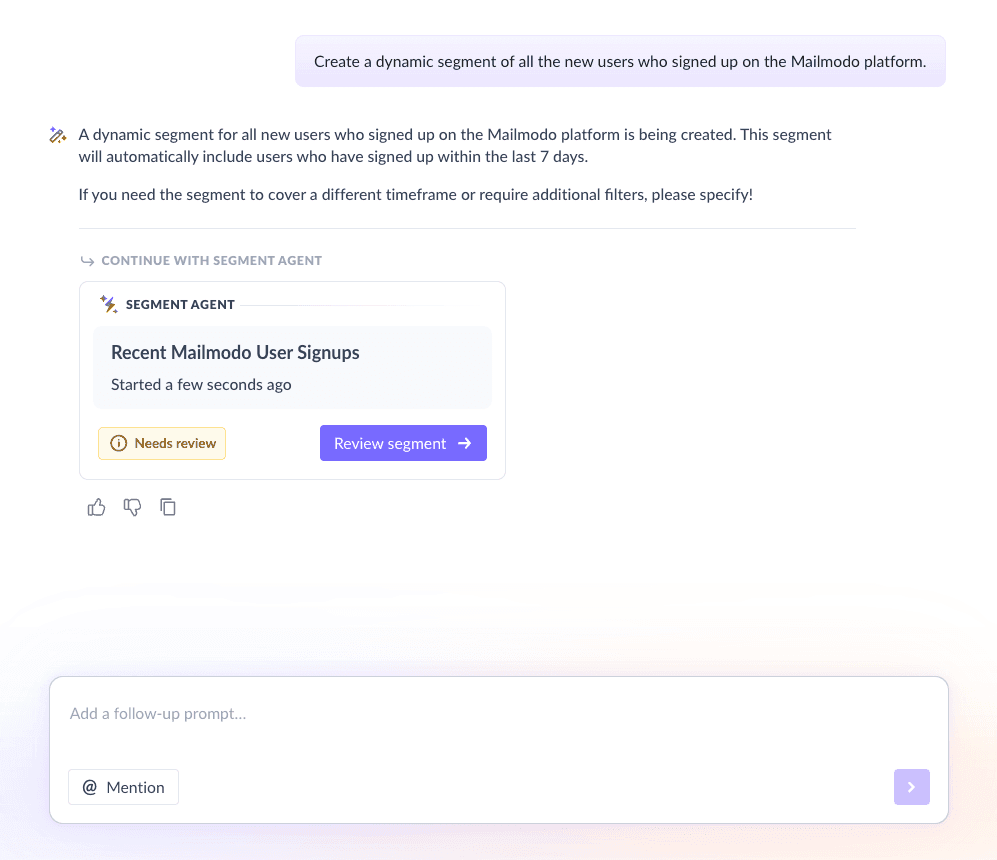
We used Mailmodo AI to create an audience segment for our SaaS onboarding email sequence. Once created, we could review it, edit it using the builder, or ask AI to make the changes. After confirmation, the segment was ready for use.
Take a look at the prompt we used for this and the output we got.
Create a dynamic segment of all the new users who signed up on the Mailmodo platform.
Step 3: Create the email templates
During onboarding, every email has a specific purpose. This is where you turn your plan into high-performing templates that guide users toward activation.
Below are the essential emails for a self-serve SaaS onboarding sequence.
Email #1: Welcome email
When to send: Immediately after signup
Purpose: Greet the user, set expectations, and position your product
What it should include:
A friendly welcome message
A short introduction to your product
Information on what emails they’ll receive
A single clear CTA to set up their profile
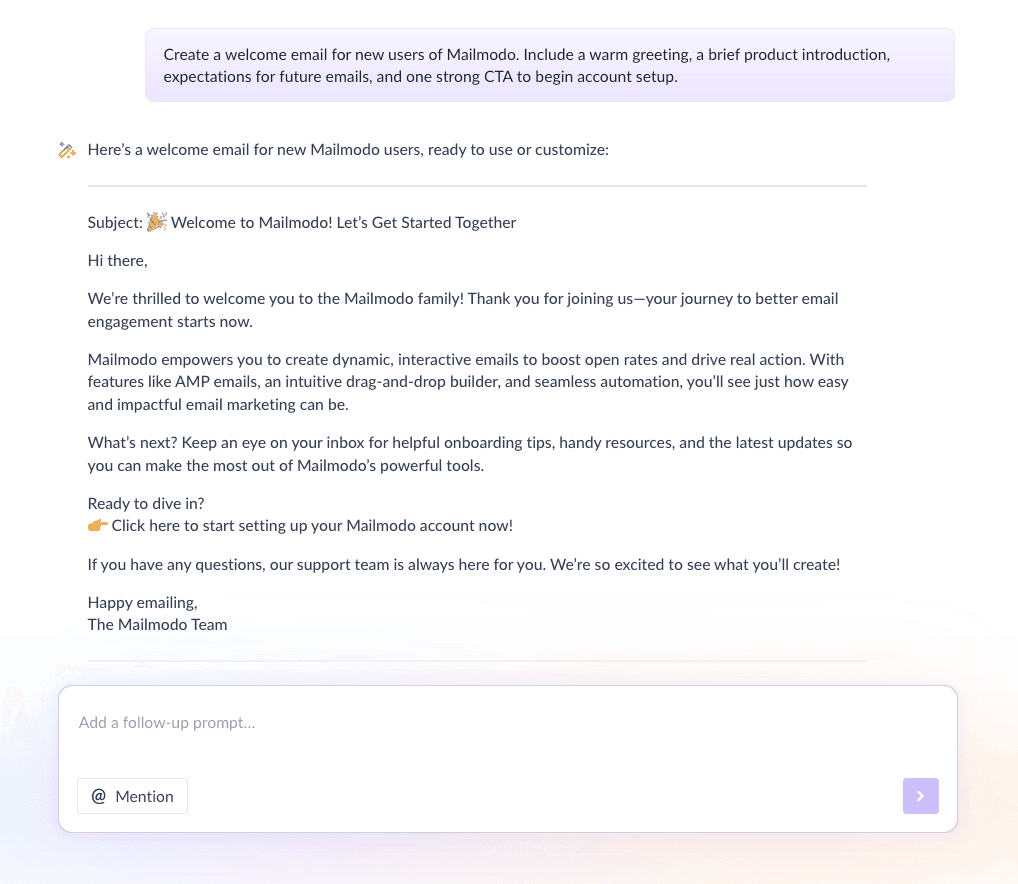
Here’s a sample prompt to generate this kind of email, along with the output it will produce.
Create a welcome email for new users of Mailmodo. Include a warm greeting, a brief product introduction, expectations for future emails, and one strong CTA to begin account setup.
Email #2: Account setup email
When to send: 1–2 days after signup
Purpose: Nudge users to complete any required account setup steps
What it should include:
Step-by-step setup instructions
Links to help docs, videos, or tutorials
Reassurance that setup is quick and easy
A CTA to complete the setup
Here’s a sample prompt to generate this kind of email, along with the output it will produce.
Create an account setup email for Mailmodo. Include simple steps, links to resources, and encouragement and a CTA to complete the account setup.
Email #3: Success action nudge
When to send: 2–4 days after signup
Purpose: Encourage users to complete key actions that lead to their first success or “aha” moment inside the product.
What it should include:
One primary success action to focus on
Why this action matters and what value it unlocks
Supporting resources such as guides or tutorials
A clear CTA to take action
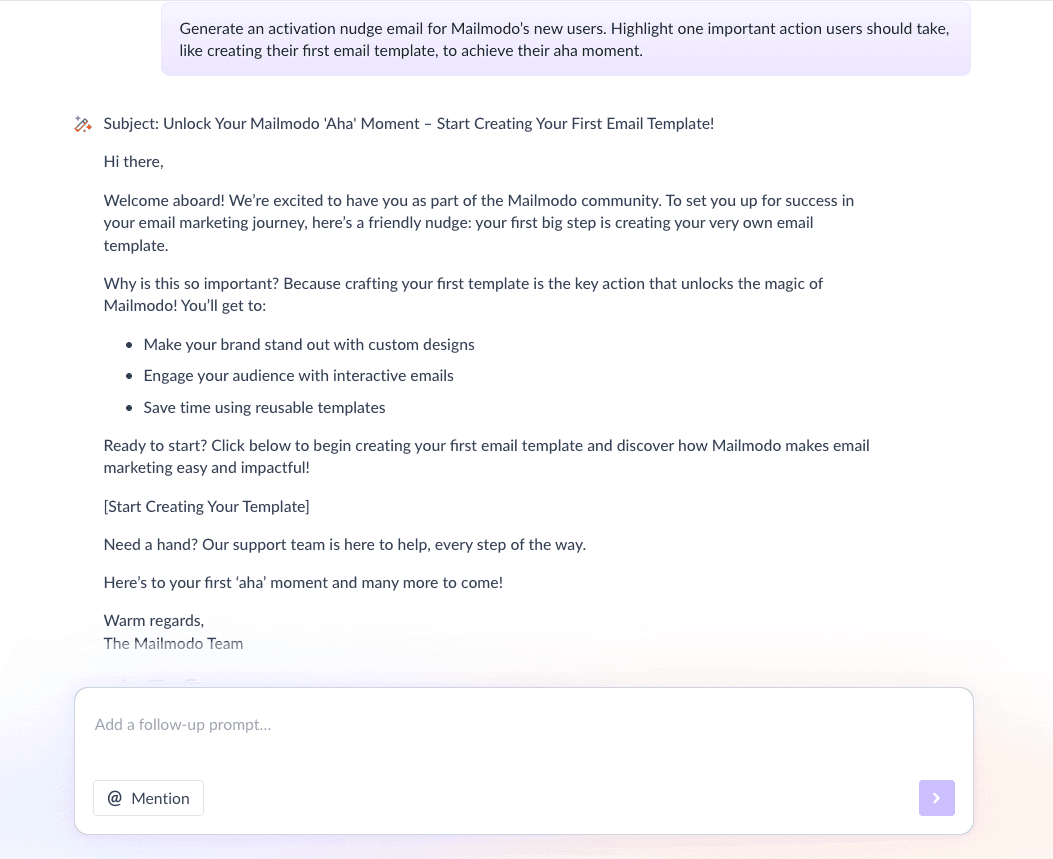
Here’s a sample prompt to generate this kind of email, along with the output it will produce.
Generate an activation nudge email for Mailmodo’s new users. Highlight one important action users should take, like creating their first email template, to achieve their aha moment.
Email #4: Case study/Testimonial email
When to send: 5–7 days after signup
Purpose: Build confidence and motivation
What it should include:
A short case study or testimonial
A problem → solution → result narrative
Social proof from users in a similar role or industry
A CTA to continue using the product or explore a feature
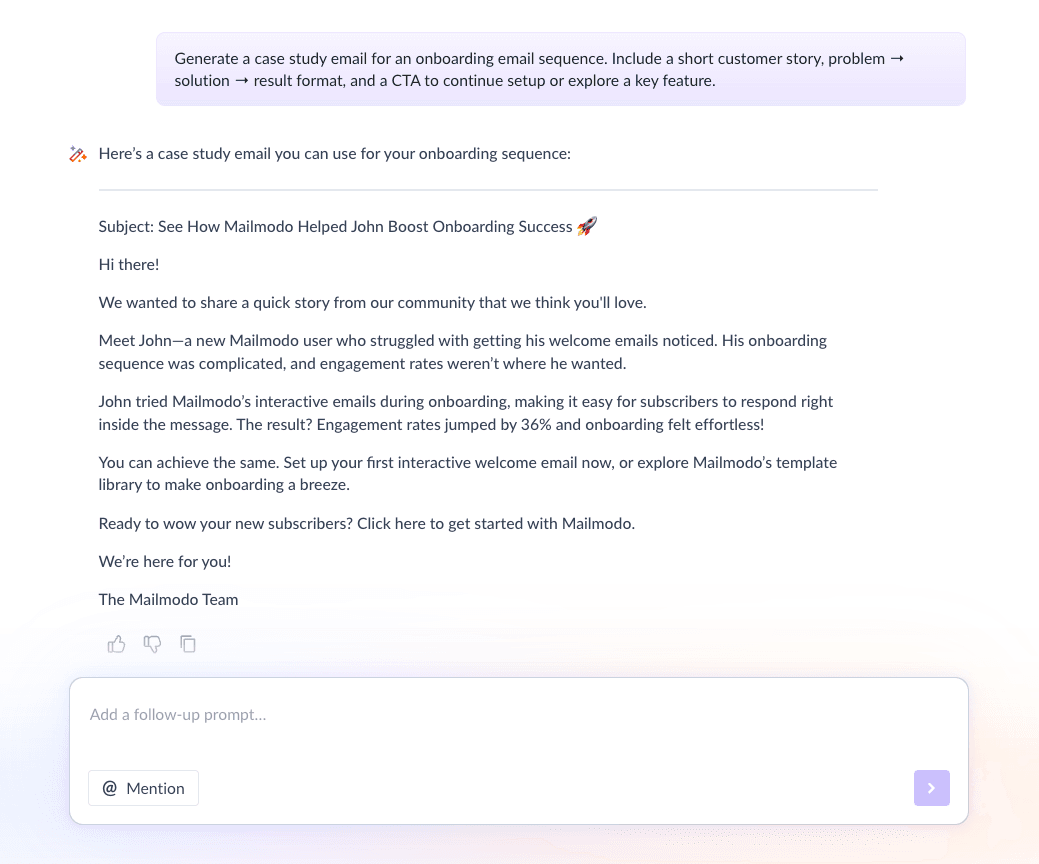
Here’s a sample prompt to generate this kind of email along with the output it will produce.
Generate a case study email for an onboarding email sequence. Include a short customer story, problem → solution → result format, and a CTA to continue setup or explore a key feature.
Email #5: Reminder email
When to send: 7–10 days after signup, after low or no activity
Purpose: Re-engage users who haven’t fully activated and give them a final nudge to try the product
What it should include:
A friendly reminder to revisit the product
A quick summary of key benefits
Links to helpful resources or support
One low-friction CTA to get started again
Here’s a sample prompt to generate this kind of email along with the output it will produce.
Generate a reminder email for an onboarding email sequence for Mailmodo. It should include reasons to return, links to resources, and one clear CTA.
Step 4: Build the automated workflow
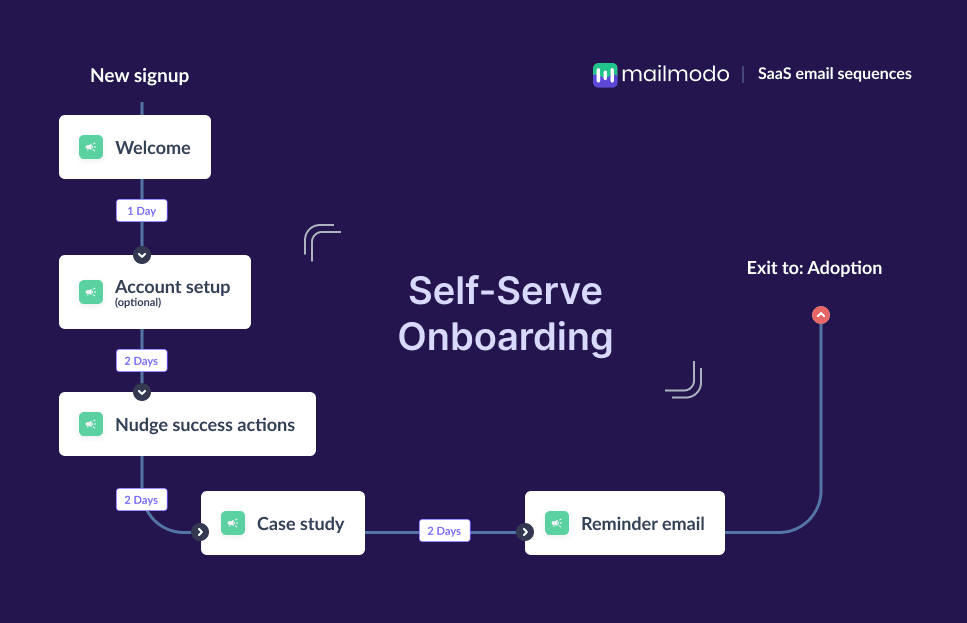
Now it’s time to set up the automation that powers your onboarding sequence so your users receive the right emails at the right time.
Your workflow should include:
Trigger: User signs up
Delays: 0 days → 1 day → 2–3 days → 2–3 days
Branching logic: If active, skip email; if inactive, send follow-up email
Exit criteria: User becomes active or moves to adoption flow
Mailmodo AI can build this entire workflow for you from scratch. Once the output is ready, you just have to review the overall journey following a set up checklist and ask the AI to make the tweaks you want in the workflow.
Here’s a sample prompt that you can use to generate a similar workflow, along with the a sample output.
Create a complete self-serve onboarding workflow for Mailmodo. Include triggers, delays, conditions, branches, and exit points.
Step 5: Analyze and improve
Once your onboarding sequence is live, continuous improvement is essential. Important metrics for you to track includes:
Open rate
Click-through rate
Activation rate
Time-to-value
Drop-off points
We asked Mailmodo AI to analyze our previous onboarding sequence, and it summarized performance, and suggested improvements.
Here’s a sample prompt you can use in Mailmodo AI to do this analysis.
Analyze and list down the performance data from my last onboarding email sequence and give insights and recommendations for improvement.
Conclusion
Email sequences provide the structured guidance users need, delivered at the right time based on their behavior. With a thoughtful sequence and ongoing optimization, you can increase activation rates, reduce early churn, and set users up for long-term success.
Mailmodo helps streamline everything so you can build onboarding that truly works.


 Learn more about Mailmodo