All the products of your ecommerce store are experienced through delivery, packaging, usability, support, and post-purchase communication. If any of these break, customers quietly churn and you never find out why.
That’s why collecting customer feedback is critical for ecommerce brands. Reviews alone don’t tell the full story. You need direct, structured input from customers about what worked, what didn’t, and what stopped them from buying again.
A feedback email flow helps you capture these insights at the right moment. Instead of guessing, you get real answers you can act on. In this guide, we’ll walk through how to build a complete feedback email sequence for ecommerce, step by step.
Why should you use email flows?
Email is one of the most effective channels for collecting feedback in ecommerce because it reaches customers in a calm, non-intrusive environment. Unlike in-app prompts or pop-ups, email gives customers time to reflect on their experience and respond thoughtfully.
With email, you can personalize messages based on purchase history, product type, or time since delivery. You can also automate the entire process so feedback requests go out consistently without manual follow-ups.
Most importantly, feedback collection isn’t a one-email job. Customers may ignore the first request, forget to respond, or need reassurance that their input will actually be used. A short sequence with reminders and follow-ups increases response rates and shows customers that you genuinely care.
What is a feedback email sequence?
A feedback email sequence is a set of automated emails sent to customers after a purchase to collect, acknowledge, and act on their feedback.
It typically includes a feedback request email, follow-ups or reminders, and a response or redressal email that confirms their input has been received. These emails work together to improve response rates and strengthen customer trust.
How to build a feedback email sequence
Building a feedback email sequence can be easy if you’re following a well-defined set of steps. Here are the steps for you to follow:
Step 1: Plan your campaign
Planning sets the foundation for your feedback email flow. Without clear goals and structure, you risk collecting vague or unusable responses.
Start by defining what success looks like and who you want to hear from. Your feedback goals may vary by product category, order value, or customer type. Here are some key elements to outline in your plan:
Objective: Collect product and post-purchase experience feedback
Audience: Customers who purchased 2–6 weeks ago
Key questions: Product quality, usability, delivery experience, likelihood to repurchase
Number of emails: 2
Timeline: Spread over 3 days
Outcome: Insights for product, CX, and retention improvements
We used Mailmodo AI to generate a complete campaign plan. It gave us a clear outline of what emails to send, when to send them, and what each message should aim to achieve.
Take a look at the prompt we used. Click on the arrow to see the output we received.
Create a feedback email campaign plan for an ecommerce brand. Include objectives, target audience, number of emails, timing between emails, key questions to ask customers, and the goal of each email.
Step 2: Create audience segments
Not every customer should receive the same feedback request. Segmentation helps you reach out to the right people with the right questions. Common segmentation attributes include:
Time since last purchase
Product category purchased
Order value
First-time vs repeat buyer
Delivery status
No repurchase within a defined period
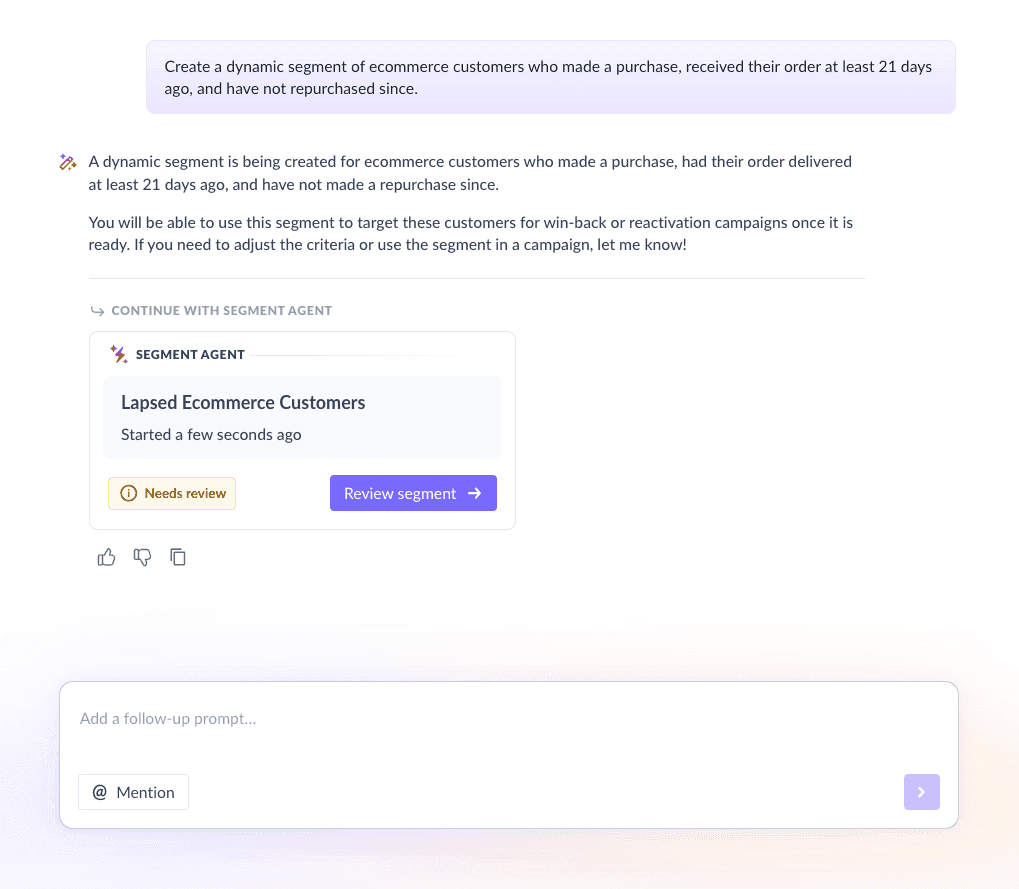
For this flow, we used Mailmodo AI to create a segment of customers who:
Completed a purchase
Have not made another purchase
Are 3–6 weeks post-delivery
Once it was done, we got the option to review, make edits using the builder, or ask AI to carry out the changes we wanted. Once we confirmed, Mailmodo AI created the segment instantly and it was ready to use for our campaign.
Take a look at the prompt we used:
Create a dynamic segment of ecommerce customers who made a purchase, received their order at least 21 days ago, and have not repurchased since.
Step 3: Create the email templates
Once your audience is set, the next step is creating the emails that make up the sequence. Here’s a sample list of emails that you should be creating for your welcome email sequence. We’ve also included sample prompts that you can use in Mailmodo AI to generate these email templates in minutes instead of having to spend hours creating them.
Email #1: Feedback email
When to send: 3–6 weeks after product delivery
Purpose: Collect honest feedback about the product and overall experience
What to include:
A short explanation of why you’re asking for feedback
1–3 focused questions about product and experience
An interactive feedback option within the email
A reassurance that feedback will be read and used
Here’s a sample prompt to generate this kind of email, along with the output it will produce.
Generate an interactive feedback email for an ecommerce brand. Ask customers about product quality, overall experience, and one improvement suggestion. Keep the tone friendly and concise.
Email #2: Feedback redressal email
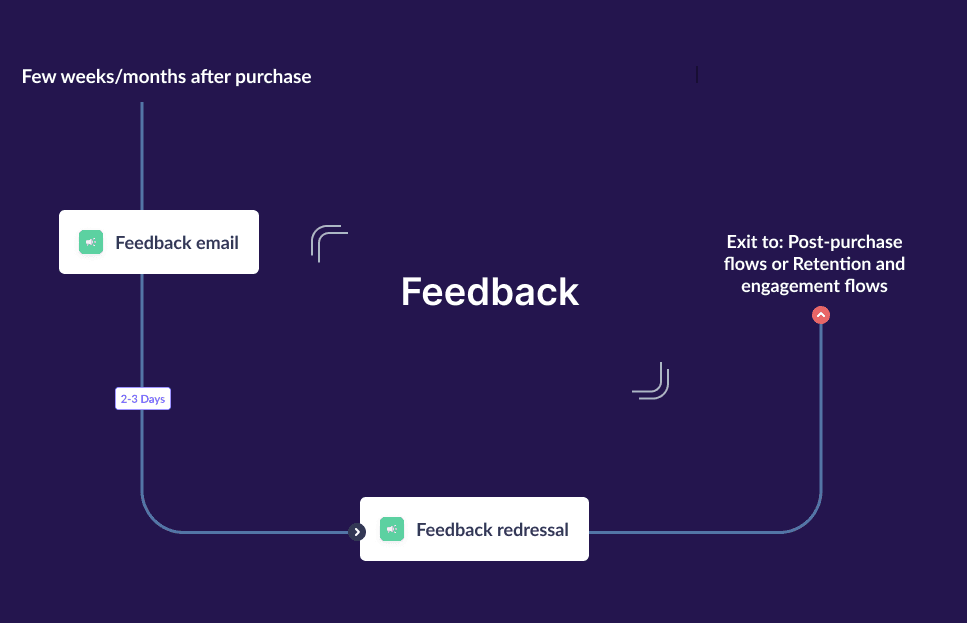
When to send: 2–3 days after the feedback submission
Purpose: Acknowledge feedback and explain next steps
What to include:
A thank-you message for sharing feedback
A brief summary or acknowledgment of their concern
Next steps or reassurance from the support team
A human sign-off from customer support
Here’s a sample prompt to generate this kind of email, along with the output it will produce.
Create a feedback acknowledgment email template for ecommerce customers. Thank them for their feedback and explain how the team will act on it. Leave room for manual customization by support agents.
Step 4: Build the automated workflow
Once your emails are ready, the next step is to automate them so every new user receives them at the right moment. Your email sequence should include:
Trigger: Order delivered
Email: Feedback request email
Delay: 2–3 days
Condition: Feedback submitted → send feedback redressal email
Exit criteria: Customer makes another purchase or completes feedback
We used Mailmodo AI to set up a welcome email sequence. It generated a complete workflow, mapping triggers, timing, and conditions. Once the output was ready, we just had to review the overall journey following a setup checklist and ask the AI to make the tweaks we wanted in the workflow.
Take a look at the prompt that we used and the output we received.
Generate a complete automated feedback email workflow for an ecommerce brand. Include triggers, delays, conditions, branching logic, and exit criteria.
Step 5: Analyze and improve
Feedback emails are only valuable if you analyze and act on the results. Tracking the right metrics helps you understand both engagement and sentiment. Some key metrics to monitor include:
Open rate
Feedback submission rate
Repeat purchase rate after feedback
Common issues or complaints
Take a look at this prompt that you can use in Mailmodo AI to analyze your and gather insights from your last email flow.
Analyze my ecommerce feedback email sequence. Identify ways to improve open rates, response rates, and quality of customer feedback.
Conclusion
A well-timed feedback email sequence helps you collect meaningful insights while showing customers that their opinions matter. Instead of one-off requests, an email sequence creates consistent engagement and higher response rates.
Mailmodo makes it easier to plan, create, automate, and optimize feedback email flows without complexity. With the right setup, feedback becomes a growth lever—not just a formality.


 Learn more about Mailmodo