In ecommerce, first impressions matter a lot. Most shoppers who sign up for your emails aren’t ready to buy right away. They’re browsing, comparing options, or just looking for a discount. If you don’t guide them early, they forget about your brand and move on.
This is where a welcome email flow becomes critical. It helps you introduce your brand, show what you sell, and build trust before asking for the purchase. Many ecommerce brands struggle with low first-time conversions, poor engagement after signup, and subscribers going cold within days.
A well-planned welcome email sequence solves these problems by warming up new leads and nudging them toward their first order. In this guide, you’ll learn how to build a complete ecommerce welcome email sequence.
Why should you use an email flow?
Email is one of the most reliable channels because it gives you direct access to shoppers at the exact moment they show interest. When someone signs up, your brand is still fresh in their mind.
With email, you can personalize messages based on signup source, browsing behavior, or product interest. You can also automate the timing, making sure the right message reaches the user at the right moment without manual effort.
A single welcome email isn’t enough. New subscribers often need multiple touchpoints before they feel confident buying. One email may introduce the brand, another may show products, and another may build trust using reviews or social proof. Together, these emails create momentum that leads to conversions.
This is why ecommerce brands rely on structured welcome email sequences instead of one-off messages.
What is an ecommerce welcome email sequence?
An ecommerce welcome email sequence is a series of automated emails sent to new subscribers after they sign up on a website or app. The goal is to introduce the brand, educate shoppers, and encourage them to make their first purchase.
These sequences usually include a welcome message, product recommendations, social proof, reminders, and helpful content. Each email plays a specific role in moving the subscriber closer to conversion.
How to build an ecommerce welcome email sequence
Building an email sequence can be easy if you’re following a well-defined set of steps. Here are the steps for you to follow:
Step 1: Plan your campaign
Planning gives structure to your welcome flow and ensures every email has a clear purpose. Without a plan, emails often feel random and fail to move users forward. Start by defining the foundation of your welcome campaign as follows:
Objective: First purchase, brand awareness, or product discovery
Target audience: New subscribers who haven’t purchased yet
Core message: What your brand stands for and why shoppers should trust you
Number of emails: 4 emails
Timeline: 7 days from signup
To speed this up, we used Mailmodo AI to generate a complete campaign plan for our ecommerce welcome flow. It delivered a detailed, actionable plan that we could review, customize, and turn into an automated workflow.
Take a look at the prompt we used. Click on the arrow to see the output we received.
Create a welcome email campaign plan for an ecommerce brand. Include objectives, number of emails, theme of each email, ideal timing between emails, and the main CTA for each email.
Step 2: Create audience segments
Segmentation ensures your welcome emails stay relevant. Even within new subscribers, interests and intent can vary widely. For ecommerce welcome flows, you can segment users based on:
Signup source (popup, footer form, app install)
Pages visited or products viewed
Location or device used
Engagement level in the first few days
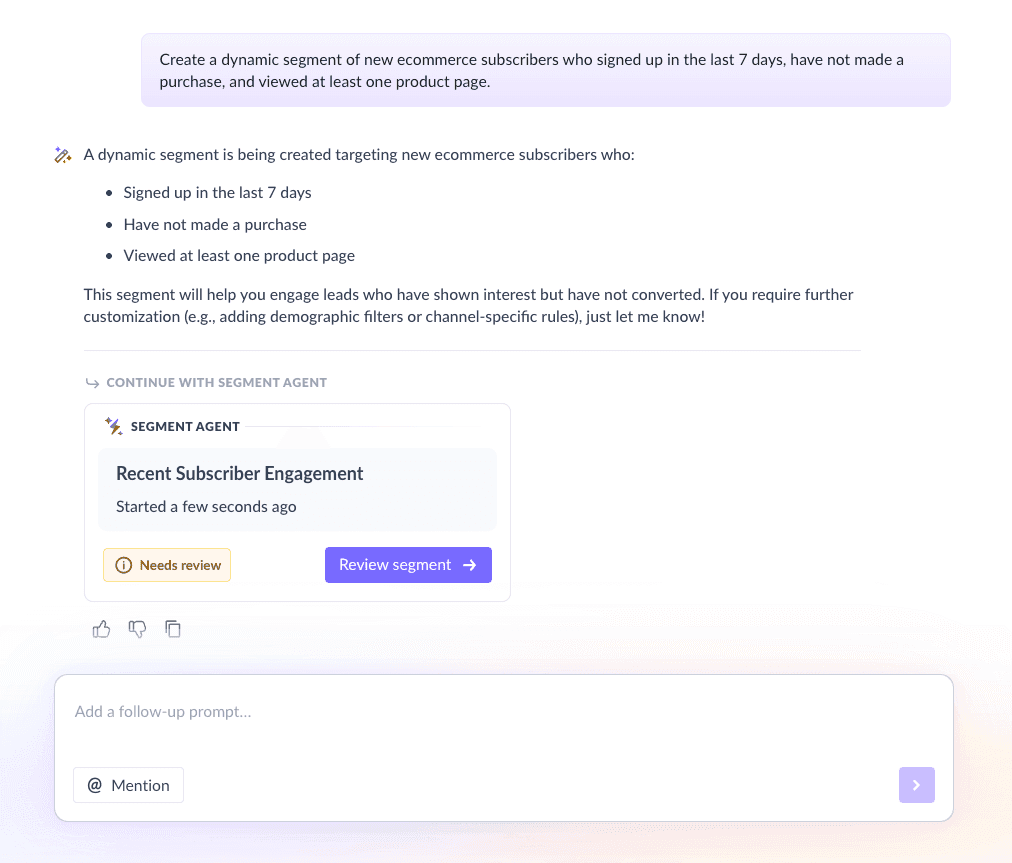
For this sequence, we asked Mailmodo AI to create a segment of new leads who signed up but haven’t purchased yet and visited at least one product page in the last 7 days. Once it was done, we got the option to review, make edits using the builder, or ask AI to carry out the changes we wanted.
Create a dynamic segment of new ecommerce subscribers who signed up in the last 7 days, have not made a purchase, and viewed at least one product page.
Step 3: Create the email templates
Once your plan and segments are ready, the next step is creating the actual emails. Each email in the welcome sequence should have a clear role and build on the previous one.
Here’s a sample list of emails that you should be creating for your email sequence. We’ve also included sample prompts that you can use in Mailmodo AI to generate these email templates in minutes instead of having to spend hours creating them.
Email #1: Welcome email
When to send: Immediately after signup
Purpose: Introduce the brand and set expectations
What to include:
Warm welcome message
Brand values or story
Bestsellers or categories
First-time offer or incentive
Preference collection (optional)
Here’s a sample prompt to generate this kind of email, along with the output it will produce.
Generate a welcome email for a new ecommerce subscriber. Introduce the brand, highlight best-selling products, and include a first-time purchase offer.
Email #2: Recommended products
When to send: 2 days after signup
Purpose: Drive product discovery and site visits
What to include:
Personalized or bestseller recommendations
Short product benefits
Clear CTA to explore products
Here’s a sample prompt to generate this kind of email, along with the output it will produce.
Create a product recommendation email for new ecommerce subscribers. Suggest best-selling products and include a CTA to visit the store.
Email #3: Social proof
When to send: 2 days after Email #2
Purpose: Build trust and reduce purchase hesitation
What to include:
Customer reviews or testimonials
User-generated content
Trust badges or stats
Limited-time offer
Here’s a sample prompt to generate this kind of email, along with the output it will produce.
Generate an ecommerce email focused on social proof. Include customer reviews, testimonials, and a soft purchase CTA.
Email #4: Additional resources
When to send: 2–3 days after Email #3
Purpose: Add value and strengthen brand relationship
What to include:
Blogs, videos, or guides
Product care or usage tips
Educational content tied to your niche
Here’s a sample prompt to generate this kind of email, along with the output it will produce.
Create an ecommerce email that shares helpful content such as blogs or videos related to the brand’s products and niche.
Step 4: Build the automated workflow
Once your emails are ready, the next step is to automate them so every new user receives them at the right moment.
For this ecommerce welcome sequence, your workflow should include:
Trigger: User signs up
Delays: 0 days → 2 days → 2 days → 2–3 days
Branching logic: If user makes a purchase → exit to post-purchase flow; If user doesn’t purchase → continue sequence
Exit criteria: Purchase completed or sequence completed
We used Mailmodo AI to generate the entire workflow, including triggers, delays, and exit rules. Once generated, we reviewed it and made small adjustments based on the store logic.
Take a look at the prompt that we used and the output we received.
Generate an automated ecommerce welcome email workflow. Include triggers, delays, branching logic for purchase behavior, and exit criteria.
Step 5: Analyze and improve
Once the sequence is live, performance tracking becomes essential. Welcome flows often set the benchmark for future engagement. For this sequence, key metrics to track include:
Open rate
Click-through rate
First-purchase conversion rate
Revenue per subscriber
Unsubscribe rate
By reviewing these metrics, you can identify which emails need better subject lines, stronger CTAs, or improved product recommendations.
Take a look at a sample prompt that you can use for this.
Analyze my ecommerce welcome email sequence and recommend improvements

to increase engagement and first-time purchases.
Conclusion
Welcome email flows play a major role in turning new subscribers into first-time buyers. They help introduce your brand, showcase products, and build trust without overwhelming shoppers.
Using email sequences instead of single emails allows you to guide users step by step, at the right pace. With the right planning, segmentation, automation, and optimization, welcome flows become a consistent revenue driver.
Mailmodo makes it easier to plan, create, automate, and improve ecommerce welcome email sequences using AI, so you can focus more on strategy and less on manual work. With a solid welcome flow in place, every new subscriber becomes a real opportunity.


 Learn more about Mailmodo